7
Control Panel
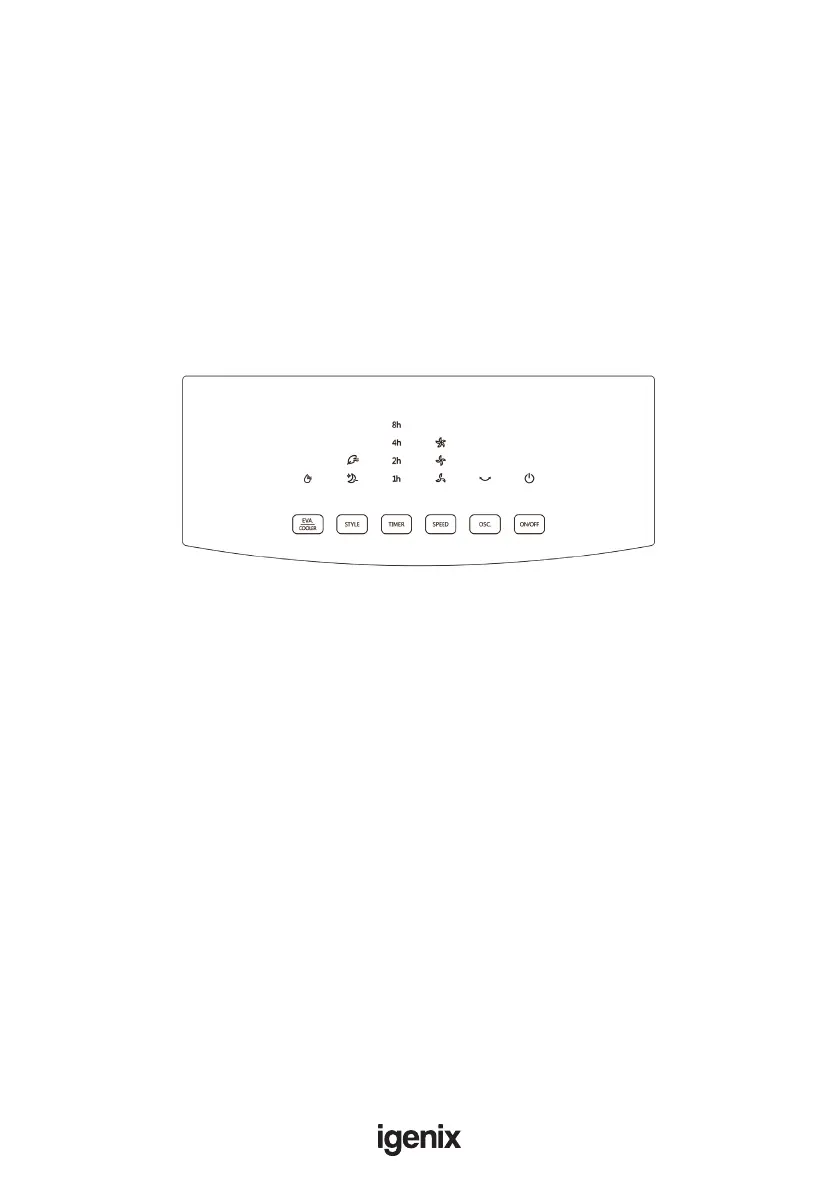
Press a key on the unit to activate a corresponding function. For instance:
• Press [OSC.] key to activate or deactivate Swing Function
Note: Manual horizontal blade allows tilting ow direction
• Press [SPEED] key to adjust 3 speeds of air ow
• Press [STYLE] key to switch between Normal, Natural and Sleep functions
• Press [TIMER] key to set 1-12 hour timer setting
• When [EVA/COOLER] key is pressed, the indicator lights up constantly if the operation is
normal; when the indicator ashes, it denotes a water shortage, please add water immediately
IMPORTANT: Push buttons on the unit may differ based on the actual product model.
Functions
Normal - Normal function. There will be three speed levels.
Natural - The wind will simulate the natural winds found outdoors and offer a unique natural
wind setting
Sleep - The wind will be slumberous. You can chose this mode when you sleep.


 To Next Page