Stowaway Ultra-Slim Owner’s Manual – BlackBerry
®
OS
Page 5
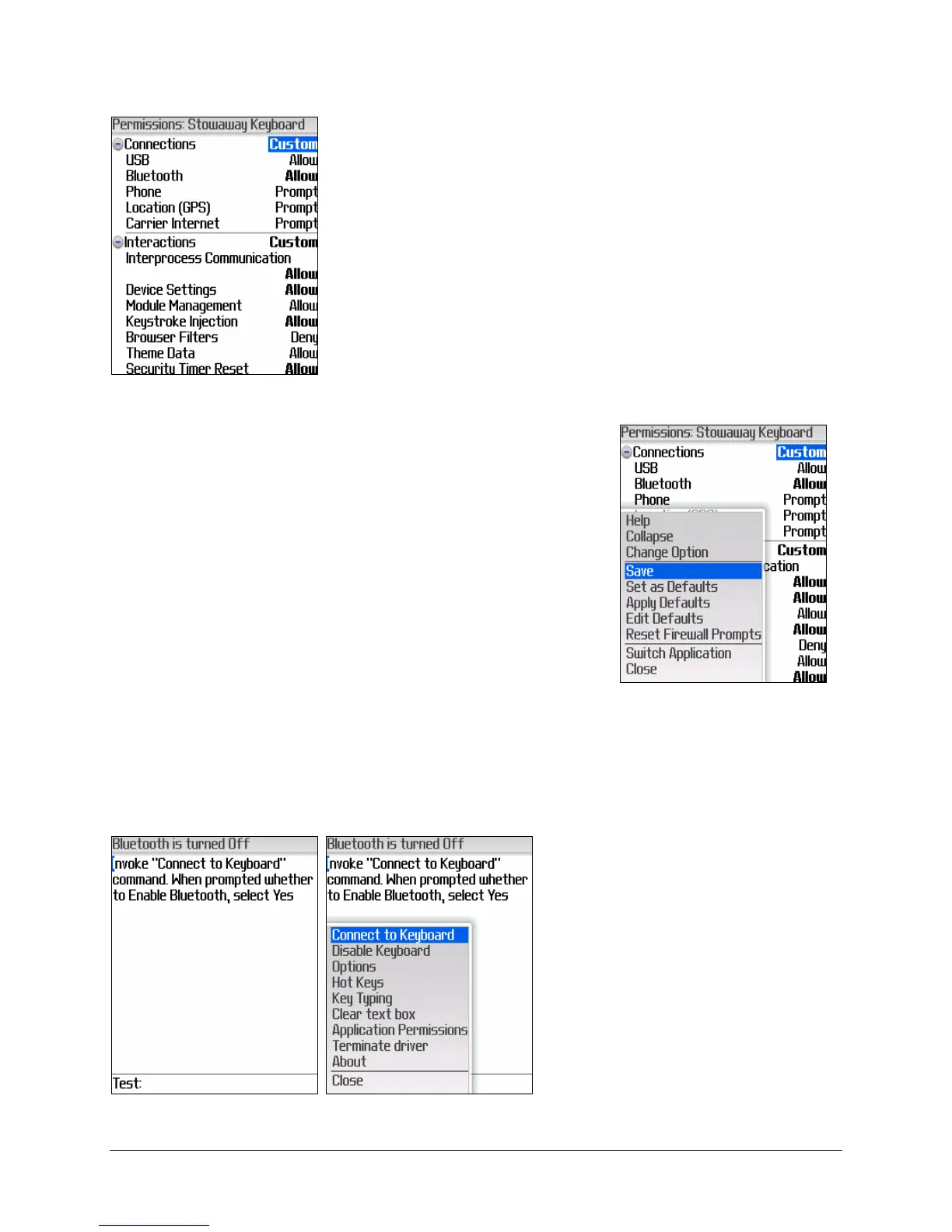
2. Next you will receive a dialog box that informs
you that the Stowaway application requests
changes to its application control permissions.
Select View to continue. The Stowaway
application’s Permissions screen will display next
with the correct permission changes already
inserted. In order to fully support the keyboard
application, you may modify only the optional
Security Timer Reset permission to Deny,
(which will disable the backlight while you’re
typing). The other four permissions noted above
must remain as Allow.
3. Once you’re satisfied with the Stowaway
application permissions, press the BlackBerry
button on your mobile device and select Save
from the menu.
Enabling Bluetooth
1. In order to connect the
BlackBerry to the Ultra-Slim
keyboard, you need to
enable Bluetooth. To do so,
open the BlackBerry menu
in the Stowaway keyboard
application and select
Connect to Keyboard.


 To Next Page