
 Need help?
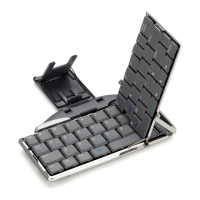
Do you have a question about the Igo STOWAWAY and is the answer not in the manual?
Prerequisites and initial checks before installing software.
Step-by-step guide for installing the keyboard application on a PC.
How to grant necessary permissions for the keyboard application to function correctly.
Steps to activate Bluetooth on the BlackBerry for keyboard connection.
Process for pairing the keyboard with the BlackBerry device via Bluetooth.
How to find and select the keyboard when multiple devices are available.
Instructions on how to disconnect the keyboard connection.
Assigning applications to keyboard shortcuts using Fn keys.
Adjusting auto-repeat delay, rate, and keyboard layout.
Exiting and stopping running driver processes for troubleshooting.
Displays driver version and copyright details for the software.
Accessing advanced features via the BlackBerry menu.
Customizing keyboard shortcuts for application launching.
Modifying key repeat delay and rate.
Using the keyboard to input numbers for calls.
Keyboard shortcuts for cursor navigation in text fields.
Keyboard shortcuts for opening and switching between apps.
Using Fn keys to type digits and specific symbols.
Keyboard commands for interacting with menus and dialog boxes.
Key combinations for precise cursor control and text highlighting.
Typing international and extended characters using key combinations.
Steps to resolve when keyboard input is not registered.
Definition and purpose of passkeys for device pairing.
Steps for when the device fails to connect to the keyboard.
 General
| Connectivity Technology | Bluetooth |
|---|---|
| Keyboard Layout | QWERTY |
| Special Feature | Foldable |
| Compatibility | iOS, Android, Windows |
| Battery | Rechargeable Lithium-ion |
| Connection | Bluetooth |

 To Next Page