ENGLISH
10 BEFORE YOU OPERATE THE MONITOR
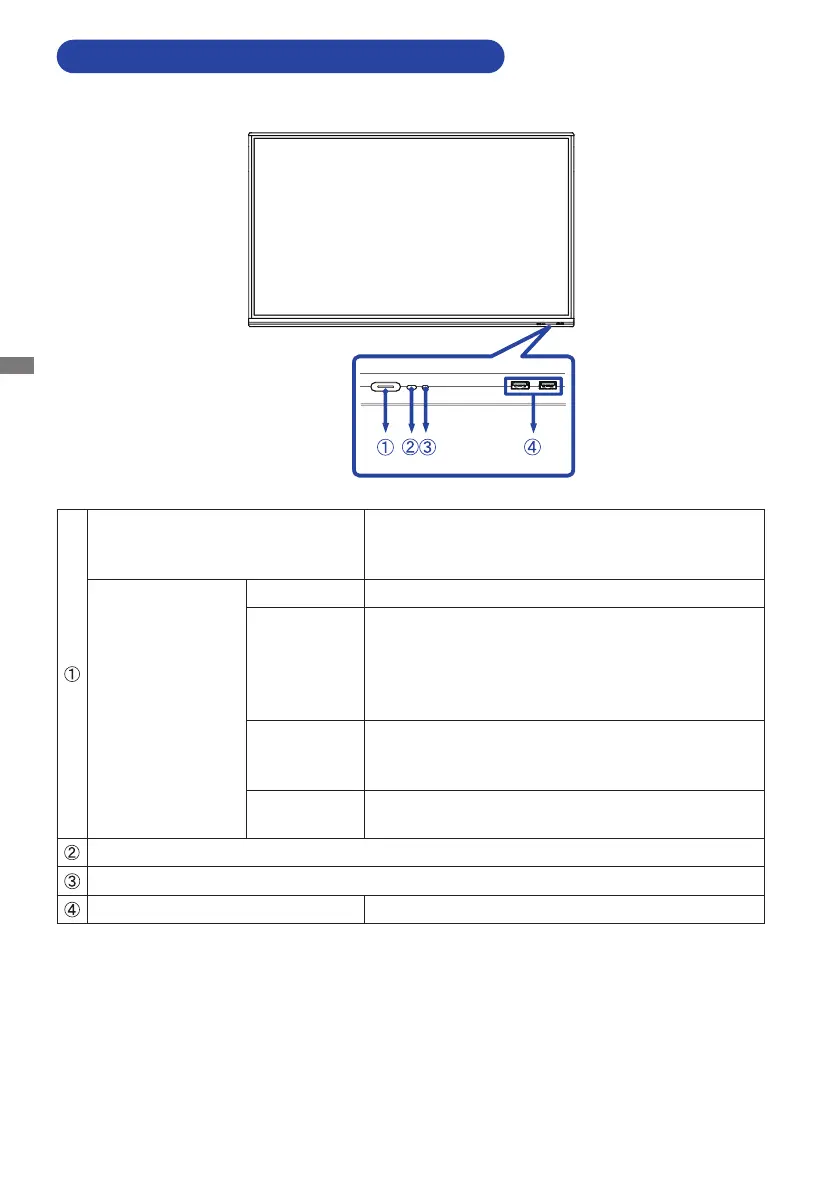
CONTROLS AND CONNECTORS : MONITOR
<Front>
Power Button
Power O
Pressing and holding the Power Button on the front
for 3-5 seconds.
Power Indicator
White Normal Operation
Red
Standby Mode
When the power indicator light is lighting red, the
display is in Power Save Mode. To turn the screen
back on, you can press the power button on the front
or the remote control.
Red & White
ashingslow
TheScreenOfunctionisactive.Toturnthescreen
back on, you can touch the screen or any button on
the remote control.
Red & White
ashingfast
Going to the Standby Mode or system is updating.
Remote Sensor
Light Sensor
USBConnector(3.0) USB3.0(5V,900mA)



 To Next Page
 Loading...