ENGLISH
BEFORE YOU OPERATE THE MONITOR 21
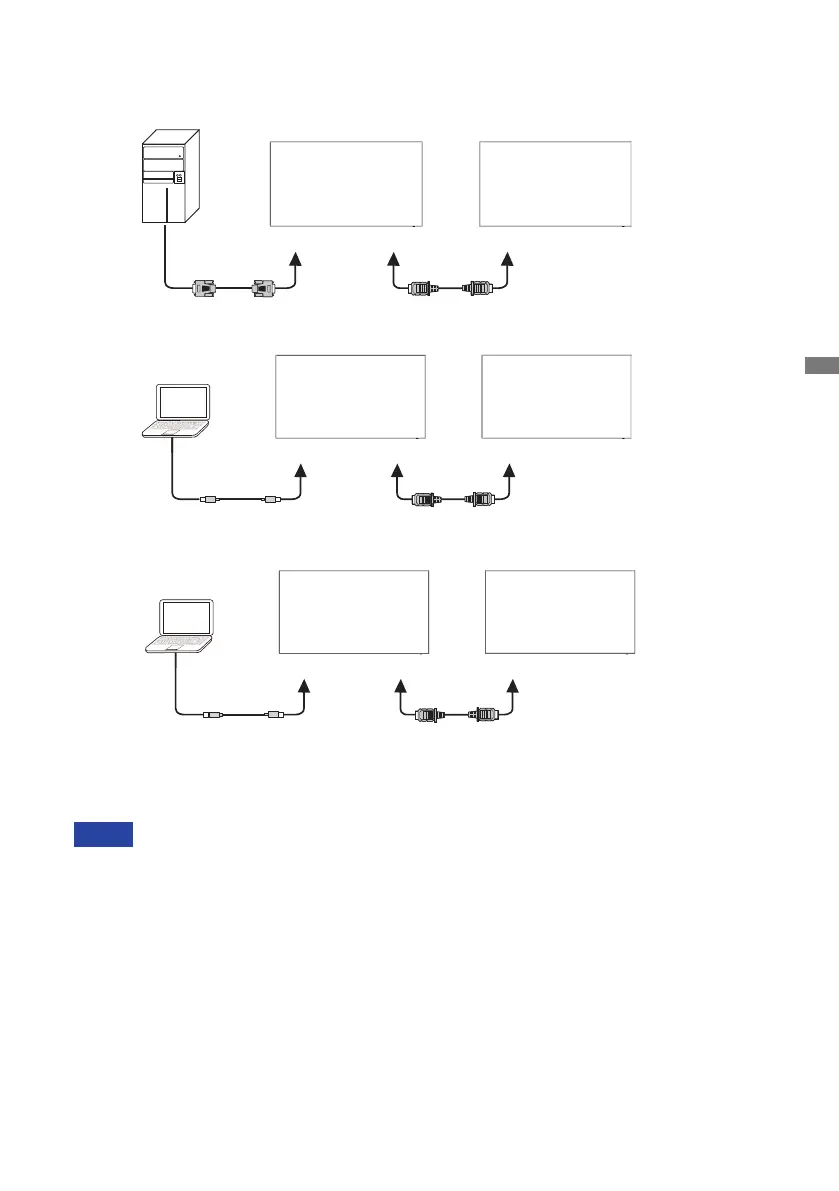
[ About the HDMI out ]
[VGAIN]
MONITOR1
[VGA]
[HDMIOUT]
[HDMIIN]
MONITOR2
Example of Digital video connection
Connection conditions
When 2 monitors are connected:
VGAinput(operatingat1920×1080resolution):MONITOR1,2(1920×1080)
USB-Cinput(operatingat3840×2160resolution):MONITOR1,2(3840×2160)
For the advance setting support HDMI in signal and iiWare, please contact to iiyama
service center.
NOTE
VGA
[USB-CIN]
MONITOR1
[USB-C]
[HDMIOUT]
[HDMIIN]
MONITOR2
USB-C
[HDMIIN]
MONITOR1
[HDMIOUT]
[HDMIOUT]
[HDMIIN]
MONITOR2
HDMI*
* Not suppoted, enable in factory menu.
Contact iiyama service center in case you want to enable this function.


 To Next Page
 Loading...