13
PR:
The device is being controlled from the selected program.
Running mode:
The vacuum pump is running in a measurement
Vent:
The venting is enabled.
Vacuum:
The current pressure is less than the existing atmospheric pressure.
Detection:
This symbol is displayed during the automatic boiling point search,
the system pressure is reduced further.
Navigation menu and menu structure:
Navigation menu:
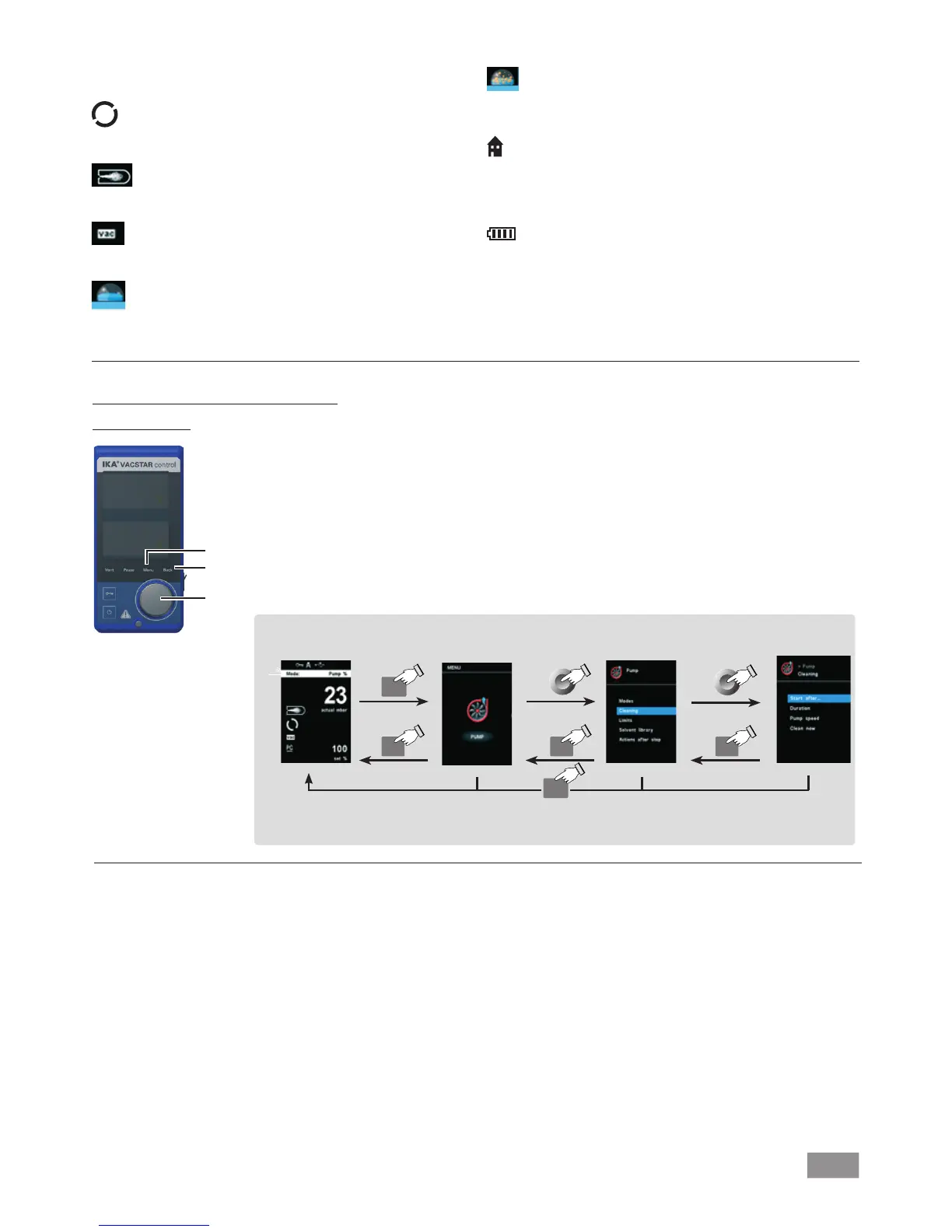
Press "Menu" key (H).
Select the menu by turning the rotating/pressing knob (K) to the right or left to select the desired menu
or sub-menu, which can then be selected by pressing the rotating/pressing knob (K).
Press or turn the rotating/pressing knob (K) again to select the desired menu option and edit the values
or settings, or activate/deactivate a function.
Turn the rotating/pressing knob to "OK" and press the "Back" (I) or "Menu" key (H) to end the procedure
and return to the previous menu or working screen.
Note: The menu option activated is highlighted blue in the display. Menus which are grayed out are inactive.
Navigation menu: Press the “Menu“ key (H) and turn the rotary/push knob (K)
Press the "Back" key (I) or the "Menu" key (H)
Note: If you press the “Menu“ key (H), the system skips directly back to the working screen.
If you press the “Back“ key (I), the system skips back to the previous display.
Back Back Back
Menu
Menu
Boiling:
This symbol indicates that a boiling point has been found automa-
tically, the system pressure is kept constant.
Home:
The Wireless Controller is connected to the station and is commu-
nicating with the station via the charging contacts. The symbol no
longer appears if the WiCo is removed from the station.
Battery pack (rechargeable battery):
The charging status of the RB 1 battery pack within the WiCo. The
charging symbol appears if the WiCo
• is connected to a PC via a USB cable
• is connected to the power supply unit OS 1.0 via a USB cable
• is connected to the station via the charger contacts.
K
I
H


 To Next Page