- 11 -
The Searching function is not available in IP VISCA mode, but you can manually add a device.
1. Manually add device via the [IP] button.
2. Press the “INQUIRE” button to view the added device. Move the joystick up/down to view
the saved device (move the joystick rightward to view the port); Press the “ENTER” button to
select a camera to control, or use the CAM button to connect and control.
The Searching function is not available in IP VISCA mode, but you can manually add a device.
1. Connect the controller and computer to the same LAN and enter the controller’s IP address
into the browser.
2. Default username: admin | Password: empty
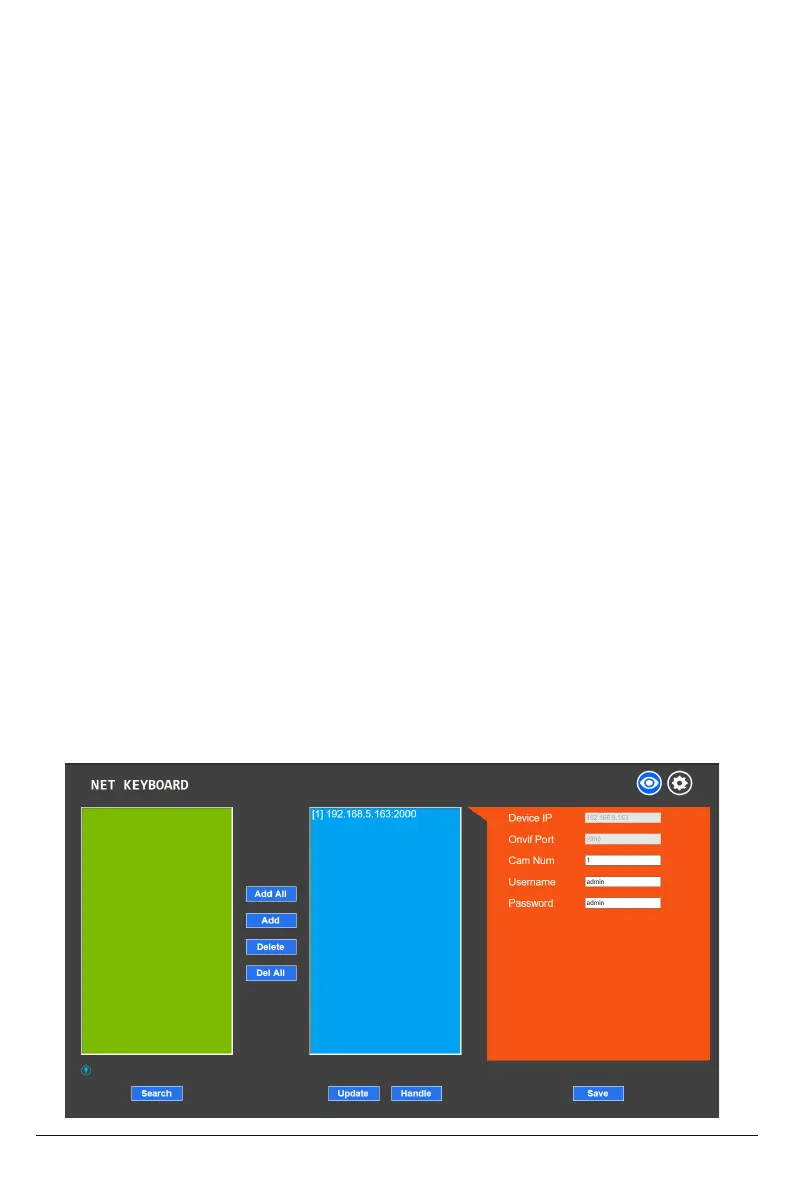
3. Home page is as below:
Simply set the address code and baud rate to control.
In PELCO Mode, correctly set the PELCO-D or PELCO-P protocol.
4.2 Connection and Control in IP VISCA Mode
4.3 Control in VISCA & PELCO Mode
5. Web Page Configuration
5.1 Home Page


 To Next Page