- 8 -
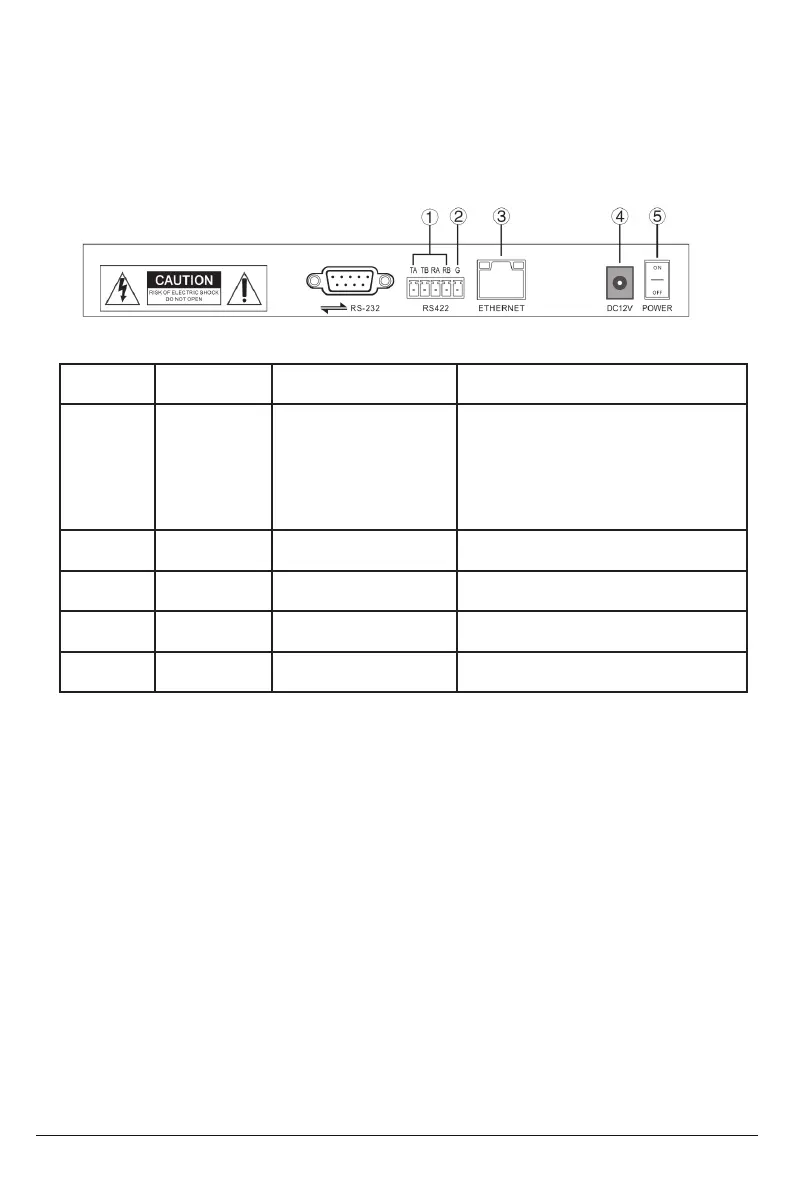
2.4 Terminal Description of Back Panel Interfaces
Back Panel Details: RS422, RS232, DC-12V, Ethernet, Power Switch
Move the joystick up and down to switch between basic settings. Move the joystick left or right
to alter settings. Confirm settings with “ENTER” button.
1. Delete Device
2. Network Type: Dynamic and Static
3. Button Sound Prompt: On and Off
4. Language Setting: English and Chinese
5. Mode: VISCA, IP VISCA, ONVIF, PELCO
Number Label Physical Interface Description
1 RS422
Control Output
(TA, TB, TA, TB)
Connect to RS422 bus of the camera:
TA to camera RA
TB to camera RB
RA to camera TA
RB to camera TB
2 Ground Control line ground (G) Control signal Line ground
3 ETHERNET Ethernet Port Network Connection
4 DC-12V Power Input DV 12V Power Input
5 POWER Power Switch Power ON / OFF
3. Local Settings (SETUP)
3.1 Basic Settings
6. Local IP
7. Version Information
8. Restore Factory Settings
9. Function Button 1 (“F1”) Setup
10. Function Button 2 (“F2”) Setup


 To Next Page