Illuminati Instrument Corp. IM100 User Manual – Android, v1.41 P a g e | 1 9
3. The color temperature of other Illuminati
Meters connected to your phone – also quite
valuable in matching light sources.
The x-axis displays the color temperature (the
yellow-blueness of the light), and the y-axis
displays the magenta-green shift of the light
source. Knowing both of these light source
characteristics is vital when balancing lights.
Gel Filter Library
You can also see the effect of adding various
color gel filters to your light source(s). This is
helpful when you want to find the right gel fast,
without trial-and-error.
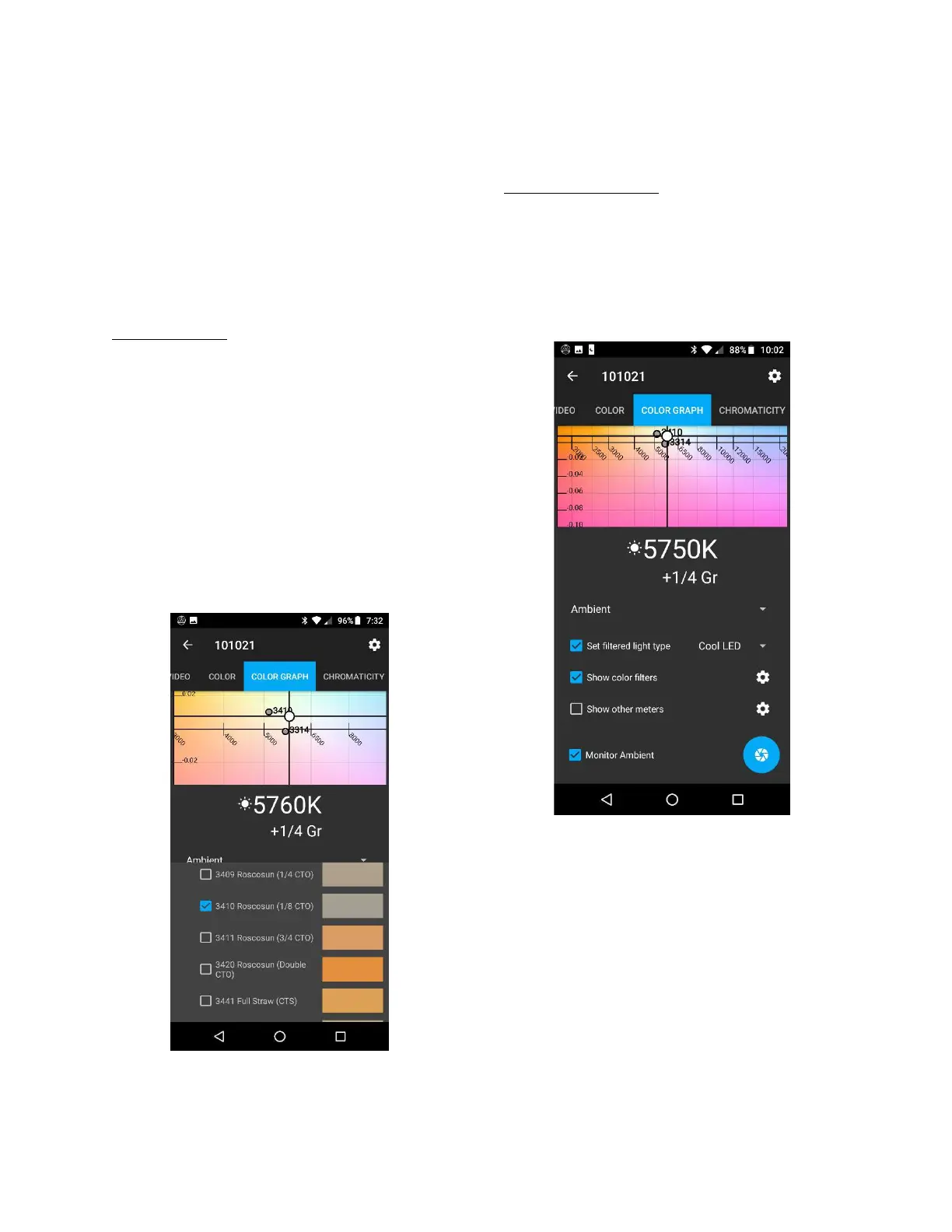
In the example below, you can see the effect of
a Roscosun 3410 filter on a light source with a
color temperature of 5760K (white dot). Also
plotted is a Rosco 3314 Minusgreen filter to
correct the excess green. The two filters
together would make the light source about
5000K and 0 Gr.
COLOR GRAPH tab showing the effect of color
correction filters on a light source
There are over 400 filters from the libraries of
Lee, Rosco, and Profoto.
Set Filtered Light Type
In order to accurately display the position of the
filtered light in the graph, the app recalculates
the effect of the filter based on the type of light
you are using. Click the “Set filtered light type”
box and select the Filtered Light Type from the
menu.
COLOR GRAPH screen showing option to “Set
filtered light type” for filter calculations



 To Next Page