Illuminati Instrument Corp. IM100 User Manual – Android, v1.41 P a g e | 9
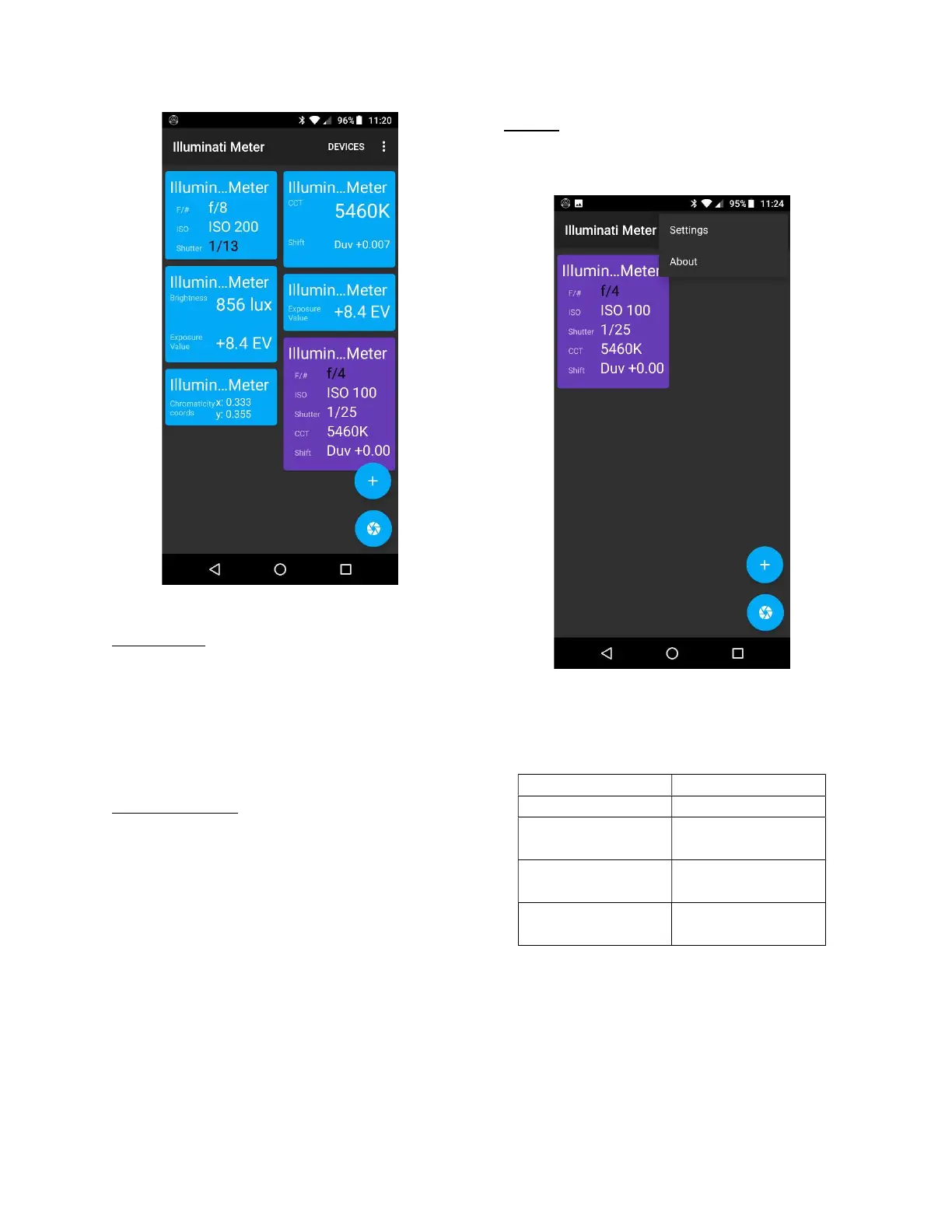
Tile Options
Deleting Tiles
To delete a tile, use your finger to tap and hold
the tile to be deleted, then slide the tile to the
“+” icon lower-right. The “+” icon will turn into
a trash icon and the tile turn gray. When this
happens, simply let go and the tile will be
erased.
Adding More Tiles
You can have multiple tiles for your meter and
multiple meters showing up on your tile screen.
It is also possible to have two exposure tiles
with different exposure settings. One tile could
be set to ISO 100, for example, and the other to
ISO 1600 – each showing the correct exposure
values for that particular condition.
Tile Names
The name of your meter (see later section on
renaming your meter) will be displayed
automatically at the top of the tile.
Settings
In the upper-right of the Tiles screen, is a three-
dot icon that controls some meter settings.
Location of Settings
From here you can set the default units for the
following parameters:
magenta shift
Duv
compensation step
increments)
ON after startup
initial startup
Parameters and values for the Settings Options



 To Next Page