29
ENGLISH
NOTES:
• If a station being viewed stops
broadcasting, the TV will automati-
cally shut itself off after 15 minutes.
• To confirm the ON/OFF TIMER:
Press -/DISPLAY to indicate the
program on the screen.
• To return from ON/OFF TIMER
menu to OPTION menu, select
“OPTION MENU” then
press
or .
EXAMPLE: Turning off the TV at 11:30 PM, daily.
Preparation:
Set the clock, if you have not already done so (see page 27).
This feature allows you to have
the TV turn off automatically at a
predetermined time. If you pro-
gram the OFF TIMER to “DAILY”,
the TV will turn off everyday at the
same time everyday.
1
3
4
Setting the off timer
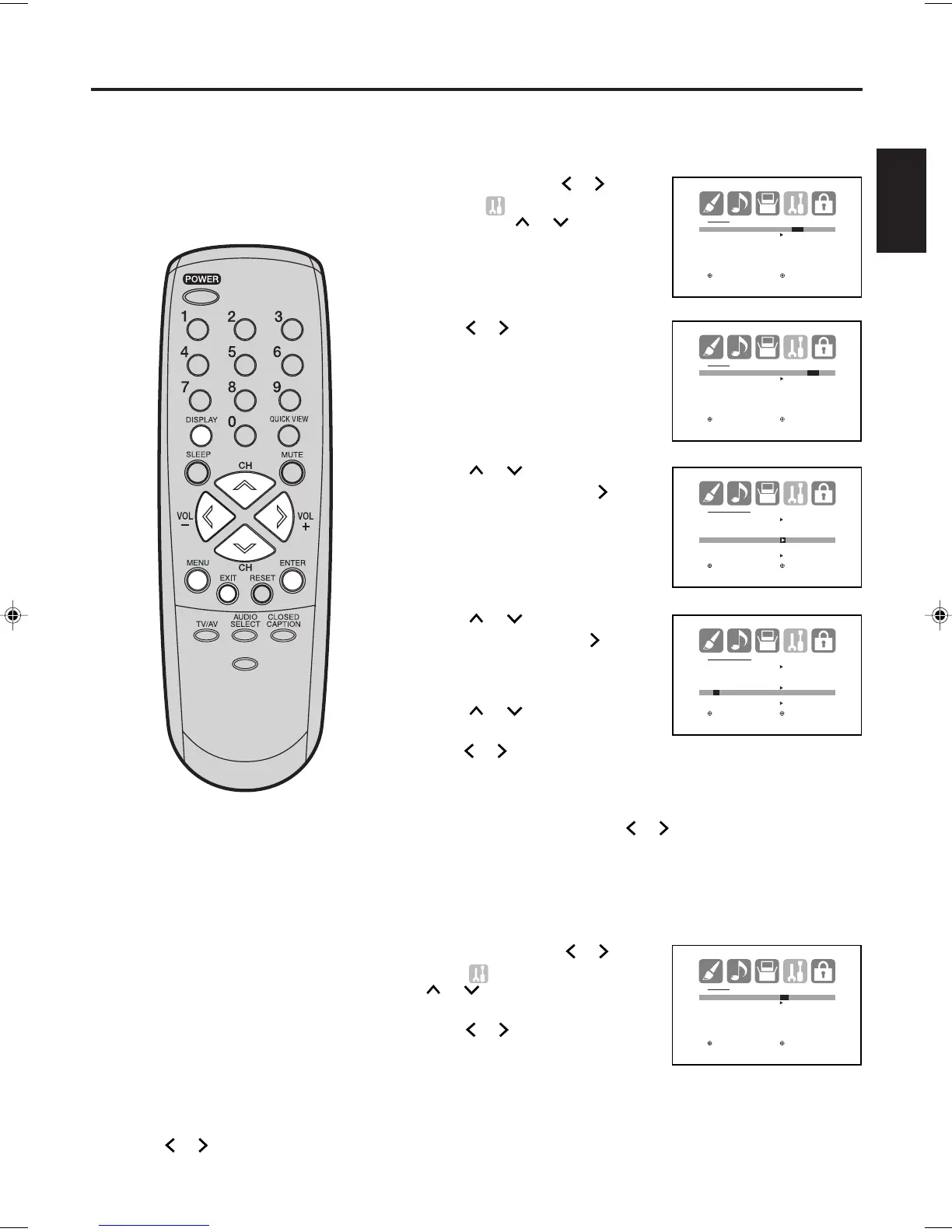
Press MENU. Press or
to select (OPTION)
menu. Press
or
to
select “ON/OFF TIMER”.
Press
or
to select
“OFF TIMER”, then press
to enter the setting for the
OFF TIMER.
Press
or
to set the
desired hour, then press
.
Please note if the hour is AM
or PM, and choose desired
setting.
Press
or
to set the
desired minutes and
press or to select
“DAILY”, then press ENTER.
NOTE:
To cancel OFF TIMER, press
or to select “CLEAR” after this
step, then press ENTER.
Enable or disable the ON/OFF TIMER function
1
Press MENU. Press or to
select
(OPTION) menu. Press
or
to select “ON/OFF
TIMER”.
Press or to select “ON” or
“OFF”.
ON: Timer setting is enabled.
OFF: Timer setting is disabled.
2
Press EXIT to return to the normal screen.
OPTION
ON/OFF TIMER ON/ OFF/ SET
CH LABEL
: SELECT : ADJUST
ENTER : SET
ON/OFF TIMER
ON TIMER
12:00AM CH 1
CLEAR
OFF TIMER
12:00AM
CLEAR
OPTION MENU
: SELECT : ADJUST
EXIT : END
ON/OFF TIMER
ON TIMER
12:00AM CH 1
CLEAR
OFF TIMER
11:30PM
CLEAR
OPTION MENU
: SELECT : ADJUST
EXIT : END
OPTION
ON/OFF TIMER ON/ OFF/ SET
CH LABEL
:SELECT :ADJUST
5
Press EXIT to return to normal screen.
2
Press or to select
“SET”, then press ENTER.
The ON/OFF TIMER menu
appears.
OPTION
ON/OFF TIMER ON/ OFF/SET
CH LABEL
:SELECT :ADJUST
PICTURE
SIZE
-/
J3W40621B_En_P25-30 15/02/2006, 10:46 AM29


 To Next Page