22
EN
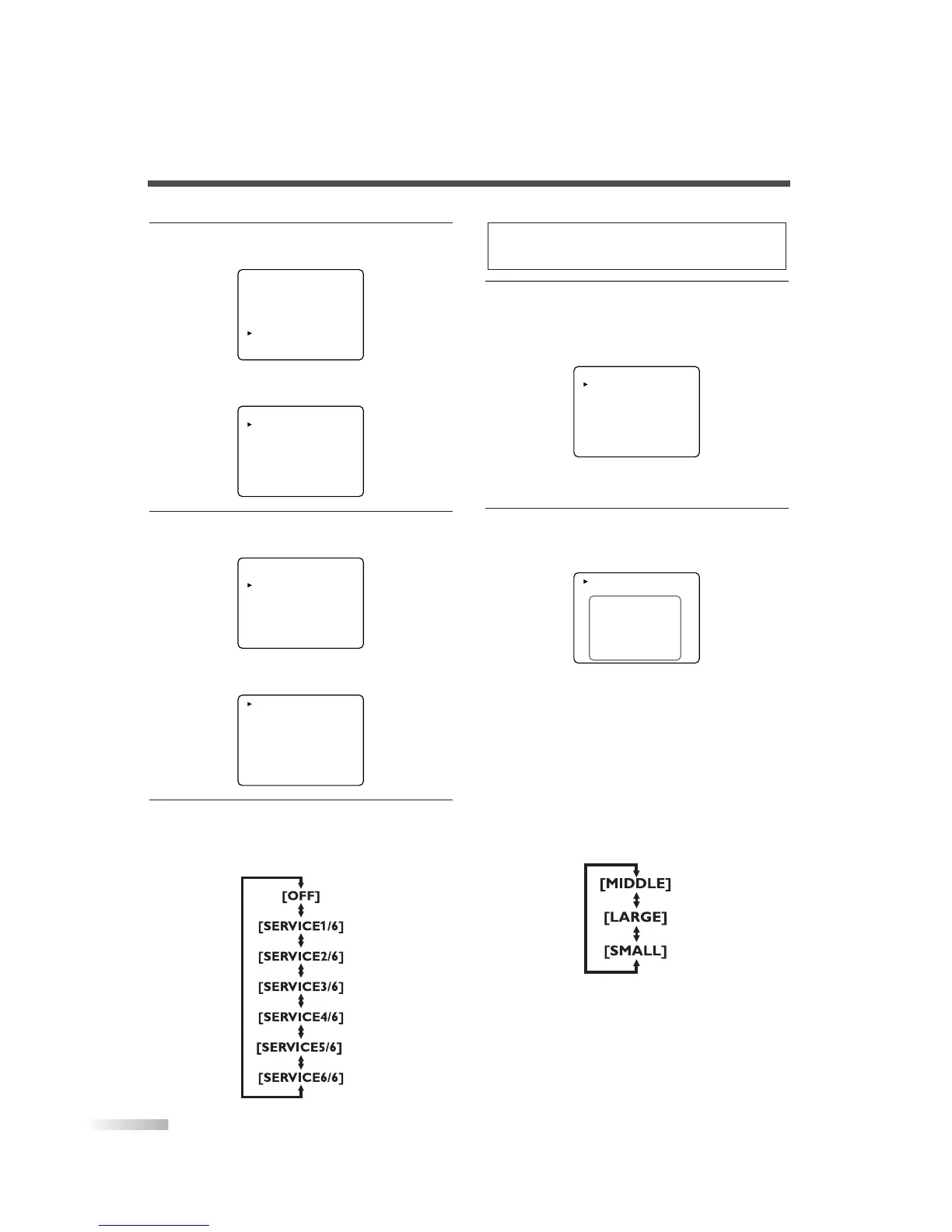
2 Select "DTV SET UP".
• Using
[CH
K
/
L
], select "DTV SET UP".
• Press
[VOL
X
].
The following screen is displayed.
3
Select "DTVCC".
• Using
[CH
K
/
L
], select "DTVCC".
• Press
[VOL
X
].
The following screen is displayed.
4 Select "CAPTION SERVICE".
• When you press
[VOL
X
/
Y
], you can switch
CAPTION as below. Select CAPTION SERVICE
you want to use.
5 Use "USER SETTING".
• The "USER SETTING" function lets you
change the caption size and font style.
• Using
[CH
K
/
L
], select "USER SETTING".
• Press
[VOL
X
] and set "USER SETTING" to
"ON".
6
Set each item.
• When "USER SETTING" is set to "ON", you
can set the following items.
• Using
[CH
K
/
L
], select the item you want to
set.
• You can switch the setting for each item with
[VOL
X
/
Y
].
• The setting description for each item is shown
below.
[CAPTION SIZE]
Text size of the displayed caption can be
switched as below.


 To Next Page