32
EN
D.S.T.
After the initial setting you set when you first turned
on the power, you can set the D.S.T. (Daylight
Saving Time) again. When you set this function to
ON, the clock will automatically move forward one
hour at 2:00 a.m on the first Sunday in April and
move back one hour at 2:00 a.m on the last
Sunday in October.
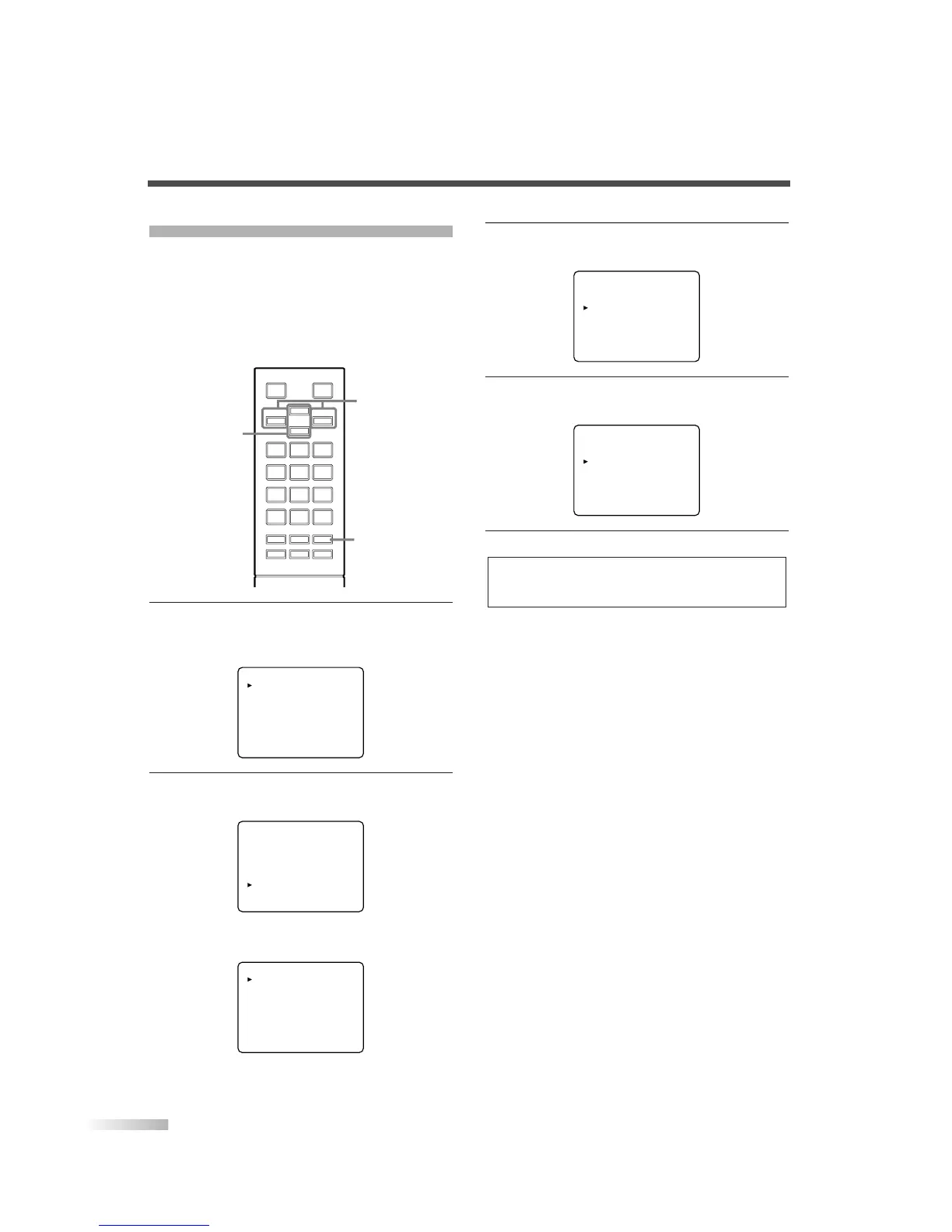
1 Display the menu screen.
• Press
[MENU].
The following menu screen is displayed.
2
Select "DTV SET UP".
• Using
[CH
K
/
L
], select "DTV SET UP".
• When you press
[VOL
X
], the following menu
screen is displayed.
DTV DISPLAY [LETTERBOX]
DTVCC
D.S.T.[Daylight Saving] [- - -]
TIME ZONE [ALASKA]
PICTURE
CHANNEL SET
[ENG]/ESP/FRA
V-CHIP SET UP
CAPTION [OFF]
DTV SET UP
PICTURE
CHANNEL SET
[ENG]/ESP/FRA
V-CHIP SET UP
CAPTION [OFF]
DTV SET UP
123
456
789
0
+100
-
/ENT
o
p
m
n
MUTE SLEEP
AUDIO
MENU
INFO INPUT
SELECT
DTV/TVPOWER
CH
VOL VOL
MENU
CH
K
/
L
VOL
X
/
Y
3 Select "D.S.T. (Daylight Saving)".
• Using
[CH
K
/
L
], select "D.S.T. (Daylight Saving)".
4 Set "D.S.T. (Daylight Saving)".
• Using
[VOL
X
/
Y
], set to "ON" or "OFF".
5
To exit the menu, press [MENU].
NOTE:
When you set D.S.T. to "OFF", the date and time information
adjusted for the area set by "TIME ZONE" is displayed.
DTV DISPLAY [LETTERBOX]
DTVCC
D.S.T.(Daylight Saving) [ON]
TIME ZONE [ALASKA]
DTV DISPLAY [LETTERBOX]
DTVCC
D.S.T.(Daylight Saving) [- - -]
TIME ZONE [ALASKA]


 To Next Page