21
EN
CLOSED CAPTION
You can view specially labeled (cc) TV programs,
movies, news and prerecorded tapes, etc. with
either a dialogue caption or text display added to
the program.
You can also change the font size and font style of
the caption in the digital broadcasting.
1
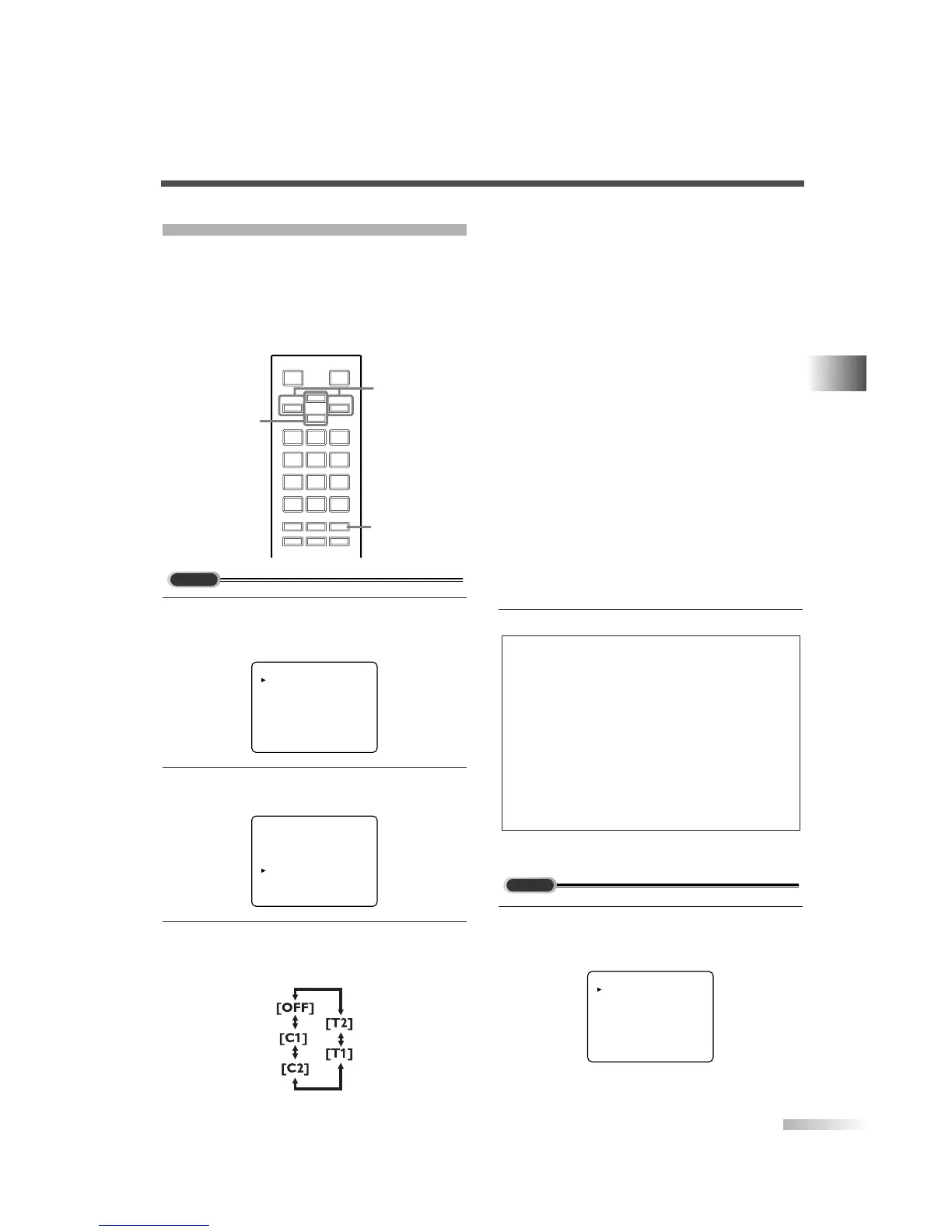
Display the menu screen.
• Press
[MENU].
The following menu screen is displayed.
2 Select "CAPTION".
• Using
[CH
K
/
L
], select "CAPTION".
3
Switch the CAPTION mode.
• When you press
[VOL
X
/
Y
], CAPTION will be
switched as below.
PICTURE
CHANNEL SET
[ENG]/ESP/FRA
V-CHIP SET UP
CAPTION [OFF]
DTV SET UP
PICTURE
CHANNEL SET
[ENG]/ESP/FRA
V-CHIP SET UP
CAPTION [OFF]
DTV SET UP
123
456
789
0
+100
-
/ENT
o
p
m
n
MUTE SLEEP
AUDIO
MENU
INFO INPUT
SELECT
DTV/TVPOWER
CH
VOL VOL
MENU
CH
K
/
L
VOL
X
/
Y
[CAPTION MODE (C1, C2)]
• CAPTION1 (C1)
Displays standard closed captions (what a char-
acter is saying).
• CAPTION2 (C2)
Displays foreign language closed captions (for-
eign language words showing what a character
is saying).
• There are three display modes according to
programs:
Paint-on mode: Displays input characters on the
screen immediately.
Pop-on mode : Once characters are stored in
memory, they are displayed all
at once.
Roll-up mode : Displays the characters continu-
ously by scrolling (max. 4 lines).
[TEXT MODE (T1, T2)]
• TEXT1 (T1) and TEXT2 (T2) display half-
screen text by scrolling (such as a channel
guide, schedule or announcement).
4 To exit the menu, press [MENU].
1
Display the menu screen.
• Press
[MENU].
The following menu screen is displayed.
PICTURE
CHANNEL SET
[ENG]/ESP/FRA
V-CHIP SET UP
CAPTION [OFF]
DTV SET UP
NOTES:
• If the closed caption is not broadcasted, nothing is displayed.
• When your TV receives a special effects playback signal
(i.e., Search, Slow and Still) from a VCR’s video output
channel (CH3 or CH4), the TV may not display the correct
caption or text.
• Captions and texts may not match the TV voice exactly.
• Interference may cause the closed caption system not to
function properly.
• The caption or text characters will not be displayed while the
menu display or functions display is shown.
• If a black box appears on the screen, this means that the
TV is set to TEXT mode. To clear screen, select CAPTION
"C1", "C2" or "OFF".
OPTIONAL SETTINGS


 To Next Page