11
Recall Function
After switching off the hob [ ], it is possible to recall the last settings.
x cooking stages of all cooking zones (power)
x minutes and seconds of programmed cooking zone-related timers
x Keep warm function
The recall procedure is following:
x Press the key [ ]
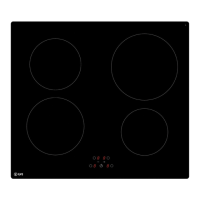
x Then simultaneously press the 2 zones back in less than 6 seconds.
The previous settings are again active.
« Keep warm » Function
This function allows to reach and maintain automatically a temperature of more or less 70°C.
This will avoid liquids overflowing and fast burning the bottom of the pan.
x To engage, to start the function « Keep warm » :
Action Control panel Display
To engage press the slider between [ U ]
[ 0 ] and [ 1 ]
To stop slideonthe“SLIDER“ [ 0 ] to [ 9 ] or [ H ]
Control panel Locking
To avoid the activation of the cooking zones, in particular during cleaning, the control panel can
be locked (with exception to the On/Off key [ ]).
x Lock :
Action Control panel Display
Start press on key [ ] [ 0 ] or [ H ] on displays
Hob locking press on key [ ll ] and keep your
finger on this key, with your other
finger press 3 times key [ ] [ L ] on displays
x Unlock :
Action Control panel Display
Start press on key [ ] [ L ] on displays
In the 5 seconds after start:
Unlocking the hob press on key [ ll ] and keep your
finger on this key, with your other
finger press 3 times key [ ] [ 0 ] or [ H ] on displays



 To Next Page