imc CRONOS-PL/-SL/compact - Getting Started, Version 5 R 7 - 2018-06-28© 2018 imc Meßsysteme GmbH
Connecting via LAN in four steps 25
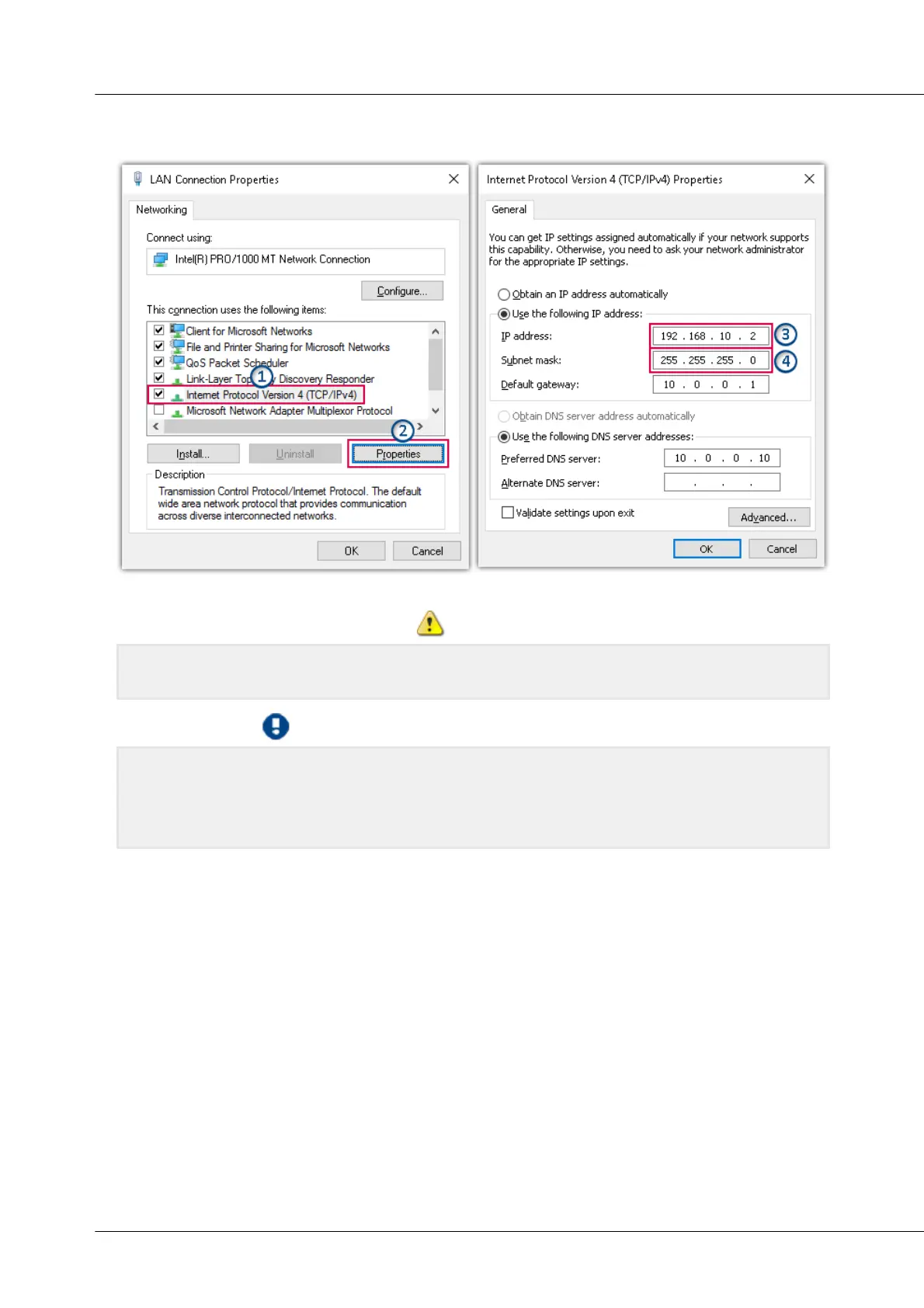
Select Version 4 of the Internet Protocol Version 4 (TCP/IP4) and click on Properties. Now the current
settings are visible. Please note the computer's IP address (3) and the subnet mask (4).
Select Internet Protocol (TCP/IP)
Be careful in changing settings, since if the same network card is used, there may be difficulties later
in the company network. Please discuss this with your responsible administrator/IT-service.
Note: Obtain IP-address automatically (DHCP)
If "Obtain IP address automatically" (DHCP) is selected, no IP address is displayed. In this case, you
have to determine the current IP-address using the Command Prompt/Command line.
Note, however, that automatically obtained IP-addresses might change the next time the operating
system is started!


 To Next Page