54
21
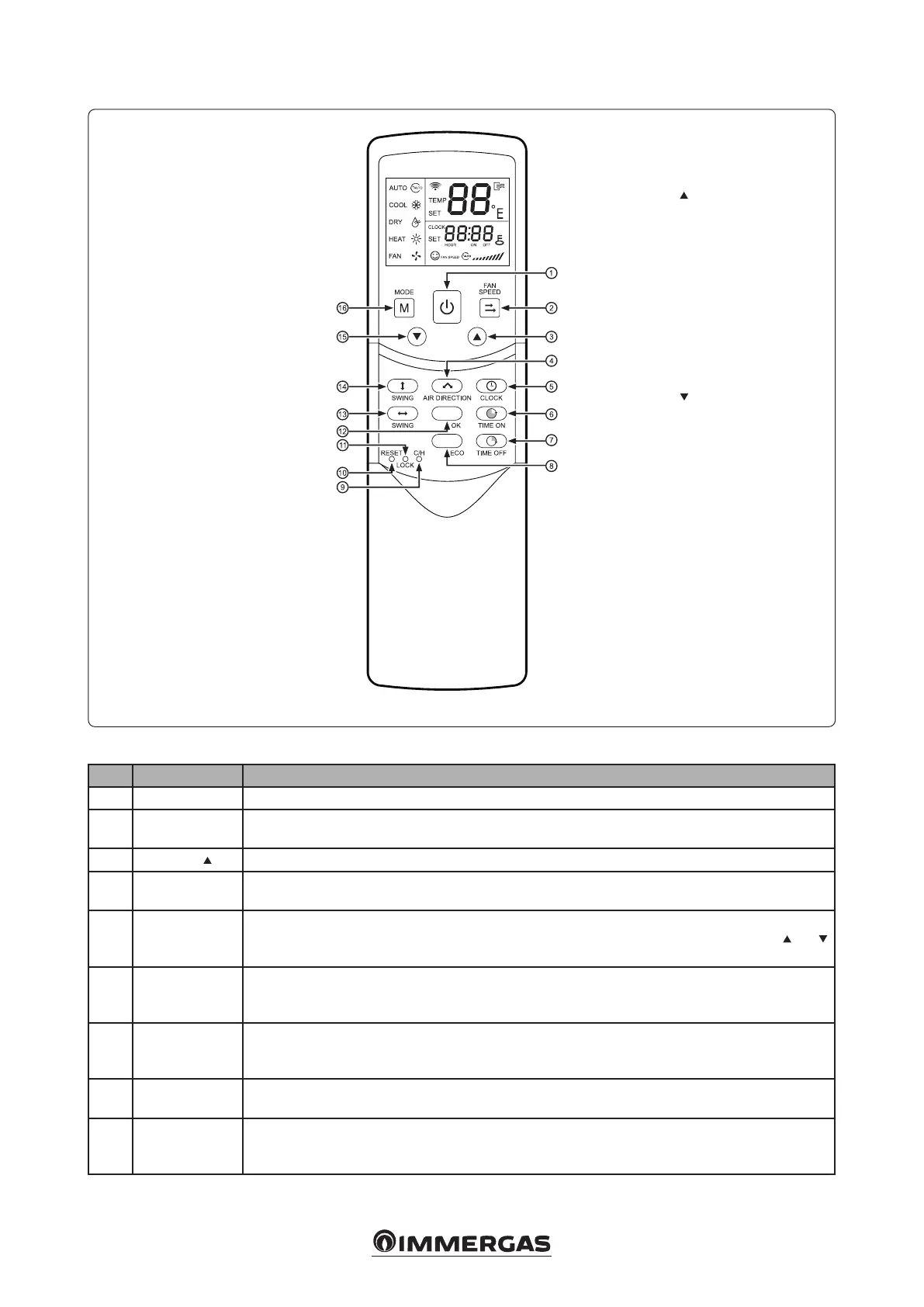
Key:
1 - On / O
2 - Fan speed setting
3 - Adjust
4 - Air direction setting
5 - Time setting
6 - Timer On
7 - Timer O
8 - Economic operation
9 - Cool/ Heat
10 - Reset
11 - Lock
12 - Conrm button
13 - Wind horiz swing
14 - Wind vert. swing
15 - Adjust
16 - Mode setting
4.3 REMOTE CONTROL BUTTON.
4.4 REMOTE CONTROL MENU’.
Nr Button Function
1 On / O e On / O button allows the indoor unit to be switched on and o.
2 Fan speed setting
e fan speed is set in the sequence shown below, by pressing the “Fan speed setting” button: “AUTO
(automatic) - LOW (low) - MED (medium) - HIGH (high)”.
3 Adjust
Increases the set temperature.
4
Air direction
setting
Activate the “Wind horiz swing” function or the air deector. Aer pressing, the deector turns 6 °.
5 Time setting
Shows the time (when the unit is reset or turned on for the rst time, 12.00 appears). Press the “Clock” button
for 5 seconds. e time icon ashes for 3 seconds. Press again and the minute icon will ash. e
and
keys are used to set the values. Aer setting the value, conrm it by pressing the “OK” conrmation key.
6 Timer On
is button is used to activate and congure the programmed power-on function. At each pulse the switch-
on time increases by half an hour. When the selection exceeds 10 hours, the time will be increased from
hour to hour. Set the time to “0.0” and the automatic switch-on will be canceled.
7 Timer O
is button is used to activate and congure the programmed shutdown function. At each pulse the switch-
o time increases by half an hour. When the selection exceeds 10 hours, the time will be increased from
hour to hour. Set the time to “0.0” and the automatic shut-o will be canceled.
8
Economic
operation
Activate the economic operating mode. It is recommended to use this mode during sleep hours. With this parameter,
the fan will operate in “AUTO” mode
9 Cool / Heat
(Inside the remote control). Press this button with a 1 mm needle to change from “Cool Only” mode to
“Cool and Hot” mode. During adjustment, a rear light is switched on. e factory default conguration
is in “Cold and Hot” mode.




 To Next Page