55
22
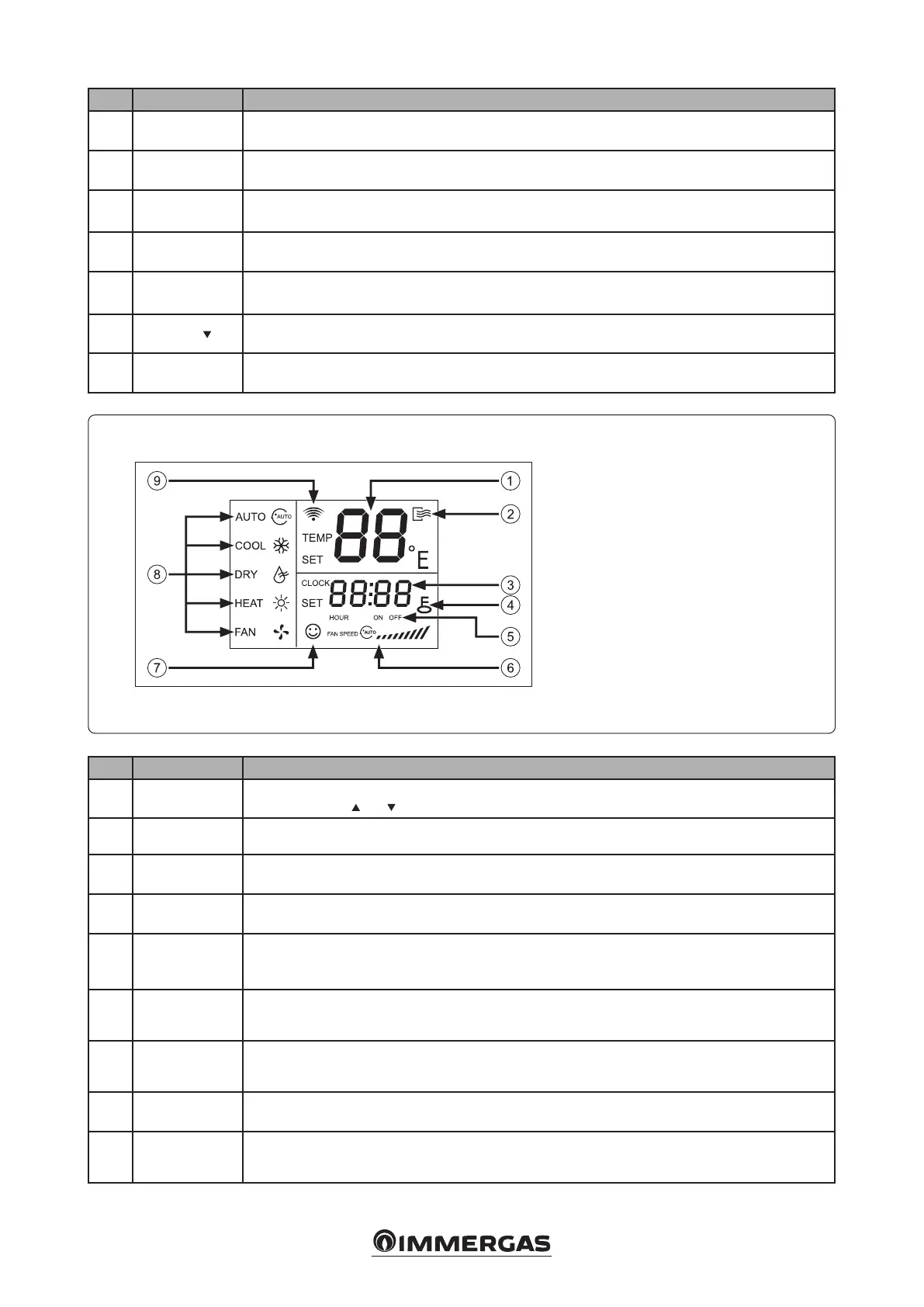
4.5 REMOTE CONTROL DISPLAY.
Remote control display indicators menù.
Key:
1 - Temp
2 - ON / OFF
3 - Time
4 - Lock
5 - Time ON / OFF
6 - Fan speed
7 - Economic operation
8 - Running mode
9 - Transmitting display
Nr Button Function
10 Reset
(Inside the remote control). Press this button with a 1 mm needle to clear the current setting and reset
the remote control.
11 Lock
(Inside the remote control). Press this button with a 1 mm needle to lock or unlock the remote control,
thus deactivating all buttons of the same, except the “LOCK” button.
12
Conrm but-
ton
Conrm settings
13
Wind horiz
swing
Pressing this button activates or deactivates the horizontal “SWING” function of the air deector.
14
Wind vert
swing
Function not available.
15
Adjust
e set temperature decreases. Keeping the button pressed, the temperature will drop by 1 ° every 0.5
seconds.
16
Mode setting
By pressing, the following modes can be selected in succession: “AUTO (automatic) - COOL (cooling) -
DRY (dehumidication) - HEAT (heating) - FAN (ventilation)”.
Nr Indicator Function
1 Temp
Displays the selected temperature in the range of values from 17 ° C to 30 ° C e temperature can be
adjusted using the
and buttons. If the unit operates in ventilation mode, this indicator will not appear.
2 ON / OFF e icon is activated each time the system is turned on and will disappear when it is switched o.
3 Time
Shows the current time and, by pressing the “Timer On” or “Timer O” button, displays the presence of
any timed programming carried out.
4 Lock
e icon turns on or o by pressing the “LOCK” button. When the unit is locked, all keys are disabled
except the lock key.
5 Time ON / OFF
By programming the ignition timer the “ON” icon will be displayed, by programming the switch-o timer
the “OFF” icon. If we select both the “ON” and “OFF” timer at the same time, the two icons will appear
on the display.
6 Fan speed
Indicates the speed of the selected fan, with the sequence below: “AUTO (automatic) - LOW (low) - MED
(medium) - HIGH (high)”.
7
Economic
operation
e icon turns on or o by pressing the “ECO” button.
8 Running mode
Displays the operation mode of the unit at that time. e following modes can be selected: “AUTO (auto-
matic) - COOL (cooling) - DRY (dehumidication) - HEAT (heating) - FAN (ventilation)”.
9
Transmitting
display
Whenever the remote control transmits a signal to the system, the icon ashes.




 To Next Page