Operation Manual
E
74
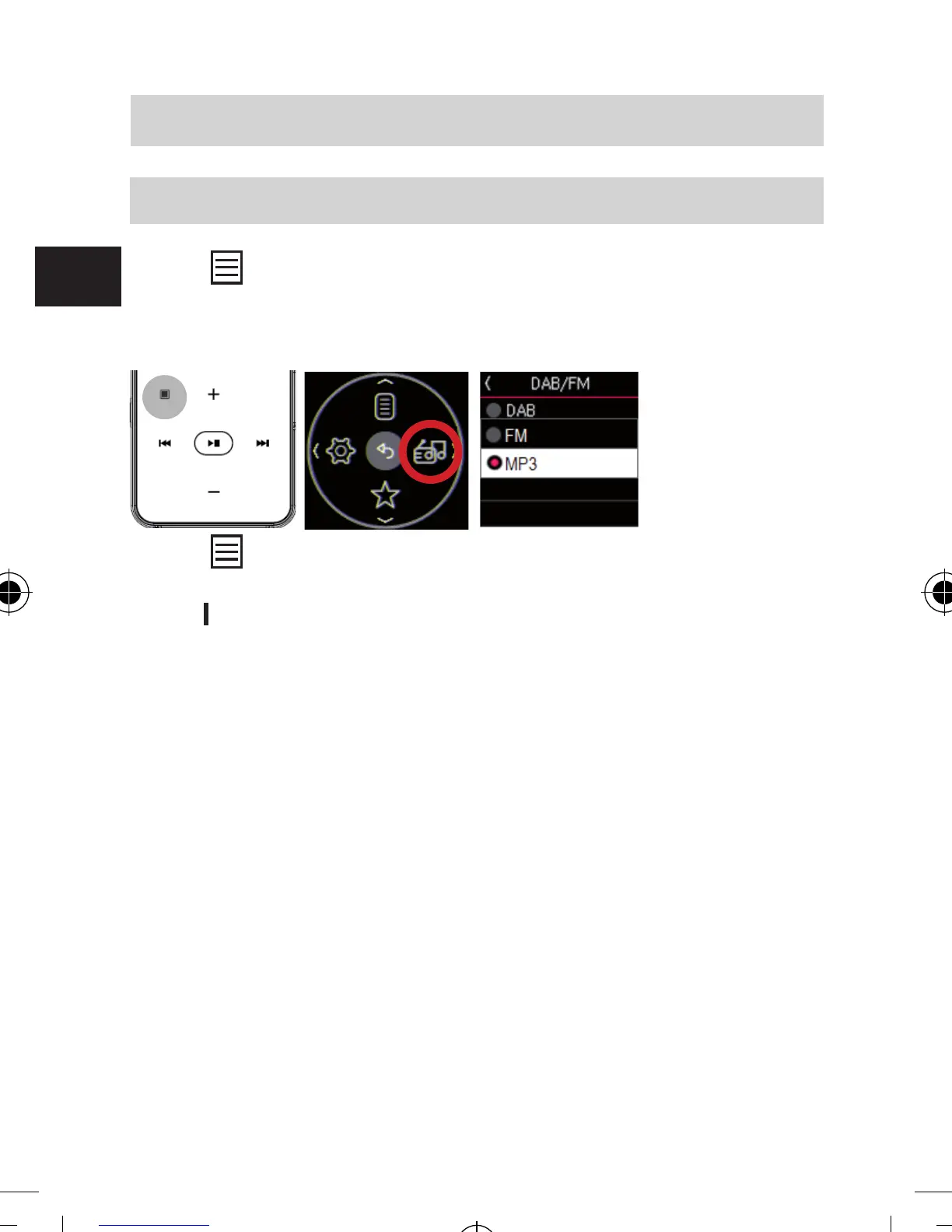
7.3. Mode switch
Press button to open menu screen and select “Mode”.
Now choose a mode between DAB/DAB+, FM radio, and
MP3.
Press button to open menu screen and select “Setting”
to displays setting menu.
Press
▶▶
button to return to exit from the menu.
Setting menu list for DAB/DAB+/FM
1) Channel Scan
2) Bluetooth
3) FM Transmitter
4) Audio
5) Service Following
6) Sleep Timer
7) Language
8) System
Channel Scan
Scan for DAB/DAB+ channels
Bluetooth
Turns on or o sound output via Bluetooth audio device,
Search available Bluetooth devices nearby
7. SETTINGS
bda_Dabman 2_DIN A 7_D_E_F_10_17.indd 74 15.01.18 08:47







 To Next Page