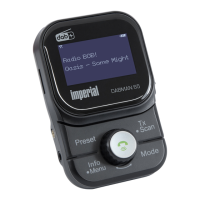
DABMAN 2
E
77
8. TROUBLESHOOTING
Symptom Possible cause and solution
Does not turn on Fully charge DABMAN 2 before
using it
Cannot hear any
sound in the head-
phone
Cannot hear any sound in the
headphone
Check if headphone is firmly inserted
to the port.
Check if headphone cable is
stretched enough. Rolling out the
cable may aect radio reception.
When you connected DABMAN 2
to Bluetooth audio device, no sound
come out from headphone port.
Failed to scan or
connect to Blue-
tooth audio device
Check if Bluetooth device is in
“Pairing” mode
Check if PIN code of Bluetooth
device is correct
Place DABMAN 2 closer to the
Bluetooth device
Cannot hear any
sound in FM car
audio
Check if car radio is tuned to correct
FM frequency
Check if FM transmitter setting of
DABMAN 2 is ON
and FM frequency is correct
Check if an headphone or headpho-
ne extension cable is connected to
the port.Try other FM frequency
bda_Dabman 2_DIN A 7_D_E_F_10_17.indd 77 15.01.18 08:47







 To Next Page