80
User manual
E
Use the tune- and tune + buttons together with the
select button to adjust the time display.
5.5. Switch reception mode
To switch between DAB+ and FM Radio reception, press
the Mode button.
5.6. Using headphones.
You can connect headphones to your radio with a 3.5 mm
jack plug (not included).
The headphone jack is located on the rear side of the ra-
dio. When headphones are connected, the radio speaker
turns off and the sound is only played via the headphones.
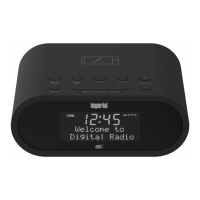
5.7. Wireless charging
Your DAB alarm clock radio features wireless charging
technology so you can charge compatible mobile devices
such as tablets or smartphones without cables.
1. Place your Qi-compatible mobile phone on the
mobile phone icon on the radio.
Your mobile phone will begin to charge.
Please also read the user manual of your
mobile phone, if necessary.
Please make sure that the aerial antenna is fully extended
before trying to tune for a DAB station. A vertical position
is recommended to ensure maximum reception of radio
signals.
5. FIRST STEPS AND START-UP


 To Next Page