Cheetah Pregius Camera with Camera Link – User Manual
July 6, 2018 Page 30 of 64 Rev 1.1
Switch Port – use this option to switch the com port/camera. You can also Rescan Ports
before switching.
Set Baud Rate – use this to change the speed of data transmission. A higher baud rate
number indicates the transfer of more bits per second. Baud rates are 9600, 19200,
28400, 57600, and 115200. The factory default is 115,200.
3.4.2 View
Use the View menu to display or hide the following panels: Acquisition, I/O Control,
Strobe, Processing, Color, and Data Out on the screen.
3.4.3 Help
Help provides access to a user help file and the following options:
• Debug. This puts the software in debug mode for test purposes and
troubleshooting.
• Save Dump Camera Regs. This is for saving camera registers to a file.
• About. This provides information about the camera’s firmware build, revision,
image sensor, and other components.
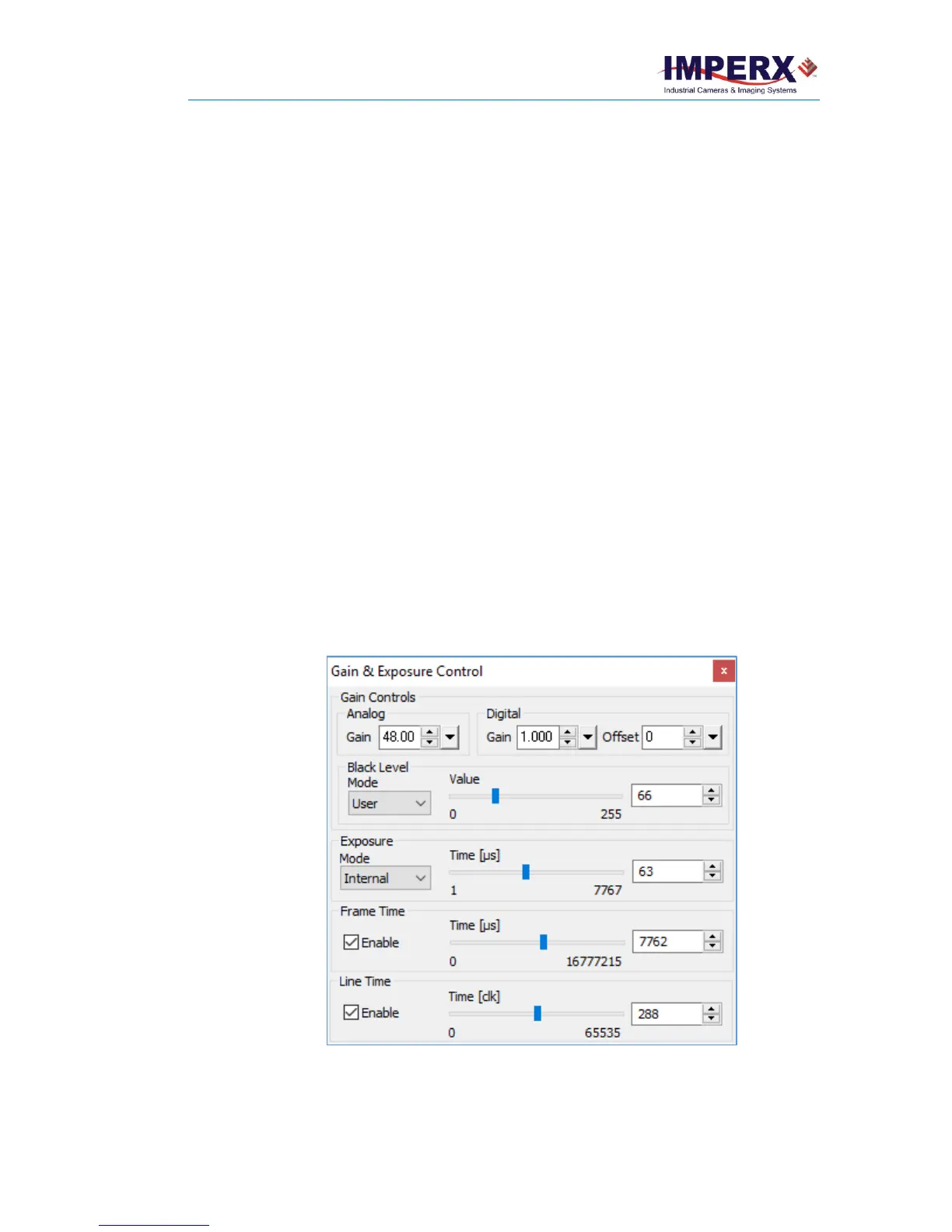
3.5 Gain & Exposure
Gain and Exposure Control enables adjustments to Analog gain, Digital gain and offset,
black level, and Exposure Modes.
Figure 21: Gain & Exposure Control
Analog Gain: Amplifies the image signal before converting the signal to digital data. You
can set the analog gain from 0 to 48 dB in 0.1 dB steps.



 To Next Page