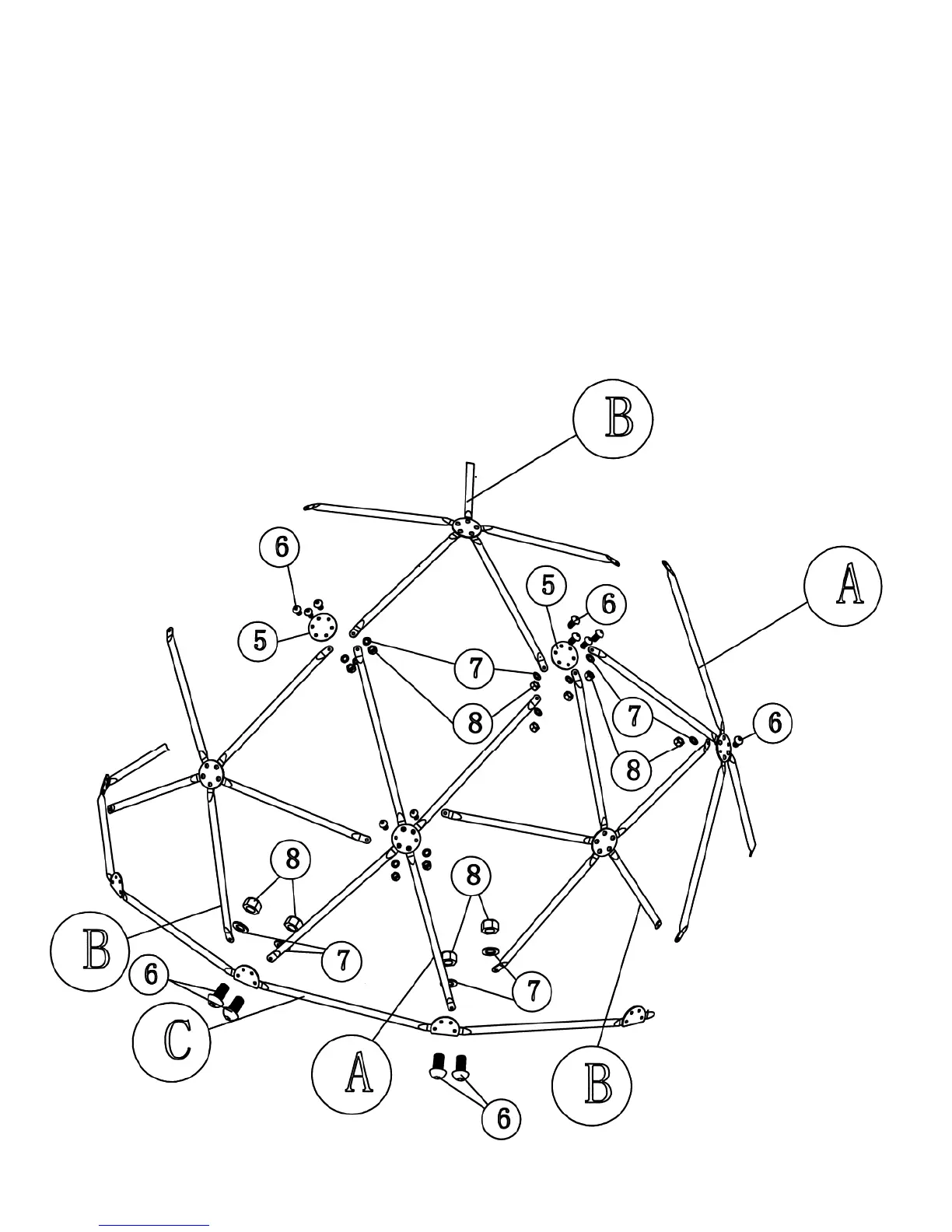
Step 4 (See Diagram 4)
A.) Connect two lower beams on a Frame-A (Blue) to the 4-hole Brackets (#3) on Frame-C.
B.) Secure each hole with one M8 x 5/8” Allen Bolt (#6), Ø 5/8” Washer (#7), and M8 Aircraft
Nut (#8). Do not tighten the Nut and Bolt yet.
C.) Connect two lower beams on a Frame-B (Yellow) to the adjacent hole on the same 4-hole
Bracket (#3) on Frame C.
D.) Repeat procedures above to install all the Frame-A and Frame-B onto Frame C to form a
hemisphere.
E.) Connect Frame-A and Frame-B together horizontally.
F.) You should have one last Frame-B left by now. Set the last Frame-B to the top of the
hemisphere and connect all five beams with five 6-hole Brackets to the diagonal beams on
Frame-A and Frame-B previously installed in Step D above.
DIAGRAM 4
9







 To Next Page