The iN-Command NCTP100 is a Bluetooth Low Energy (BLE) Tire Pressure Monitoring System (TPMS) designed to provide real-time tire pressure and temperature data to a smart device via the iN-Command TPMS App. This system aims to enhance safety by alerting users to abnormal tire conditions.
Function Description:
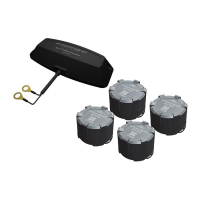
The NCTP100 system consists of tire sensors and an optional Bluetooth Repeater. The tire sensors are installed on the valve stems of a vehicle's tires and transmit data wirelessly. This data, including tire pressure and temperature, is then received by a smart device (Android or iOS) running the iN-Command TPMS App. The app displays this information and issues warning notifications (on-screen and audible) if abnormal conditions are detected, such as high or low tire pressure, or high tire temperature. The system is designed to provide alerts while driving, with the app running in the background.
The Bluetooth Repeater is an optional component recommended for larger vehicles like travel trailers and 5th wheel trailers, and is optional for motorhomes. It extends the range of the sensor signals, ensuring reliable data transmission to the smart device. The repeater is weather-resistant and can be mounted outside. It should be connected to a switched power source (e.g., running lights) to allow it to be turned on/off with the vehicle's lights, preventing continuous battery drain. When installing the repeater, the "Front" side should point towards the vehicle to optimize signal transmission to the app and reception from the sensors.
Users must complete the TPMS App setup before driving. The app is not intended for constant viewing while driving; warning notifications will be issued automatically. TPMS sensors transmit data only when the vehicle is moving over 20 miles per hour or when tire pressure changes by 5 PSI, or when the battery is installed. Bluetooth must be enabled on the smart device, and the TPMS App must be running in the background to receive notifications. The smart device should be placed in a viewing area that does not obstruct normal driving. Regular maintenance and visual inspections of tires are still necessary, as the iN-Command TPMS does not provide warning notifications for sidewall failure, although it can help prevent failures through pressure and temperature monitoring. This mobile application is intended for adult use only.
Important Notes:
- Consult the vehicle manual or a tire professional to determine proper tire pressure. Set tire pressure when the ambient temperature is cool or low, and before driving.
- Be aware that dramatic changes in tire pressure can occur due to ambient temperature changes, wheel and axle loads, and sun exposure.
- If a TPMS sensor has a low battery or other abnormal conditions, it will continuously emit signals, shortening battery life. Contact a tire specialist for battery replacement or sensor issues.
- Ensure tire stems and Schrader Valves are in good condition. Metal-bodied stems or T-Valve types are recommended.
- Avoid using temporary resealing or re-inflation products injected through the valve hole, as they may adversely affect sensor operation. Do not allow the TPMS sensor to contact tire sealant, balancing compounds, or other chemicals.
- The system operates on Bluetooth Low Energy, and wireless interference may occasionally affect accuracy or operation.
- The iN-Command TPMS should not be solely relied upon for safety. Continue regular visual inspections and periodic checks by tire professionals.
Usage Features:
- Mobile Device Pairing: The iN-Command TPMS App is available on Google Play and Apple App stores. To pair, enable Bluetooth on the mobile device. The app will request location, photos, media, and file access; denying these may limit functionality. A notice will appear, reminding users that the app must be open to receive alerts while driving.
- Vehicle Profiles: Users can create and manage multiple vehicle profiles within the app. This includes selecting vehicle and tire configurations. Vehicle profiles can be edited or deleted.
- Sensor Pairing:
- Tire Deflation Sensor Pairing: Select the tire location in the app, then install the sensor on the corresponding valve stem. The app will search for the deflation signal and display the sensor's ID number. Sensors transmit a learning signal for 10 minutes after battery installation; if more time is needed, remove and reinstall the battery.
- Manual Sensor Pairing: Select the tire location and manually enter the sensor's ID number into the app.
- QR Code Sensor Pairing: Select the tire location, and the device camera will launch. Position the sensor's QR Code within the camera's guidelines for automatic capture.
- Tire Locations Settings: Users can exchange tire locations by dragging and dropping tire numbers in the app. The associated location numbers will update automatically.
- Alert & Units & Ranges Settings:
- Alarm Tone: Users can select different alarm tones for notifications.
- Units & Ranges: Users can set temperature units (℃ or °F) and customize the upper and lower limits for pressure and temperature.
- Pressure Range: 0-217 psi (Default: 100-150 psi)
- Temperature Range: 100°F-257°F (38℃-125℃) (Default: 211°F/100℃)
- System Warnings: The app displays warnings for high/low tire pressure, high tire temperature, low sensor battery, and no signal. Abnormal tire values turn red and are accompanied by a sound and warning symbol.
Maintenance Features:
- Battery Replacement: The tire sensors use CR1632 batteries. The included wrench can be used to remove the sensor cover for battery replacement. It is recommended to keep the wrench in the vehicle for this purpose.
- Troubleshooting:
- If the app displays no value after inputting the sensor ID: Data is transmitted when the vehicle is over 20 mph, tire pressure changes by 5 PSI, or the battery is installed. Data is not continuously transmitted to save power. Check sensor function by increasing or deflating tire pressure.
- If no data is shown despite app installation and sensor ID settings: Check if Bluetooth is turned off and restart the app. Close other apps if experiencing intermittent signals, as wireless audio streaming via Bluetooth may cause interruptions.
- If there is no alarm sound: Check if the device is in silent mode or if the volume is at the lowest setting. Certain iPhone models may not give audio alerts if connected to multiple Bluetooth devices simultaneously.
Important Technical Specifications:
BLE TPMS Sensor:
- Operating Voltage: 3V
- Operating Humidity: 95% MAX
- Operating Current: <15 mA at DC 3V
- Storage Temperature: -40°F to 185 °F
- Operating Temperature: -4 °F to 185 °F
- Monitored Pressure Range: 0 to 184 psi
- Monitored Temperature Range: -4 °F to 185 °F
- Operating Frequency: 2.4GHz
- Transmission Power: 4 dBm MAX
- Battery Life: 1 year (under normal operating condition)
- Battery Capacity: 130 mAh (CR1632)
- Weight: 10 g ± 0.5 g (including battery)
Repeater Sensor:
- Operating Voltage: 12V/24V
- Operating Humidity: 90% MAX
- Storage Temperature: -40 °F to 257 °F
- Operating Temperature: -4 °F to 185 °F
- Operating Frequency: Bluetooth Low Energy 4.0, 2400MHz~2483.5MHz
- Transmission Power: 4 dBm MAX
- Receiver Sensitivity: < -85dBm
- Modulation Format: GFSK
- Operating Current: 40mA Max. @ DC 12V
Packaging Contents:
- Lock Nut (4)
- Anti-Theft Attachment (4)
- Tire Sensor (4)
- Battery (4) CR1632
- Wrench (1)
- Bluetooth Repeater (1)
The Lock Nuts and Anti-Theft Attachments are used to secure the sensors and prevent unauthorized removal. The wrench is used for tightening/loosening lock nuts and removing the sensor cover for battery replacement.


 To Next Page
 General