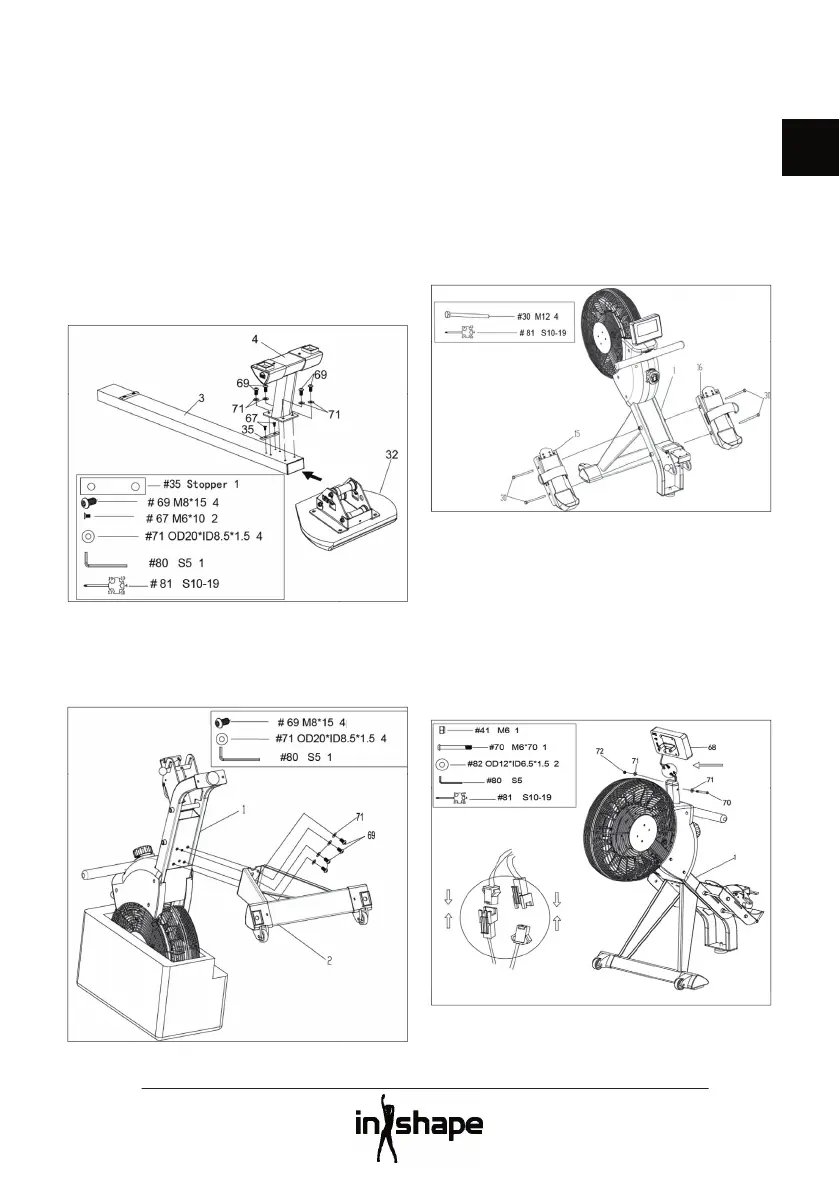
Place the rail (3) and seat (32) with the
underside facing upwards.
Push the seat over the rail. Screw the stop
plate (35) securely to the rail using 2 screws
Screw the rear stabiliser (4) securely to the
rail using 4 washers (71) and 4 screws (60).
Tighten the screws using the Allen key (80).
Stand the frame (1) upright while the
fl ywheel is still in the styrofoam packaging.
Screw the front stabiliser (2) securely to the
frame using 4 washers (71) and 4 screws (69).
Tighten all the screws using the Allen key
Attach the left footplate (15) and right
footplate (16) to the left and right side of the
frame (1) respectively, using 2 bolts (30) on
each side. Tighten the bolts using the multi-
Connect the wires between the frame (1) and
Fit the computer bracket to the frame using
a bolt (70), a washer (82) and a nut (41).
Tighten the bolt and the nut towards one
another using the Allen key (80) and the



 To Next Page