45 QUICK START GUIDE INCOTEX 500F
To recognize the document, the system must be able to find pre-marked words in it.
These words are so called 'keys'.
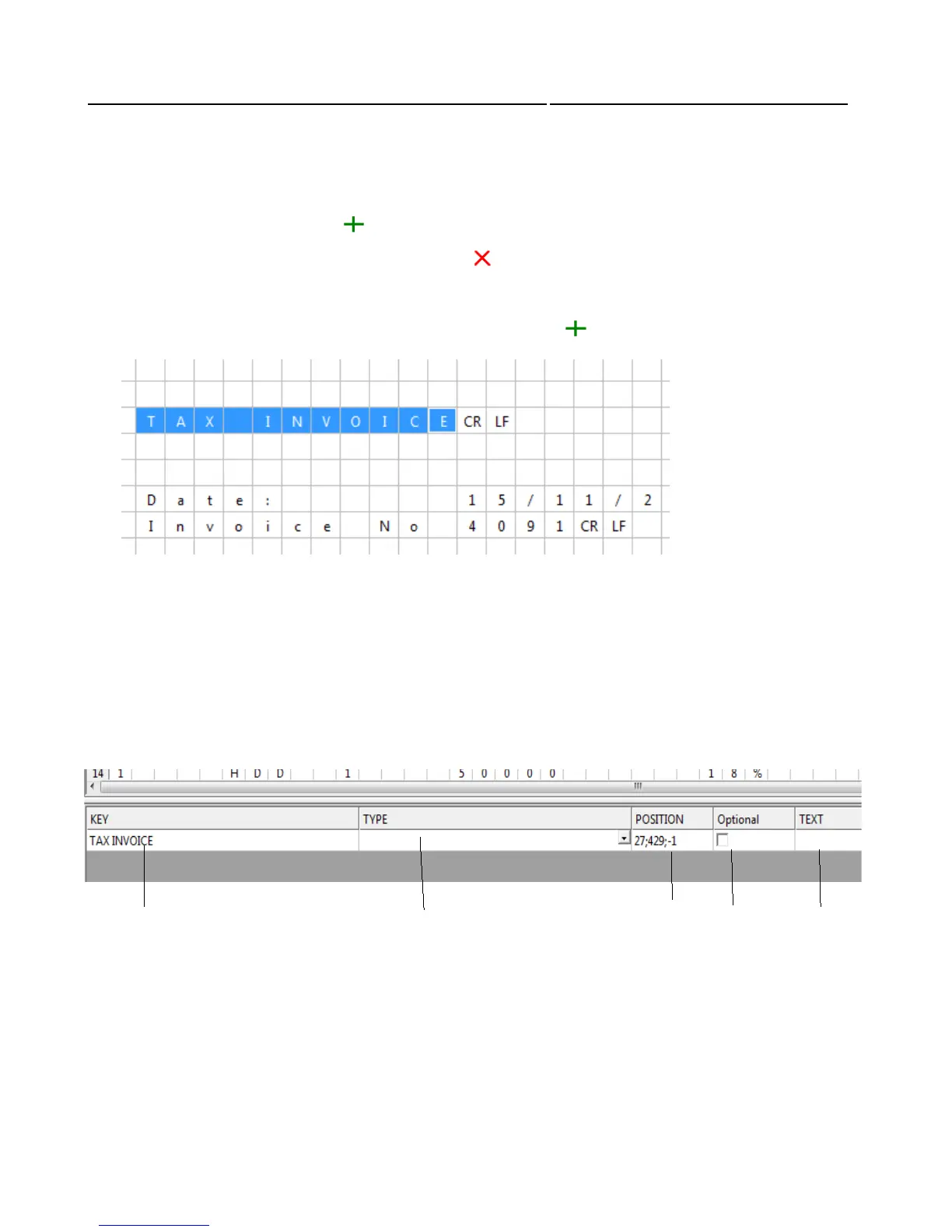
Select the parameter you want to set from the captured document in the grid by highlighting it.
To set the key highlight the word by using the mouse or keyboard
To save your selection press the “ ” button or select “Set Record” from the “Configuration” menu. If
you want to clear your selection press the “ ” button or select “Clear Record” from the
“Configuration” menu. The program displays the text which has to be detected for a valid recognition
of the “INVOICE” parameter (in the “KEY” field). When this KEY word has a value connected to it,
use the “control” button to select both the texts and then press “ ”.
Then select its type from the falling menu in the “TYPE” field.
The name of the 'key' and its position in the document are recorded in the second lattice window.
Caution: Do not select the fields marked with 'CR' and 'LF'.
These are symbols for end of line (DOS convention), and appear in the document, but
should not be used as part of a 'key'.
1. Keyword
2. Key type
3. Key position and value offset
4. Marker for optional keys
5. Key value
1
2
3
4
5



 To Next Page