PPU-S User’s Manual
Page 8 of 20 Copyright 2023 IndeeLift, Inc. All Rights Reserved 08/2023
Mounting-Ramp Seat
The PPU-S mounting-ramp seat (seat mount) includes two modes of operation, locked and unlocked. Locked
mode renders the seat mount rigid and is used when a person is being lifted from the floor or being transferred
to or from another seated position (i.e., wheelchair, commode, bed, etc.). The optional unlocked mode is used
when raising a person from a seated position to fully standing. The seat mount is unlocked in preparation to raise
the user to standing. Unlocked mode allows the seat mount to rotate forward as the user is raised, shifting their
weight onto their legs.
A spring under the seat mount keeps the locking mechanism in a locked position. When the Lock Release Levers
are released by pulling them towards the seat mount, the seat mount mechanism is unlocked, and when the rear
end of the seat mount is pushed downward, the locking system will automatically lock.
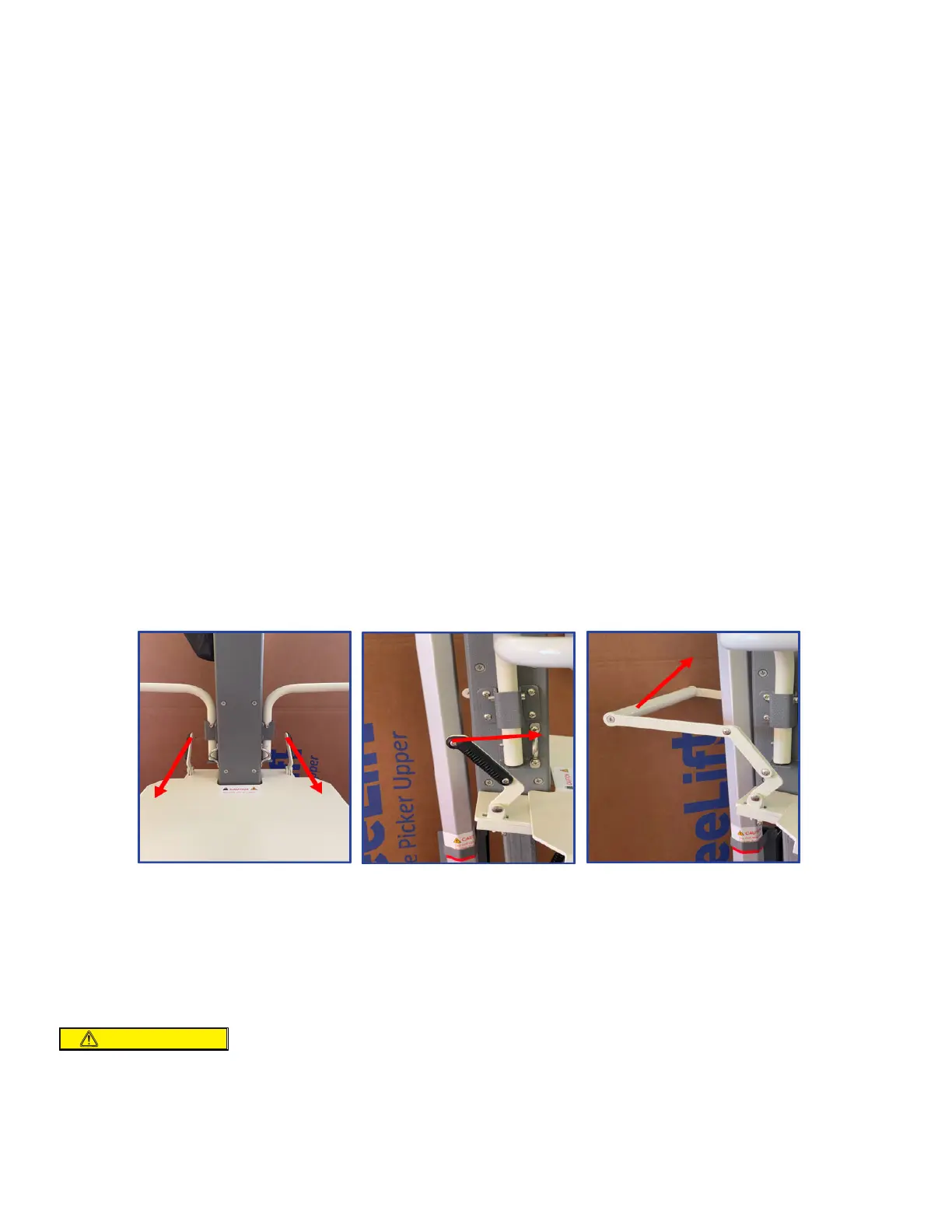
Two Lock Release Levers are located at the rear of the seat mount, one on each side of the main vertical column
(Fig 1). The Lock Release Levers are to be used simultaneously and pulled forward to release the seat for tilting.
For users who are not able to operate the Lock Release Levers with two hands, there is a Lock Release Bar
assembly that can be attached to the locking tabs (Fig 3) that allows the seat mount to be unlocked using only
one hand.
How to lock and unlock the seat mount:
1. Mount Lock Release Levers: The default configuration has two lock release levers, one on the left side and
one on the right side. Both left and right Lock Release Levers must be pushed forward simultaneously to
unlock both sides so that the seat mount can be released and tilt forward upon rising. (Fig 1 & 2)
2. Lock Release Bar: This allows the left and right Locking Levers to function simultaneously. The user pushes
either side of the Lock Release Levers or the Lock Release Bar up and forward to unlock the seat panel. (Fig
3)
3. To re-lock the seat mount platform: Push the rear of the seat mount platform downward.
NOTE: The default seat-lock configuration requires both seat lock levers to be pushed forward
simultaneously to release the seat. This eliminates any possible inadvertent release of the seat tilt
function. Some users may have mobility challenges that will not allow them to reach rearward and push
both levers forward simultaneously. The PPU-S comes with a Lock Release Bar assembly that can be
attached to allow a single hand to lift the Lock Release Bar to disengage the seat lock.
The Seat Locks MUST be engaged to raise a person from the floor or for transfers
on to or off of the PPU-S seat platform!
CAUTION
Fig 1
Fig 2
Fig 3



 To Next Page