PPU-S User’s Manual
Page 9 of 20 Copyright 2023 IndeeLift, Inc. All Rights Reserved 08/2023
Preparing the PPU-S for Use
Unpacking the PPU-S:
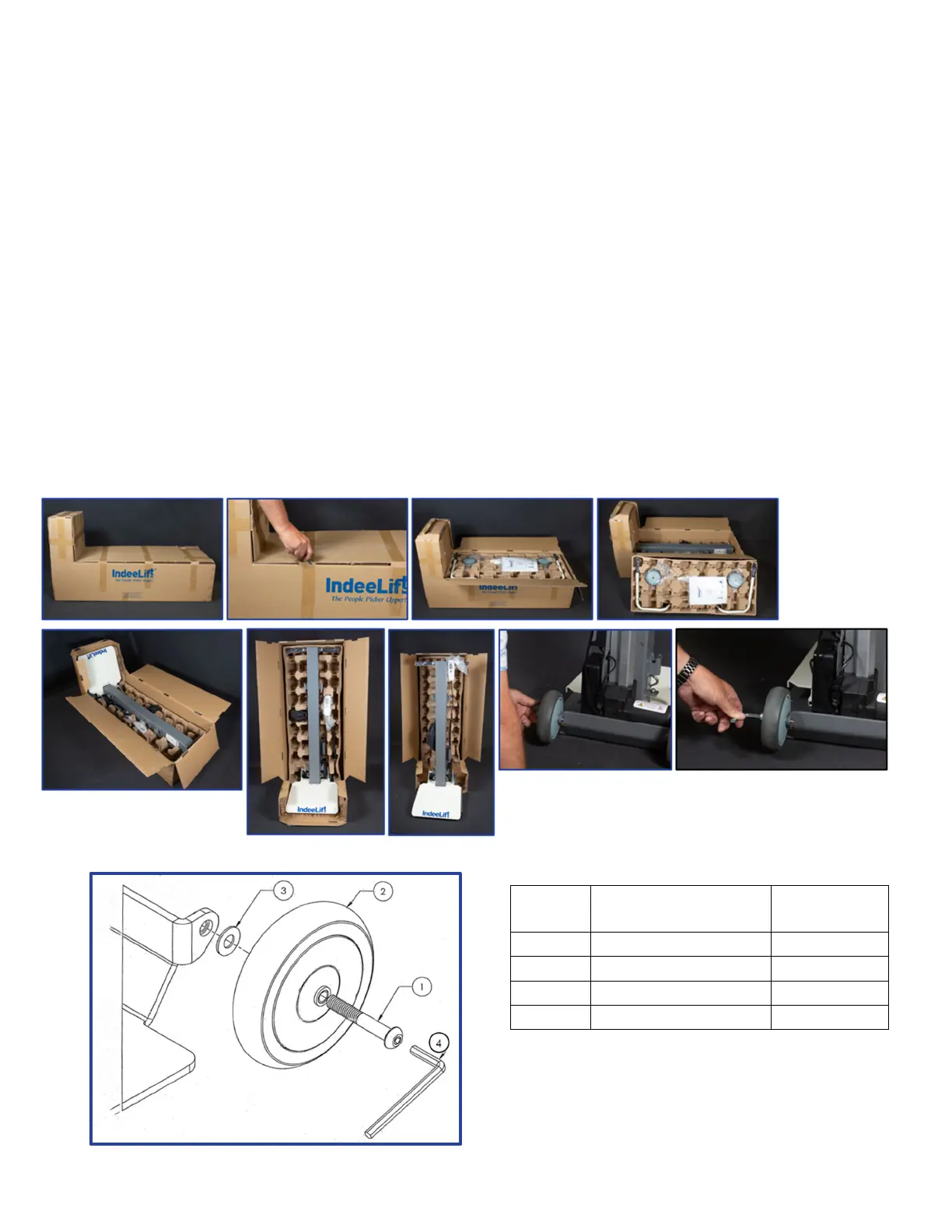
The PPU-S comes packaged for shipment in an L-shaped carton that is sealed with shipping tape. The unit ships
without the wheels attached. Packed inside the shipping carton will be the PPU-S, a corrugated box that holds
the wheels, the rise-assist handles, the seat lock release bar mechanism, and the user manual which is packaged
with both the AC power cord that connects to the battery charger and the wheel components.
Cut or remove the shipping tape on the top edges of the carton and remove the top layer.
Open the top flaps to expose the corrugated box that contains the components shown above.
Remove the corrugated box and the top layer of the box covering the seat mount.
Stand the packing carton upright with the heavy L-shaped end down.
Unfasten the transport handles from the box.
Slide the PPU-S out of the box in its upright position on the floor.
Remove the securement belt bag and the remote control from the box and attach them to the PPU-S.
Attach the wheels by following the illustration below using the wheel components and wrench.
Test the PPU-S by raising and lowering the seat using the wired remote’s up and down buttons.
Properly dispose of the packaging materials.
Wheel Mounting Illustration:
Wheel Parts List:
Item
No.
Description Quantity
1 Screw 3/8-16x2.5 2
2 Caster Wheel 2
3 Washer, Flat, 3/8” 2
4 HEX Key Wrench 1



 To Next Page