iD-S9920-OPT: INSTALLATION & OPERATION MANUAL
PAGE 5
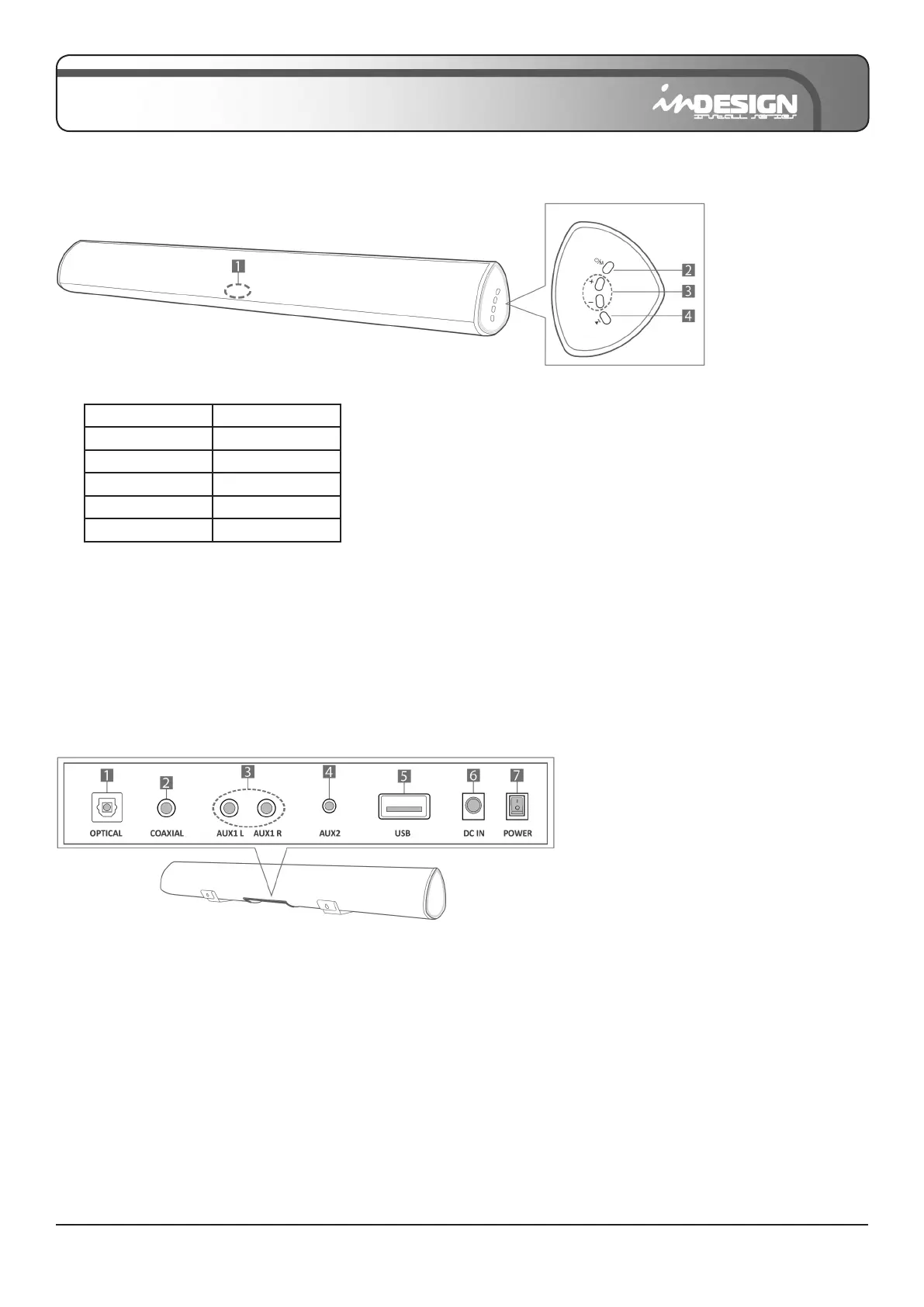
1. LED INDICATOR: Displays current mode using the following colours –
2. POWER / MODE: Turns power on or selects the source input mode. Press and hold for power off.
3. VOL+ / VOL-: Adjusts the volume. When adjusting, the LED indicator will ash until MAX or MIN volume is reached.
4. PLAY/PAUSE: Play or pause audio.
PRODUCT OVERVIEW
Front Panel / Right Side Panel of the Sound Bar
BLUE Bluetooth
WHITE Optical
GREEN Coaxial
LIGHT BLUE AUX1 (R/L)
YELLOW AUX2
PURPLE USB
• When you plug in the power cord, allow 2-4 seconds for the buttons to begin working.
• If you want to enjoy sound only from the Sound Bar, you must turn off your TV’s speakers in the Audio Setup menu of
your TV. Refer to the owner’s manual supplied with your TV.
Bottom Panel of the Sound Bar
1. DIGITAL AUDIO IN (Optical): Connects to the digital (optical) output of an external device.
2. COAXIAL AUDIO IN: Connects to the digital (coaxial) output of an external device.
3. AUX1 (L/R): Connects to the analog output of an external device.
4. AUX2 (3.5mm jack): Connects to the analog output of an external device.
5. USB: Connect a USB device here to play music les from the USB device through the Sound Bar.
6. DC IN (Power supply in): Connects the AC/DC power adapter.
7. POWER: Press to power on/off.
• When disconnecting the power cable of the DC/AC power adapter from a wall outlet, pull the plug.
Do not pull the cable.
• Do not connect this unit or other components to an AC outlet until all connections between
components are completed.


 To Next Page