iD-S9920-OPT: INSTALLATION & OPERATION MANUAL
PAGE 6
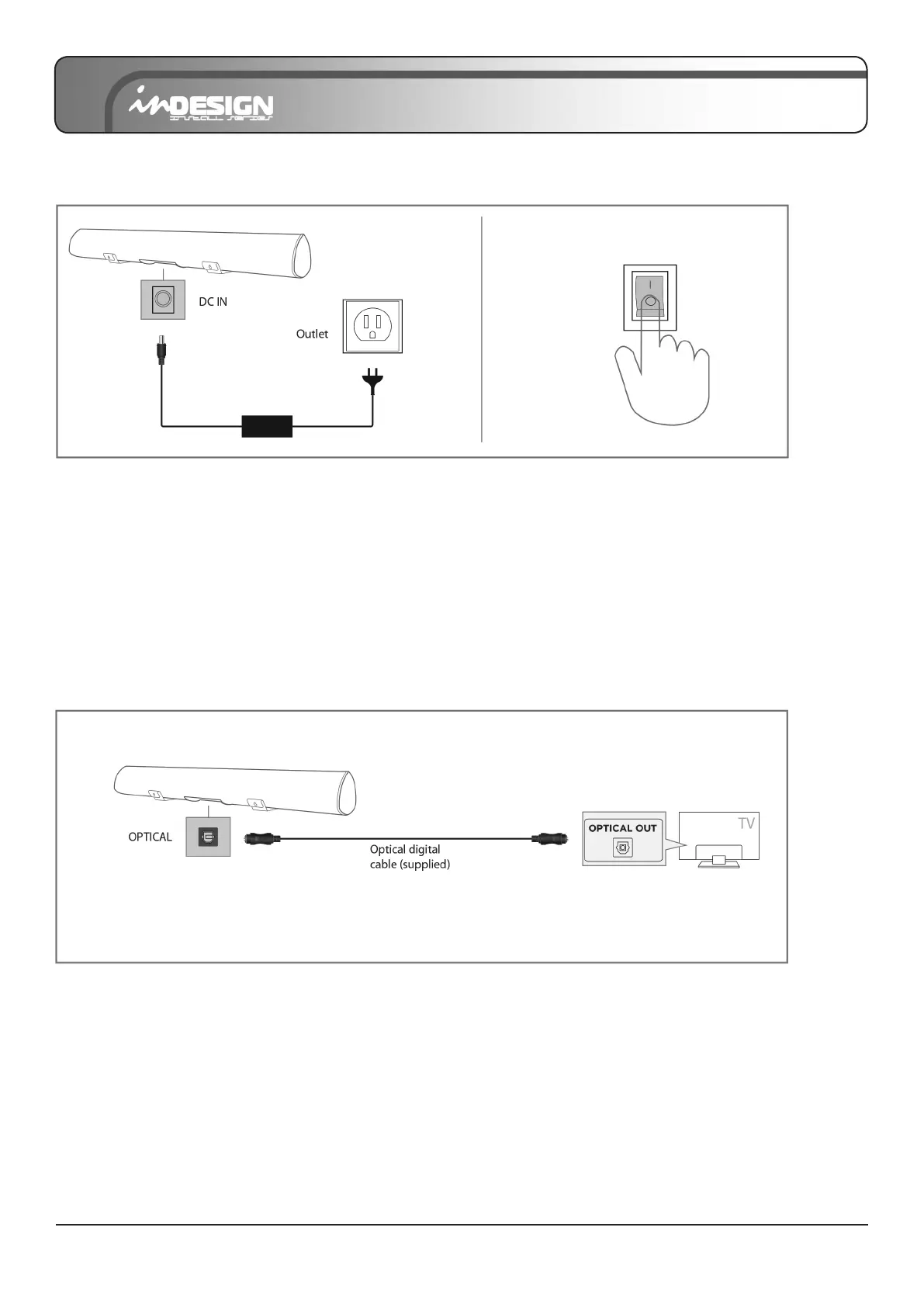
CONNECTING ELECTRICAL POWER
1. Using the power adapter, connect the unit to electrical outlet as shown.
2. Press the “POWER” switch to turn on the Sound Bar (LED indicator should be on).
• Make sure to rest the AC/DC adapter at on a table or the oor. If you place the AC/DC adapter so that it is hanging
with the AC cord input facing upwards, water or other foreign substances could enter the adapter and cause the
adapter to malfunction.
CONNECTING WITH A TV
1. Connect the DIGITAL AUDIO IN (OPTICAL) jack on the Sound Bar to the OPTICAL OUT jack of the TV with the digital
optical cable supplied.
2. Press the “OPT” button on the remote, and the LED indicator will be WHITE.
• You must use the Sound Bar’s remote to turn power on or control the volume under this connection.
• If there is no sound or a cracking noise, set your TV’s audio output to “PCM” (refer to TV’s manual).
* NOTE: Take the caps off on the OPTICAL jack.
Method 1: Connecting with an Optical cable


 To Next Page