iD-S9920-OPT: INSTALLATION & OPERATION MANUAL
PAGE 8
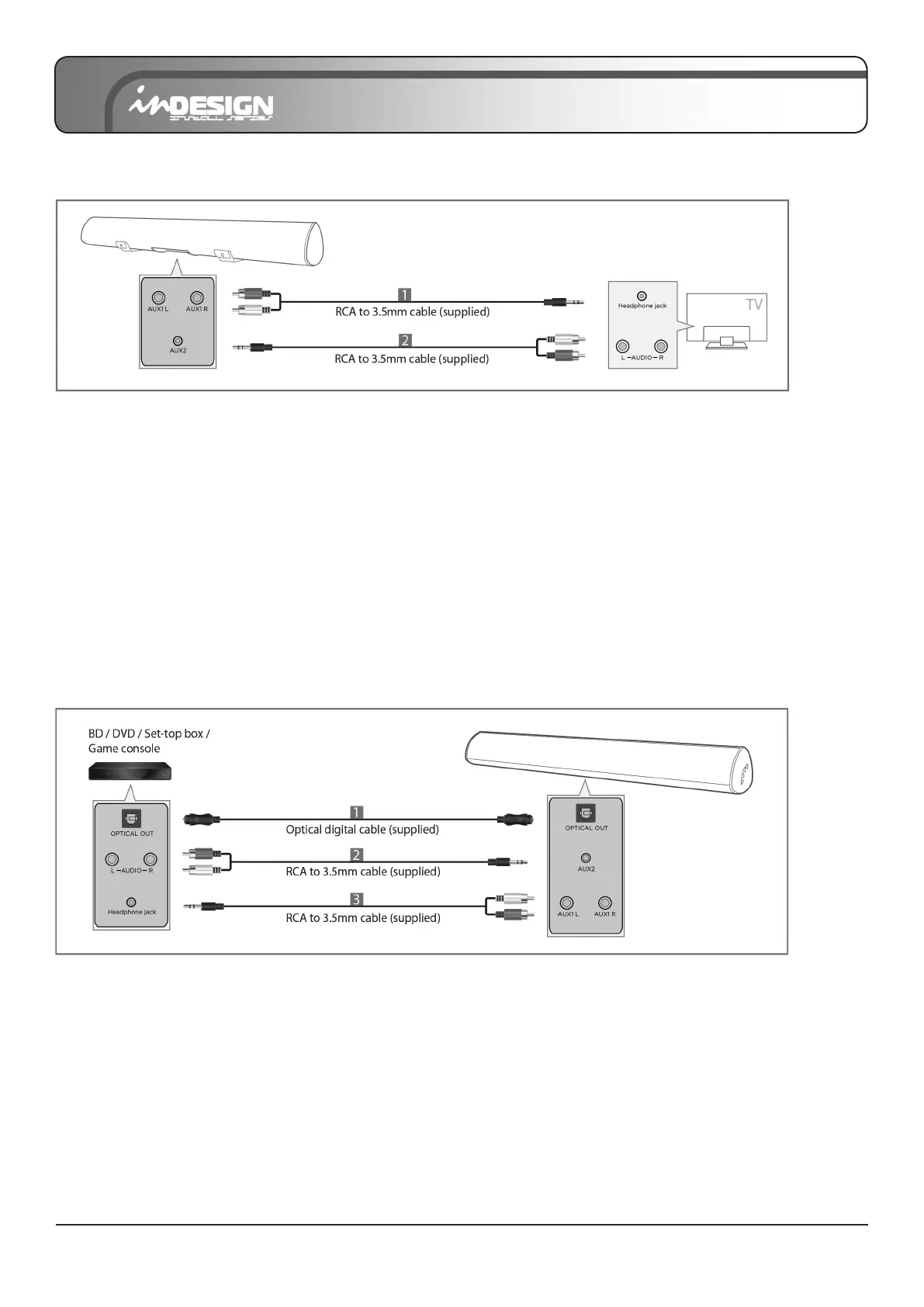
Method 3: Connecting via AUX1/AUX2
[1] Connect AUX1(L/R) on the Sound Bar to the AUDIO OUT (Headphone) jack of the TV using the RCA
to 3.5mm cable.
Press “AUX1” on the remote. LED indicator will be LIGHT BLUE.
[2] Connect AUX2 on the Sound Bar to the AUDIO OUT (L/R) jack of the TV using the RCA
to 3.5mm cable.
Press “AUX2” on the remote. LED indicator will be YELLOW.
• If there is no sound or an echo, set your TV’s audio output to external speaker (Refer to TV’s manual).
• Choose only one connection from above, it depends on your TV’s audio output jack.
CONNECTING AN EXTERNAL DEVICE
An external device can be connected via 1. Optical cable, or 2/3. RCA to 3.5mm cable.
To connect via Optical cable, refer to Page 6.
To connect via RCA to 3.5mm cable, refer to Page 8 (above).


 To Next Page