EasyManua.ls Logo

Infineon IMC300A Series - User Manual

Infineon IMC300A Series
15 pages
Print Icon
To Next Page IconTo Next Page
Loading...
Please read the Important Notice and Warnings at the end of this document V 1.2
page 1 of 15 2021-07-22
AN2021-05
IMC301/302A MCU Getting Started Guide
About this document
Scope and purpose
The IMC300A motor controller series, namely IMC301A and IMC302A product line, contains two distinct cores,
the Motion Control Engine (MCE) for control of a motor and/or power factor correction (PFC) and an additional
microcontroller (MCU) based on an Arm® Cortex® -M0 processor.
This application note is a getting started guide to quickly get up and running with the IMC300A MCU. Detailed
information on the functionality and configuration of the MCE, is beyond the scope of this document and can
be found in the iMOTION™Motion Control Engine Software Reference Manual. For example code and
explanation of example code please refer to document [3].
Intended audience
This document is intended for customers who would like to get started with the IMC300A MCU core.
Table of contents
About this document ....................................................................................................................... 1
Table of contents ............................................................................................................................ 1
1 Brief Overview of MCU ............................................................................................................ 2
2 Getting Started ...................................................................................................................... 3
2.1 Requirements .......................................................................................................................................... 3
2.1.1 Hardware Requirements .................................................................................................................... 3
2.1.2 Software Requirements ..................................................................................................................... 3
2.1.2.1 Arm Keil MDK ................................................................................................................................. 3
2.1.2.2 µVision® IDE ................................................................................................................................... 3
2.1.2.3 Infineon IMC300A DFP ................................................................................................................... 3
2.2 Installing IMC300A DFP onto Keil µVision® IDE ....................................................................................... 4
2.3 Setting up J-LINK/J-TRACE Cortex as debugger .................................................................................... 5
2.4 Building A Project and Downloading to Flash Memory ......................................................................... 9
3 Troubleshooting FAQ ............................................................................................................. 12
4 Reference ............................................................................................................................. 13
Revision history............................................................................................................................. 14
Question and Answer IconNeed help?

Do you have a question about the Infineon IMC300A Series and is the answer not in the manual?

Summary

About this document

Scope and purpose

Defines the purpose and scope of the application note, covering the IMC300A motor controller series.

Intended audience

Specifies the target users for this guide, focusing on customers new to the IMC300A MCU core.

Brief Overview of MCU

Getting Started

Requirements

Lists the necessary hardware and software prerequisites for evaluating the IMC300A product line.

Installing IMC300 A DFP onto Keil µVision IDE

Step-by-step guide on how to install the Infineon IMC300A Device Firmware Pack into the Keil µVision IDE.

Setting up J-LINK;J-TRACE Cortex as debugger

Instructions for configuring the J-LINK/J-TRACE debugger with the Keil µVision IDE for the IMC300A MCU.

Building A Project and Downloading to Flash Memory

Details on how to compile a project and load the resulting object file onto the IMC300A MCU's flash memory.

Troubleshooting FAQ

Reference

Revision history

Overview

The IMC301/302A MCU is a highly integrated motor controller series designed for variable speed drives. It combines a Motion Control Engine (MCE) for motor and/or power factor correction (PFC) with an additional microcontroller (MCU) based on an Arm® Cortex®-M0 processor. This dual-core architecture allows for efficient motor control and the implementation of complex system functionalities.

Function Description:

The device's primary function is to control variable speed drives. The MCE handles the core motor control and PFC tasks, ensuring efficient and precise operation. This includes motor control algorithms, PFC control, protection features, scripting capabilities, and safety functions. The integrated Arm® Cortex®-M0 MCU provides additional processing power for system-level tasks, offloading the MCE and enabling more sophisticated applications. This MCU is equipped with Flash memory, SRAM, and a comprehensive set of peripheral modules, making it suitable for implementing complex system functionality beyond basic motor control.

Important Technical Specifications:

  • Processor Cores:
    • Motion Control Engine (MCE) for motor control and PFC.
    • Arm® Cortex®-M0 processor for general-purpose microcontroller tasks.
  • Memory:
    • Flash memory for program storage.
    • SRAM for data storage.
  • Clock Speed (IMC300A_0128): 48 MHz.
  • RAM (IMC300A_0128): 15 kB.
  • ROM (IMC300A_0128): 128 kB.
  • Peripherals: A comprehensive set of peripheral modules is integrated, as indicated by the Device Firmware Pack (DFP) which contains low-level API library code for these modules. These likely include UART, GPIO, analog inputs, and potentially others for sensor interfacing, actuator control, and communication.
  • Application Block Diagram Components:
    • Power Factor Correction (PFC) Boost/Totem Pole: Handles PFC functions.
    • Power Supply: Provides necessary power to the system.
    • Gate Driver: Controls the power stage.
    • Power Stage: The main power electronics for motor drive.
    • Arm® Cortex®-M0 (MCU) Functions: MCE supervision, sensor interfacing, actuator control, communication, and additional safety features.
    • iMOTION™ MCE Functions: Motor control, PFC control, protection, scripting, and safety.
    • Interfaces: UART, Status LED, Temperature Sense, GPIO, Analog inputs, and optional Hall sensor input for motor feedback.

Usage Features:

  • Getting Started Guide: The document serves as a comprehensive guide for quickly setting up and running the IMC300A MCU.
  • Development Environment: Utilizes Keil® MDK (Microcontroller Development Kit), which is a complete software development solution for Arm®-based microcontrollers. This includes µVision® IDE for project management, run-time environment, build facilities, source code editing, and program debugging.
  • Device Firmware Pack (DFP): The Infineon IMC300A DFP provides low-level API library code for the device's peripherals, simplifying software development. It can be installed via Keil's Pack Installer.
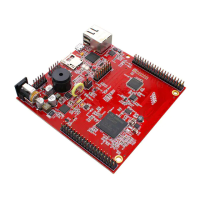
  • Hardware Compatibility: Recommended for use with iMOTION™ Link (isolated debug probe) and MADK (Modular Application Design Kit) control boards such as EVAL-M1-301F/EVAL-M3-302F, along with compatible MADK Power Boards.
  • Debugging: Supports J-LINK/J-TRACE Cortex debuggers. The setup process involves configuring the debugger in µVision® IDE, including selecting the correct debug interface (SWD), scanning for the device, and configuring flash download settings.
  • Project Management: µVision® IDE allows for opening existing projects, building source code into object files, and downloading these files to the MCU's flash memory.
  • Example Code: Users can start with provided use case example codes, which can be found on the Infineon website.
  • Documentation: Detailed information on MCE functionality and configuration is available in the iMOTION™ Motion Control Engine Software Reference Manual. Further details on the MCU's complex system functionality and peripheral use cases are covered in the iMOTION™ IMC300A Hardware Reference Manual and AN2020-10 IMC300A Peripheral Use Case Examples.

Maintenance Features:

  • Software Updates: The DFP can be updated, and new versions of Keil MDK and µVision® IDE are available for download, ensuring access to the latest features and bug fixes.
  • Troubleshooting: The guide includes a FAQ section to address common issues, such as difficulties in finding the iMOTION Link during scanning or "No J-Link found" errors during firmware loading. These issues are typically resolved by ensuring the correct debug port (SW) is selected and debugger settings are properly configured.
  • Reference Materials: A list of reference documents is provided, including code examples, software reference manuals, and hardware reference manuals, which are crucial for in-depth understanding and maintenance.

Infineon IMC300A Series Specifications

General IconGeneral
BrandInfineon
ModelIMC300A Series
CategoryController
LanguageEnglish

Related product manuals