NAME AND FUNCTION OF EACH COMPONENT
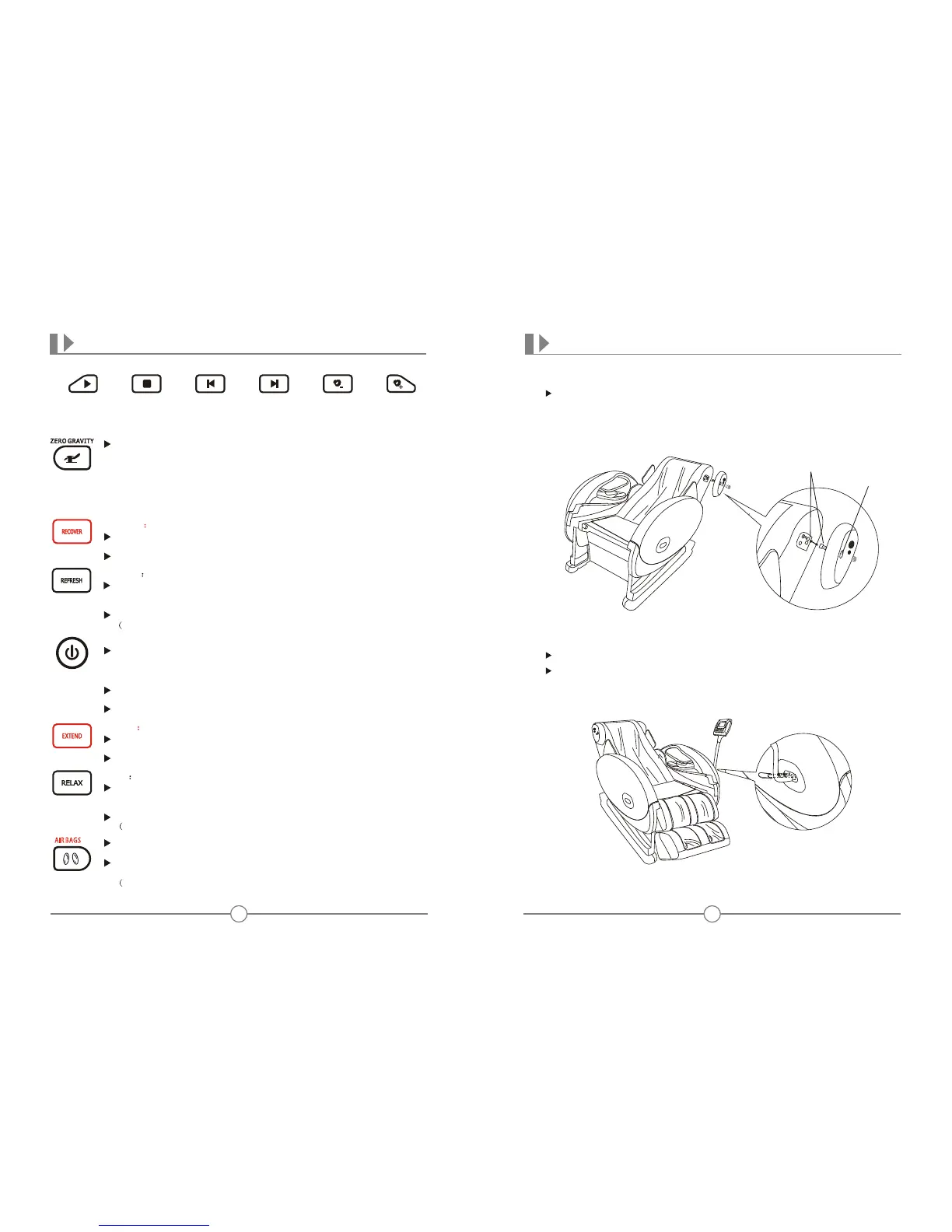
Pause/Play Stop Previous Next Volume- Volume+
Note: press Previous once to return to the beginning of the present episode,
continuously press this button twice to return to previous episode.
When this icon is constant on, Zero Gravity starts. Zero Gravity
includes weak and strong status, which cater for dierent
people needs. When you feel the massage force is weak and
need stronger massage, please press Zero Gravity button again
for strong status. When it reaches strong zero gravity, press
this button again to cancel zero gravity. The chair returns to
original position when it is in regular massage mode and the
Zero Gravity icon is o.
Recover Recover auto function on
When this icon is o, press this button to start the whole auto
program, which is mainly for strong massage on big scope.
When the icon is constant on, the chair is in Recover mode.
When this icon is ashing, all massage functions are not available.
Press this button to start massage, and then all massage function
buttons are ashing for choice. Press anyone of these to start
massage, whose defaulted time is 20mins.
When this icon is constant on, press this button to end all
massage functions, the chair goes back to its original position.
When this icon is o, all buttons on the controller are not available.
Power button : Massage chair on/o
Relax Relax auto function on
When this icon is o, press this button to start the whole auto
program, which is mainly for moderate strength massage on
whole body.
When the icon is constant on, the chair is in Relax mode.
Remark: This program has air pressure massage of pillow.)
When this icon is o, and massage function is already on, press
this button to start airbags massage mode.
When this icon is constant on, press this button to end airbags
massage.
Remark: In automatic program, the airbags and roller is linked.)
Refresh Refresh auto function on
When this icon is o, press this button to start the whole auto
program, which is mainly for moderate strength massage
on big scope.
When the icon is constant on, the chair is in Refresh mode.
Remark: This program has stretch massage.)
6
15
PREPARATION BEFORE USING
Step 4 Installation of the speaker
Open the screw cap cover on the speaker; insert the line from upper
side of backrest to the line from the speaker, then aim the speaker to
the hole on upper side of the backrest, and fasten them by screws.
(It is the same installation method for the other side)
Connecting line
Screw cap cover
Step 5 Installation of controller holder
Take o the small cover on the left armrest
Aim the installation hole of the controller holder to the hole on
armrest, and then fasten them together by screws, lastly place the
small cover.
Extend Extend auto function on
When this icon is o, press this button to start the whole auto
program, which is mainly for weak massage on big scope.
When the icon is constant on, the chair is in Extend mode.
AIR BAGS











 To Next Page