6.Charging Battery
Tube series have double power supply system – built-in rechargeable lithium ion battery
pack and a replaceable 18500 battery, the
whole system supports standard working
time: 15 hours. Please ensure the battery is
fully charged before first time using.
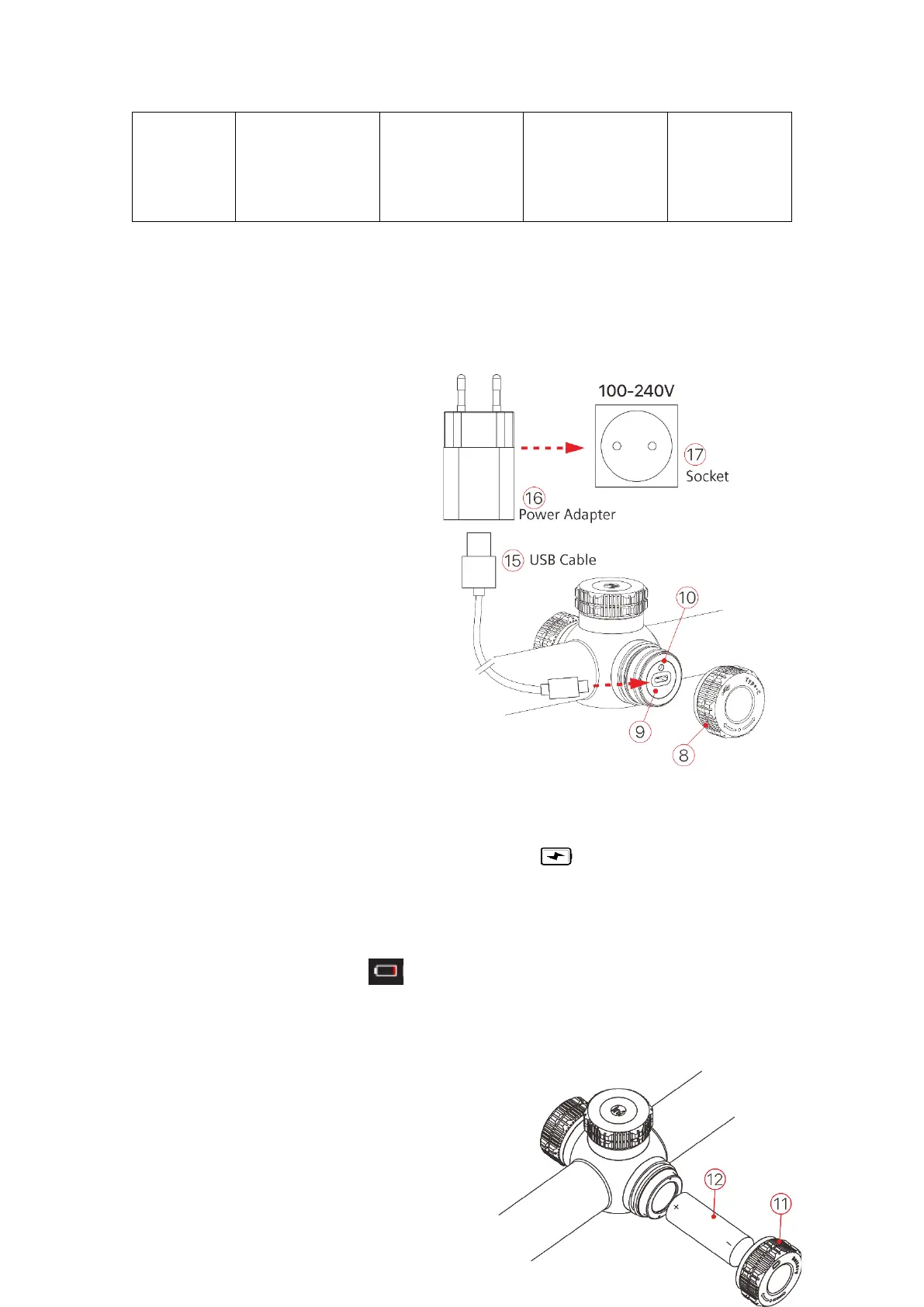
Charging Built-in Battery Pack
⚫ Rotate USB lid anti-clockwise to
open it;
⚫ Plugin the Type-C cable to Type-C
port on Tube;
⚫ Connect power adapter with
another port of Type-C cable. Plugin the power adapter to socket with 100-240V for
charging;
⚫ When charging, there will be an icon in flash shape appears in the icon of battery.
Meanwhile the LED on device turns into red; when LED changed to green, indicates
battery fully charged.
⚫ While the icon turns into , means low battery, please charge on time, to avoid
battery over discharge, resulting in device aging.
Tips: Only the built-in battery pack been charged while charging via USB port.
Installing 18500 battery
⚫ Rotate Extend battery lid (11)



 To Next Page