
 Need help?
Do you have a question about the InfiRay ZOOM ZL38 and is the answer not in the manual?
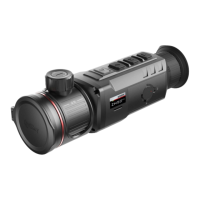
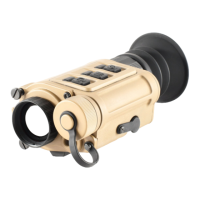
Lists and identifies the physical parts and controls of the thermal camera.
Provides a step-by-step guide for powering on, focusing, and initial configuration.
Details the short and long press functions for Power, Up, M, and Down buttons in various states.
Explains how to connect and charge the battery pack using the charger and power adapter.
Describes the procedure for correctly installing and locking the battery pack into the device.
The InfiRay ZOOM Thermal Imaging Camera, available in ZL38, ZH38, and ZH50 models, is a sophisticated device designed for thermal observation and imaging. This quick start guide provides essential information for getting started with the camera, from unboxing and initial setup to basic operation and maintenance. The device is accompanied by the InfiRay Outdoor APP, which enhances its functionality by enabling image transmission via Wi-Fi to smartphones or tablets, allowing for remote viewing and control.
The InfiRay ZOOM Thermal Imaging Camera serves as a portable thermal observation tool, capable of detecting heat signatures and converting them into visible images. Its primary function is to provide clear thermal imagery in various environments, including low-light or no-light conditions, fog, smoke, and through light foliage, where traditional optical devices might struggle. The camera is designed for a wide range of applications, from outdoor recreational activities like hunting and wildlife observation to professional uses such as security, search and rescue, and industrial inspection. The ZOOM series offers different models (ZL38, ZH38, ZH50), each likely optimized for specific performance characteristics, such as detection range, field of view, and image resolution, to cater to diverse user needs. The device captures both still photos and video recordings, allowing users to document their observations. It also incorporates advanced imaging features like digital zoom and various image modes to optimize visual clarity and detail.
The InfiRay ZOOM camera is designed for user-friendly operation, with a focus on quick setup and intuitive controls. To begin, users simply remove the lens cap and power on the device by pressing and holding the Power button. Achieving a clear image involves two key adjustments: rotating the diopter ring of the objective lens to ensure the image is sharp in the eyepiece, and then rotating the focusing ring of the objective lens to bring the observed object into sharp focus. This two-step focusing process ensures optimal image clarity for individual users and varying distances to targets.
The device features a shortcut menu, accessible via the Menu (M) button, which allows for quick configuration of essential image parameters. Users can adjust the image mode (e.g., different color palettes), display brightness, image sharpness, and image contrast to achieve the best possible visual effect for their specific viewing conditions and preferences. This customization is crucial for adapting the camera's output to different scenarios and maximizing target recognition.
The control interface consists of several buttons: Power (P), Menu (M), Up, and Down. Each button supports both short press and long press actions, providing a versatile range of functions. For instance, a short press of the Power button can put the device into standby mode or wake it up, while a long press turns it on or off. The Up and Down buttons are used for navigation within menus and for specific quick functions like digital zoom or activating/deactivating the Picture-in-Picture (PIP) function (Up button) and starting/stopping video recording (Down button). The Menu (M) button allows access to the main menu and shortcut menu, enabling users to switch and confirm parameters, or save and return to the home screen.
Advanced features include a stadiametric rangefinder, which can be toggled on/off by pressing the Up and M buttons simultaneously, aiding in estimating distances to objects. Hotspot tracking, activated by pressing the Down and M buttons, helps identify and follow the hottest point in the field of view, which is particularly useful for locating targets.
The device is powered by a removable IBP-1 battery pack. The battery pack installation is straightforward: pull out the ring-pull, align the pins with the device's groove, insert the pack, and then rotate the ring-pull counter-clockwise to lock it. The ring-pull's position (vertical when locked, pointing to 'CLOSE' when fully installed) provides a clear visual indicator of secure installation.
For charging, the battery pack is inserted into an IBC-1 battery charger. The charger connects to a power adapter via a Type-C data cable. An LED indicator on the charger provides status updates: continuously green for a full battery, continuously red for charging, and blinking red when no battery is present. This clear feedback ensures users are always aware of their battery's charge status.
The InfiRay Outdoor APP significantly extends the camera's capabilities. By downloading the app from Google Play or the App Store, users can connect their ZOOM camera via Wi-Fi to a smartphone or tablet. This allows for real-time image transmission, enabling remote viewing, recording, and potentially control of the camera from a mobile device. This feature is invaluable for collaborative viewing, discreet observation, or when the camera needs to be positioned in a hard-to-reach location.
Maintaining the InfiRay ZOOM camera ensures its longevity and optimal performance. The package includes a lens cleaning cloth, which is essential for keeping the objective lens and eyepiece free from dust, smudges, and debris. Regular cleaning of optical surfaces is crucial for maintaining clear image quality.
The device's design, with a removable battery pack, facilitates easy battery management. Users can carry spare battery packs (two IBP-1 packs are included) for extended operation in the field, ensuring continuous use without needing to recharge the camera itself. The external battery charger allows for convenient charging of battery packs independently of the camera, minimizing downtime.
The quick start guide emphasizes the importance of reading the full operating manual, which can be downloaded from the official InfiRay Outdoor website. This detailed manual would contain comprehensive information on troubleshooting, advanced settings, and specific care instructions, ensuring users can address any issues and perform proper maintenance. The device is built to withstand various environmental conditions, as indicated by its operating temperature range, but proper storage and handling are always recommended to protect sensitive electronic components and optics. The inclusion of a portable bag in the package suggests that the device is designed for safe transport and protection from physical damage when not in use.
 General
| Frame Rate | 50Hz |
|---|---|
| Field of View | 12°×9° |
| Lens | 38mm |
| Battery Life | 6 hours |
| Display | OLED, 1024×768 |
| Resolution | 384x288 |
| NETD | <40mK |
| Objective Lens | 38mm |
| Thermal Sensitivity | <40mK |
| Spectral Range | 8-14μm |
| Digital Zoom | 1-4x |
| Operating Temperature | -20°C to +50°C |




 To Next Page