
 Need help?
Do you have a question about the InfiRay P2 Pro and is the answer not in the manual?
Guides users on connecting the P2 Pro device to their smartphone via OTG.
Explains temperature measurement modes like simple, professional, and advanced settings.
Advises against use in humid environments or exposure to water to prevent electrical issues.
Warns against pointing the lens at the sun or high heat sources to prevent damage.
Prohibits unauthorized disassembly and warns about damage to lens and connector.
Addresses issues with P2 Pro not responding after plugging into the phone.
Confirms P2 Pro is safe and does not emit harmful radiation.
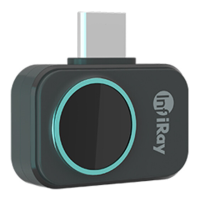
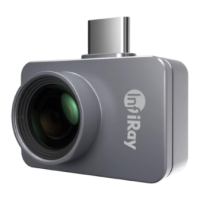
The InfiRay P2 Pro is an ultra-small professional thermal camera designed for a wide range of applications, from personal use to industrial and engineering tasks. Its core functionality revolves around accurate temperature measurement and thermal imaging, made possible by a 12µm high-performance infrared detector and a self-developed ASIC chip. The device is characterized by its compact size, light weight, low power consumption, and high performance, offering a plug-and-play experience when connected directly to a cellphone.
The primary function of the P2 Pro is to provide thermal imaging and temperature measurement. It operates by detecting infrared radiation in the 8-14µm wavelength range, allowing users to visualize heat distribution and measure temperatures of objects. The device offers two main temperature measurement modes: Simple Mode and Professional Mode.
In Simple Mode, the app's home page displays the infrared image in the middle, with upper and lower function areas. The upper area includes "Settings," "Dual-Spectrum Switch," and "Image Correction," while the lower area features "Gallery," "Photo," "Video," and "Palette." This mode is designed for straightforward use, allowing users to view infrared images, take photos, record videos, access the gallery, and change color palettes. When "Temperature Display" is enabled in Simple Mode, a cross icon appears in the center of the screen, showing the highest, lowest, and center point temperatures in real time.
The Professional Mode expands on the measurement capabilities by supporting temperature measurement using three points, three lines, and three frames. For lines and frames, the highest, lowest, and average temperatures within the selected area are displayed. Point-based temperature measurement allows users to add or drag measurement points for precise readings. The isotherm scale, available for palettes other than white-hot or black-hot, highlights specific temperature zones, displaying them in the chosen palette while other areas remain white-hot. This mode also includes a hover button on the right side of the interface, which, when tapped, provides access to temperature measurement and screen adjustment/optimization interfaces.
The P2 Pro also features a Dual-Spectrum function, which enables a small window in the image display area to simultaneously show the image captured by the phone's visible light camera. This small window can be dragged, and users can switch between the front and rear cameras of the phone by tapping a reversal icon.
To use the P2 Pro, it must be connected to an Android phone and operated via a dedicated app. The setup process involves downloading the app by scanning a QR code and establishing a connection. Users must ensure all required permissions (storage, camera, audio recording, phone call) are enabled for the app to function correctly. Additionally, the phone's OTG (On-The-Go) function must be turned on for the device to be recognized. Once connected, the phone will prompt for permission for the P2 Pro to access the USB Camera, which should be granted.
The Settings menu offers extensive customization. "Professional Thermometry" can be toggled to activate the advanced measurement mode. "Advanced Image Setting" includes "Image Optimize" to improve image quality, "Automatic Shutter Switch" for automatic image correction (recommended for daily use, but can be turned off for long-term camera needs), and "Continuous Image Capture," which allows for continuous photo taking with adjustable intervals when the photo button is held down.
"Temperature Setting" allows users to select the temperature unit (°C, °F, or K) and set "Temperature Alarms." High and low temperature thresholds can be defined, triggering an alarm when temperatures exceed or fall below these limits. A "Burn Protection" feature is also included, which closes the shutter plate and displays a warning if the infrared image temperature measurement exceeds a specified threshold for too long, advising users not to aim at high-temperature objects for extended periods. The "General" settings allow users to select the app's language.
The "Help" interface provides access to "About Us," "User Agreement," "Help Document," "Feedback," and "Version Information."
Environmental Variable Correction is a crucial feature for accurate temperature measurement. Users can adjust parameters in a default mode or create custom modes. This function allows for "Emissivity correction," offering preset surface emissivities for eight common objects and the option to customize object surfaces. The allowed emissivity range is 0.01 to 1.00. "Distance correction" adjusts temperature measurements based on the input distance to the measured object, with an allowed range of 0.25m to 5m (for distances greater than 5m, 5m should be selected, though accuracy may not be guaranteed). "Ambient temperature correction" accounts for the ambient temperature of the device's environment.
The device supports Photo Taking and Video Recording. Tapping "Photo Taking" captures the infrared image, visible light image (if dual-spectrum is enabled), and temperature measurement elements (if enabled), saving them to the Album. Continuous photo taking is supported. Tapping "Video" records infrared images and sounds, also saving them to the Album, and allows for photo taking during video recording.
The Photo Album allows users to share or delete photos and videos. For pure infrared images, an "Edit" function is available, enabling users to collect temperature measurement data (points, lines, surfaces), delete these elements, and use the isotherm scale. Edited content can be saved, either overwriting the original image or creating a new one. A "Report Output" function allows users to generate editable analysis reports.
The manual emphasizes several precautions to ensure the longevity and proper functioning of the P2 Pro:
For troubleshooting, if the P2 Pro does not respond after being plugged into the phone, users are advised to check:
In cases of blurry screens or inaccurate temperature measurements, users are advised to tap the shutter icon in the upper right corner to refresh the infrared imaging effect, which helps produce clearer images and more accurate temperatures. The device may also automatically activate the shutter under preset system conditions to improve image quality.
The manual also clarifies that the P2 Pro does not pose a radiological hazard as it only collects heat information and does not actively emit hazardous radiation. It also explains that temperature readings may be lower at a distance due to infrared radiation attenuation through the atmosphere, and for accurate data, distance correction should be applied.
 General
| Resolution | 256x192 |
|---|---|
| Frame Rate | 25 Hz |
| Pixel Size | 12μm |
| Accuracy | ±2°C or ±2% |
| Focus Mode | Fixed |
| Interface | USB Type-C |
| Focus | Fixed |
| NETD | <40mK |
| Temperature Range | -20°C to 550°C |
| Spectral Range | 8-14μm |
| Display | Via connected device |
| Battery Life | N/A (USB powered) |
| Operating Temperature | -10°C to 50°C |
| Storage Temperature | -20°C to 60°C |





 To Next Page