24
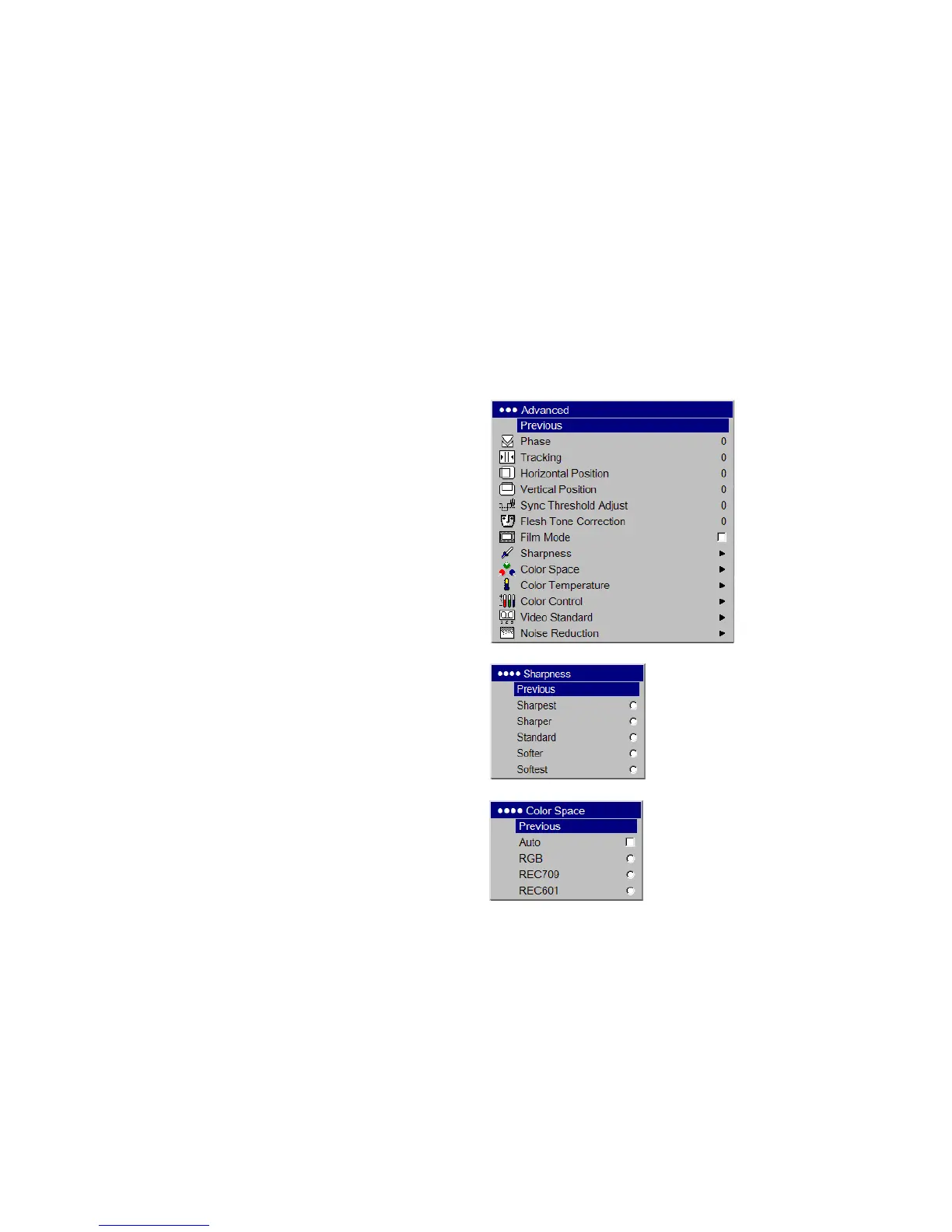
Advanced menu
Remember that not all options in the menus are available for all sources/
signals.
Phase: adjusts the horizontal phase of a computer source.
Tr ac k i n g : adjusts the vertical scan of a computer source.
Horizontal/Vertical Position: adjusts the position of a computer source.
Sync Threshold Adjust: (progressive signals only) If a hardware device,
such as a DVD player, is not syncing properly with the projector, adjust this
option to help it to sync when connected to the projector.
Flesh Tone Correction: this modifies colors to make the skin complexion
better.
Film Mode: controls deinterlacing and is On by default. When checked, it
assumes the incoming signal is film material and optimizes the image
accordingly.
Sharpness: (video sources only) changes the clarity of the edges of a video
image. Select a sharpness setting.
Color Space: This option applies to computer and component video
sources. It allows you to select a color space that has been specifically tuned
for the input signal. When Auto is selected, the projector automatically
determines the standard. To choose a different setting, turn off Auto, then
choose RGB for computer sources, choose either REC709 or REC601 for
component video sources.
Advanced menu
Sharpness
Color Space



 To Next Page