24 25
Testing Procedure
Caution
1. If the test result is out of the test range, the Hi/Lo message will be shown on the
LCD. (refer to p34)
2. Safely discard used test strip and lancet, to a proper place, according to the local
regulation.
Step 3
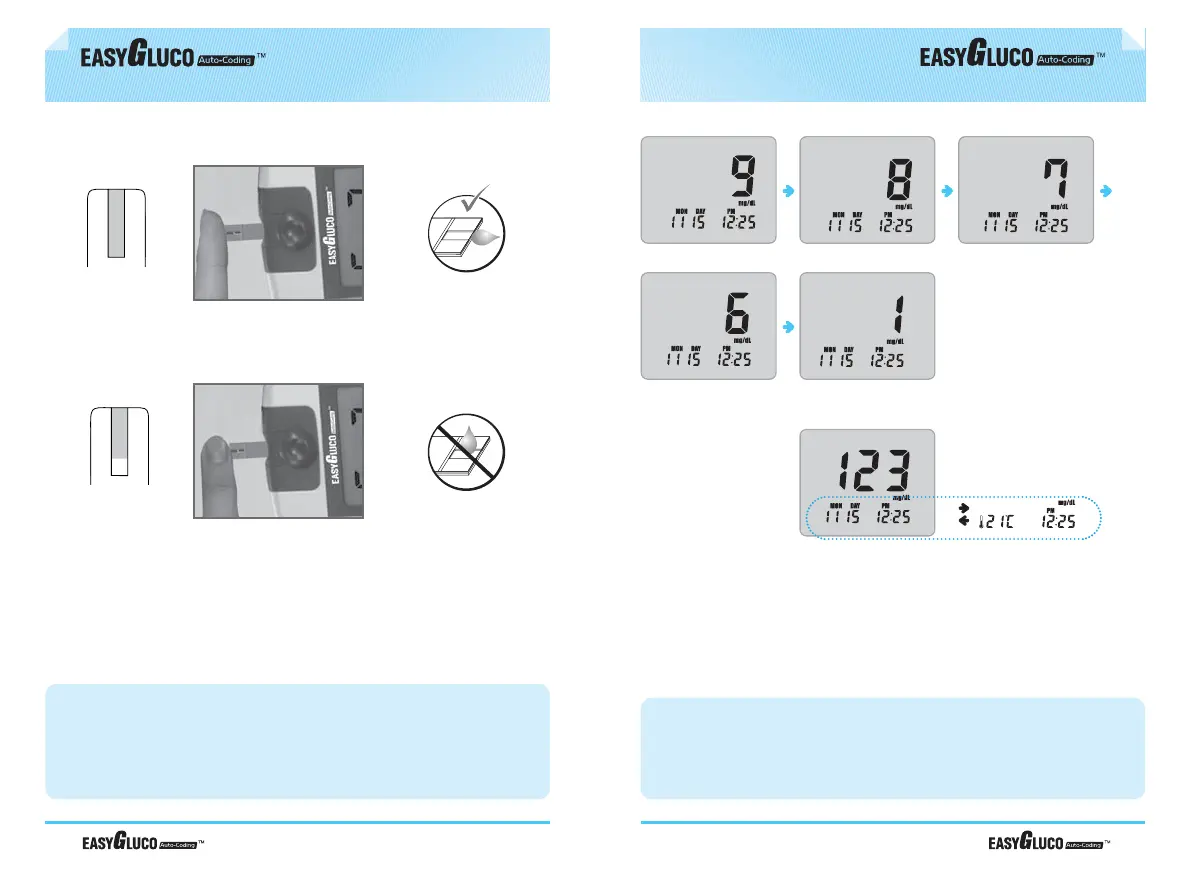
After the beeping sound, the test will begin automatically and your results will
appear in 9 seconds. It should begin counting down from 9 to 1 second on the
LCD display window. The LCD window will display the result of your blood
glucose level, temperature and time.
Record the result value in your logbook. When test strip is removed, the meter
turns off automatically.
⇣
Testing Procedure
Caution
1. If the countdown does not start, do not add more blood to the test strip! Discard
the test strip an restart testing.
2. If you do not conduct the test within 3 minutes, the meter will automatically power
off to save battery life. In this case the test procedure should start again from the
beginning.
Step 2
Place your fingertip to the top edge of EASYGLUCO Auto-coding
TM
Test Strip.
The blood on your finger will automatically draw into the applying channel of the
test strip. Allow your finger to remain until you hear a “beep” sound from the
EASYGLUCO Auto-coding
TM
Meter. A sample volume of 1.5µl is required.
Correct : Completely filled
completely
filled
correct
Incorrect : Poorly filled
poorly filled
incorrect



 To Next Page