4 5
Introduction Quick Reference
Dear EASYGLUCO Auto-coding
TM
System Owner
Thank you for choosing the EASYGLUCO Auto-coding
TM
Blood Glucose
Monitoring System. This booklet has important information you must know
about the EASYGLUCO Auto-coding
TM
system. Please read it carefully.
We understand that self-testing of blood glucose level provides a way to control
your diabetes and may give you peace of mind by testing regularly. As a result
EASYGLUCO Auto-coding
TM
was developed to provide you with a FAST and
Accurate reading with a convenient and simple process. Our goal at
EASYGLUCO Auto-coding
TM
is to provide the best quality healthcare products
coupled with superior customer service. Always consult with your healthcare
professional before making any changes to your diabetes management. The
EASYGLUCO Auto-coding
TM
System is for in vitro diagnostic use only.
A warranty registration card is included with your system. Please complete the
three year warranty card and send it to us. This will ensure that you receive any
new information about your EASYGLUCO Auto-coding
TM
System. If you have
any questions, please contact your local representative.
1
1
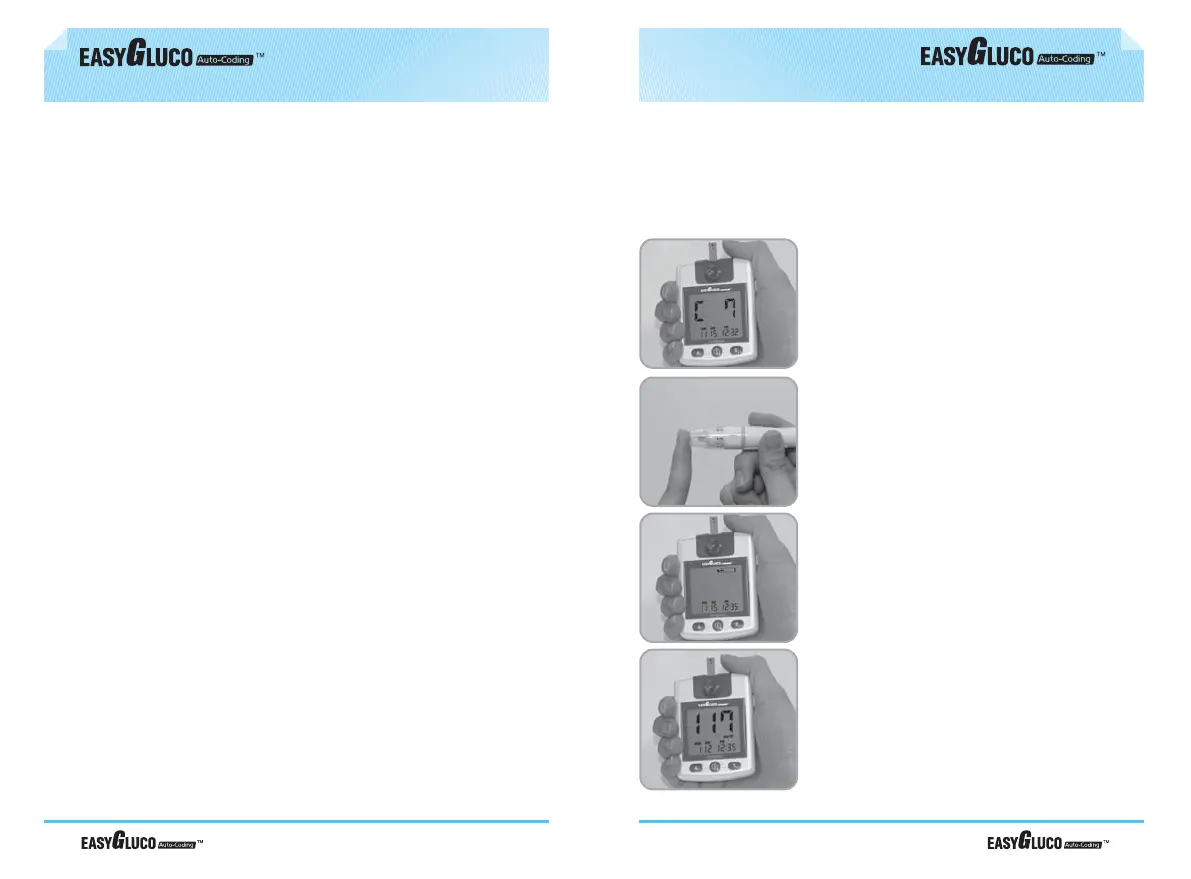
Insert the EASYGLUCO Auto-coding
TM
test strip. Code number is automatically
displayed. Compare with code number
printed on test strip vial. If not identical
discard the test strip and restart.
Collect blood sample
This is intended only for quick reference!
Before using the EASYGLUCO Auto-coding
TM
Blood Glucose Monitoring
System, read all of the operating instructions in this Operation Manual.
2
2
3
3
Apply blood sample until confirmation
window is completely filled. Meter
automatically begins to countdown. If
the countdown does not start, do not
add more blood to the test strip! Discard
the test strip a restart testing.
4
4
Test results appear in 9 seconds.



 To Next Page