47
ENGLISH
Blood Glucose Meter
Caution
1) Do not use
Finetest Auto-coding Premium
Blood Glucose Test Meter in an
environment where synthetic materials are present. Synthetic clothes, carpets, etc., may
cause damaging static discharges in a dry environment.
2) Do not use
Finetest Auto-coding Premium
Blood Glucose Test Meter near cellular
or cordless telephone, walkie talkies, garage door openers, radio transmitters, or other
electrical or electrical equipment that are sources of electromagnetic radiation, as these
may interfere with the proper operation of the Blood Glucose Test Meter.
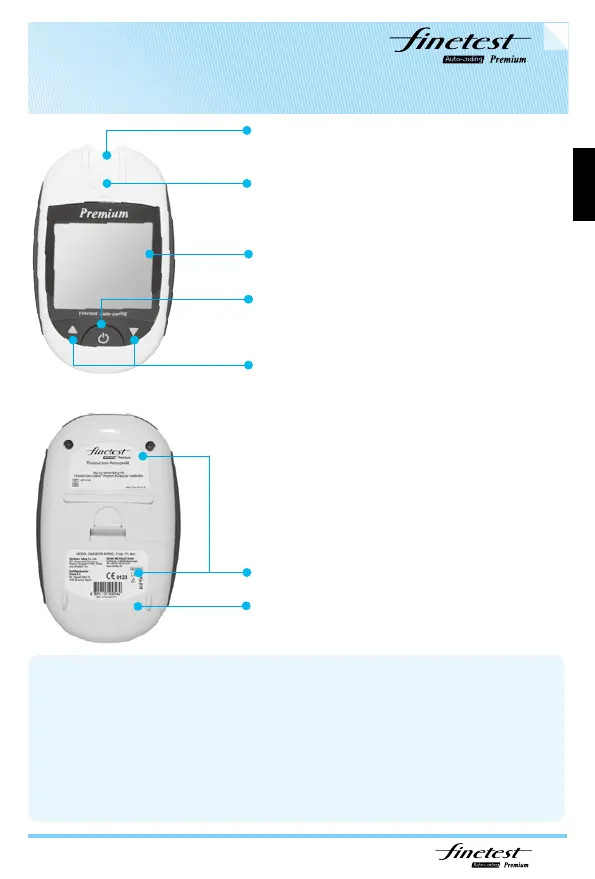
1. Test strip port: Insert the test strip into the meter
2. Test strip ejector
3. Display Screen: Displaying your test results
and important information
6. Product Label
7. Battery Cover
4. Function Button: Powers the meter on/off,
recalling past results and setting Time, Date,
Month and Year.
5. Up/Down Arrow Button: Adjusting setting,
scrolls though result, data deletion.



 To Next Page