INFOSEC UPS SYSTEM - 15, rue du Moulin - 44880 Sautron - FRANCE - www.infosec-ups.com
Hot Line – Tel + 33 (0)2 40 76 15 82 - Fax + 33 (0)240 94 29 51 - hotline@infosec.fr – 06 17 AA 59 205 05
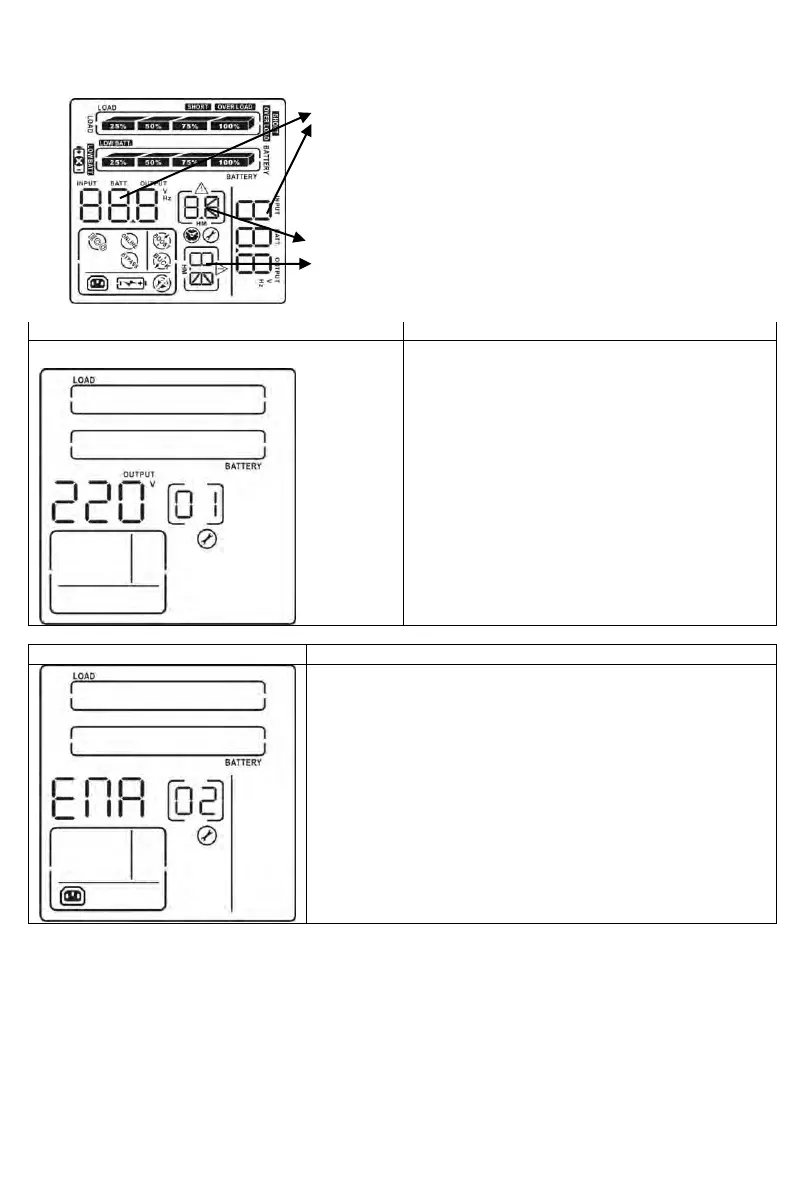
3.5 UPS setting
There are three parameters to set
up the UPS.
Parameter 1: It’s for program
alternatives. Refer to below table.
Parameter 2 and parameter 3 are
the setting options or values for
each program
01: Output voltage setting
For 208/220/230/240 VAC models, you may
choose the following output voltage:
208: presents output voltage is 208Vac
220: presents output voltage is 220Vac
230: presents output voltage is 230Vac (Default)
240: presents output voltage is 240Vac
For 110/115/120/127 VAC models, you may
choose the following output voltage:
110: presents output voltage is 110Vac (Default)
115: presents output voltage is 115Vac
120: presents output voltage is 120Vac
127: presents output voltage is 127Vac
02: Programmable outlets enable/disable
ENA: Programmable outlets enable (Default)
DIS: Programmable outlets disable



 To Next Page
 Loading...






