INFOSEC UPS SYSTEM - 15, rue du Moulin - 44880 Sautron - FRANCE - www.infosec-ups.com
Hot Line – Tel + 33 (0)2 40 76 15 82 - Fax + 33 (0)240 94 29 51 - hotline@infosec.fr – 06 17 AA 59 205 05
Steps for setting programmable outlet
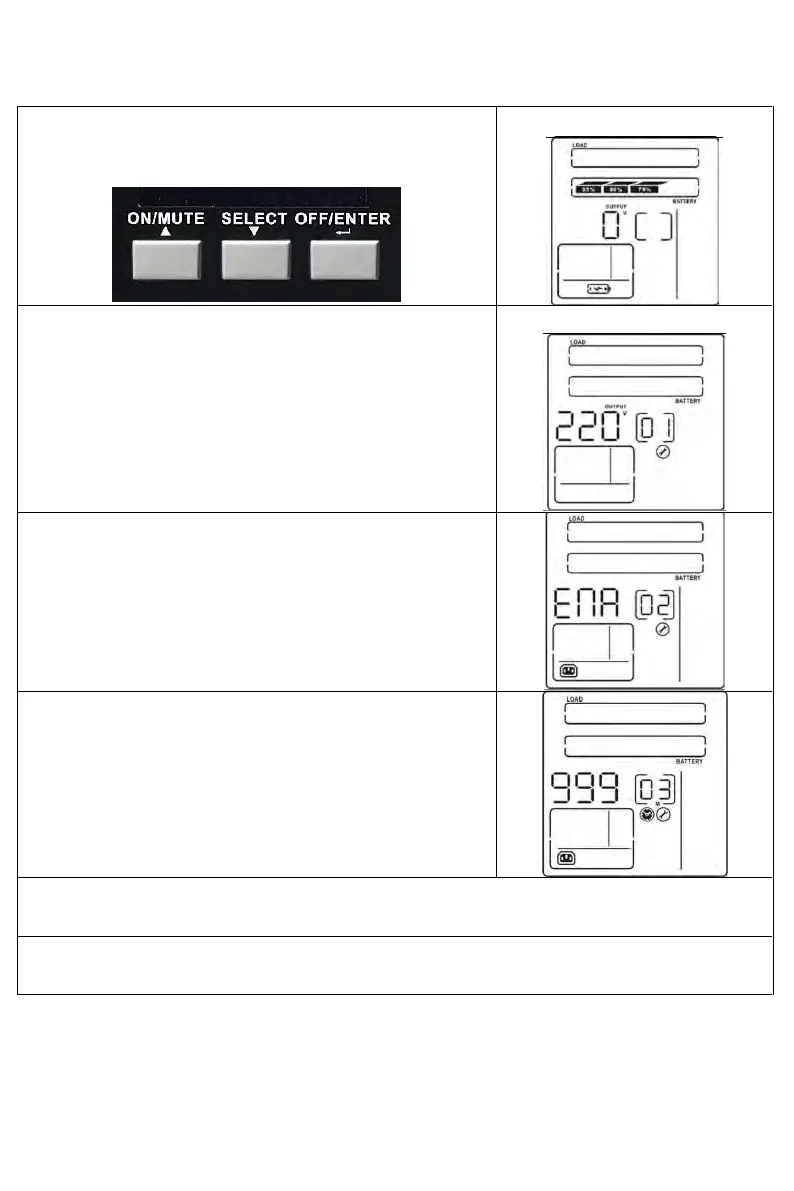
Step 1:
Before entering setting mode, the UPS should be in Stand-by
mode (off-charging) and make sure the battery is connected.
The LCD display is shown as right.
Step 2:
Press and hold the “SELECT” button for 3 seconds to enter
Setting mode.
Step 3:
Press the “Up” button (ON/MUTE) to switch to "02" of program
list. Then press “Enter” button to enter value setting of
parameter 2. Press the “Up” button to validate the value to
“ENA” to enable the programmable outlet function. Then press
“Enter” button again to confirm the setting.
Step 4:
Press the “Up” button (ON/MUTE) again to switch to "03" of
program list. Then press “Enter” button for setting
programmable outlet time. Push “Up” button to change the value
of backup time according your demand. Then press “Enter” to
confirm the setting.
Step 5:
Press “Up” button (ON/MUTE) to switch to "00" of program list. Then press “Enter” button to exit setting
menu.
Step 6:
Disconnect AC input and wait until the LCD display is off. The new setting will be activated when
turning on the UPS again.


 To Next Page
 Loading...







