EasyManua.ls Logo

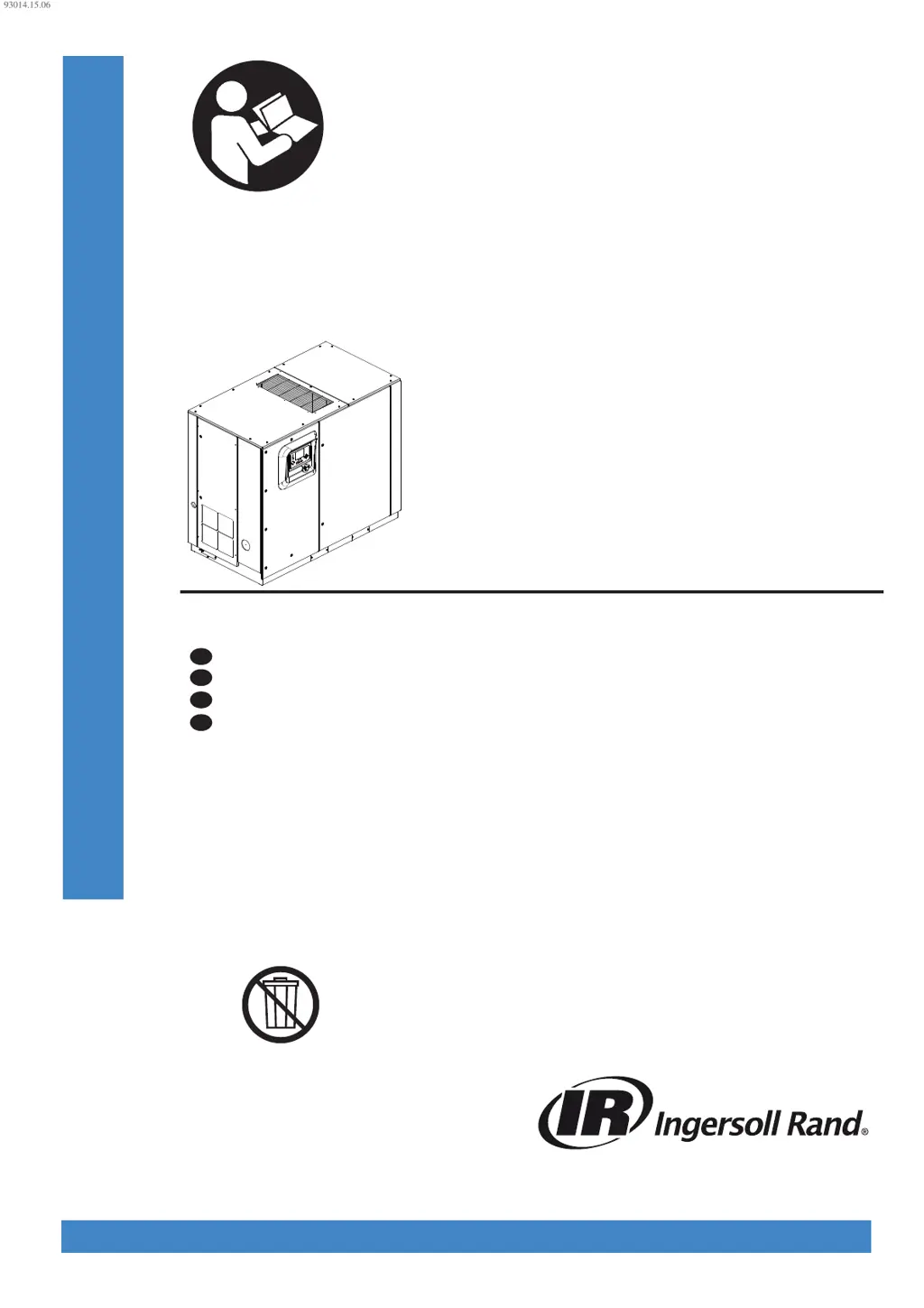
Ingersoll-Rand R55 - User Manual

Ingersoll-Rand R55
276 pages
Print Icon
To Next Page IconTo Next Page
Loading...
80447162
Revision B
June 2014
Save These Instructions
Contact-Cooled Rotary Screw Air Compressor
R30, R37, R45, R55, R75, R90, R110, R132, R160
Product Information
Information produit
FR
Información del producto
ES
Product Information
EN
Informações do produto
PT
93014.15.06
PRINT LANGUAGE
ENGLISH
SPANISH
FRENCH
PORTUGUESE

Table of Contents

Other manuals for Ingersoll-Rand R55

Questions and Answers

  • K
    Kathleen PriceSep 23, 2025
    When to change HE filter in integrated dryer models of Ingersoll-Rand Air Compressor?
    • T
      Thomas WilliamsSep 23, 2025
      To address the issue of needing to change the HE filter in integrated dryer models of your Ingersoll-Rand Air Compressor: * If there is a faulty pressure transducer measurement, calibrate and validate the after cooler discharge and package discharge transducers. * If the moisture separator condensate drain trap is faulty, ensure the condensate drain system is functioning properly and condensate is being drained. * If there is a blockage in the dryer, ensure it's not due to freeze up from refrigerant leaks. * If the dryer HE filter is dirty or blocked, change the HE filter.
  • S
    Sean Gonzales MDAug 27, 2025
    What to do if Ingersoll-Rand Air Compressor is stopped and will not restart?
    • R
      Ronald ShawAug 27, 2025
      If your Ingersoll-Rand Air Compressor is stopped and won't restart, it could be due to the following reasons: * The controller has tripped the compressor and hasn't been reset. See Tables 4 and 5. * The emergency stop button has been pressed but not released. Identify the reason, repair the fault, disengage the button, and reset the controller. * The emergency stop button has been pressed and released, but the controller hasn't been reset. Repair the fault and reset the controller.
  • J
    John JensenAug 27, 2025
    Why does my Ingersoll-Rand R55 Air Compressor stop and not restart?
    • J
      jwongAug 27, 2025
      If your Ingersoll-Rand Air Compressor stops and will not restart, it could be due to: * A tripped drive controller. See Tables 4 and 5. * The controller has tripped the compressor. See Tables 4 and 5. * The maximum number of starts per hour has been exceeded.
  • J
    Jill ContrerasAug 28, 2025
    Why is the discharge air from my Ingersoll-Rand R55 Air Compressor too hot?
    • S
      Sabrina BrightAug 28, 2025
      If the discharge air from your Ingersoll-Rand Air Compressor is too hot, consider these potential causes: * High ambient temperature. Review the installation and system parameters. * Insufficient cooling air. Check the ducting and cooling air path, and verify the direction of blower rotation. * Dirty or blocked aftercooler (cooling air side). Clean or replace the aftercooler.
  • J
    Julie SaundersSep 23, 2025
    What to do if Ingersoll-Rand Air Compressor stops but there is no alarm message?
    • K
      Kevin WebbSep 23, 2025
      If your Ingersoll-Rand Air Compressor stops but there is no alarm message: * There may be a loss of outputs of control power. Check the controller outputs (110V AC) power supply (fuses/mini circuit breaker).
  • G
    Gloria MorganNov 24, 2025
    What to do if Ingersoll-Rand Air Compressor will not meet pressure requirements?
    • B
      Bobby JamesNov 24, 2025
      If your Ingersoll-Rand Air Compressor isn't meeting the required pressure, consider the following: * Check for air loss due to pipe, hose, joint, or seal failures. Repair or replace any faulty components. * Inspect for air loss due to a blowdown valve stuck open and repair or replace if needed. * Look for air loss through the pressure relief valve if it's not seating correctly or is set incorrectly; repair or replace it. * Check for air loss due to a moisture separator drain trap stuck open; repair or replace it if necessary. * Examine the inlet grill or ducting for blockages and clean them. * Replace the air filter if it's dirty or collapsed. * Recalibrate or replace the pressure transducer if it is faulty, incorrectly calibrated, or experiencing EMF interference. * Verif...
  • S
    sara22Sep 12, 2025
    Why do I need to check setpoints on Ingersoll-Rand Air Compressor?
    • R
      Richard BakerSep 12, 2025
      You may need to check the setpoints on your Ingersoll-Rand Air Compressor if: * The controller software has been changed. Recalibrate all sensors and check the setpoints.
  • M
    Michael DaltonSep 12, 2025
    What to do if sensor failure occurs in Ingersoll-Rand Air Compressor?
    • F
      frederick87Sep 13, 2025
      If a sensor failure occurs in your Ingersoll-Rand Air Compressor: * The sensor may be missing or faulty. Install, repair, or replace the faulty sensor.
  • C
    carlarodriguezSep 5, 2025
    What causes excessive coolant consumption in Ingersoll-Rand Air Compressor?
    • M
      Mary SandersSep 5, 2025
      Excessive coolant consumption in your Ingersoll-Rand Air Compressor can be due to: * A coolant system leak. Repair or replace the leaking components. * See also ‘discharge air is contaminated with coolant’.
  • T
    Tammy MeyerSep 3, 2025
    Why is pressure too high in Ingersoll-Rand Air Compressor because speed is not reducing?
    • M
      Michael PerrySep 3, 2025
      If the pressure produced by your Ingersoll-Rand Air Compressor is too high because the speed isn't reducing as demand decreases: * The controller settings may be incorrect. Check and modify the settings. * The pressure transducer may be faulty, incorrectly calibrated, or not receiving a pressure signal. Recalibrate or replace it.

Summary

Contact-Cooled Rotary Screw Air Compressor

Product Information Overview

General overview of the compressor's features and specifications.

Save These Instructions

Important directive to retain operational guidelines for future reference.

About This Manual

Safety Precautions

Transportation, Receipt, and Handling

Unpacking and Handling Procedures

Instructions for safely removing the compressor from its packaging.

Long Term Storage Guidance

Guidance for storing the compressor for extended periods.

Installation Guidelines

Location in Plant Recommendations

Recommendations for selecting an appropriate installation site.

Discharge and Condensate Piping

Guidelines for correctly installing air discharge and condensate drainage piping.

General Electrical Installation

Electrical installation requirements and safety standards for the compressor.

VSD Electrical Considerations

Specific electrical requirements for VSD compressor installations.

Grounding Procedures

Procedures for properly grounding the compressor system.

System Identification Methods

Methods to identify the electrical system configuration for proper connection.

High Voltage Protection

Precautions and protection measures against high voltage events.

Power Factor Compensation

Information regarding the use of power factor compensation capacitors with VSDs.

EMC Filter Disconnection

Instructions for disconnecting EMC filters under specific electrical system conditions.

Transformer and Generator Power

Considerations for power sources like transformers or generators.

Control Power Transformer Connections

Guidance on connecting the control power transformer.

Water-cooled System

Cooling Water Piping Installation

Specifications and installation guidance for the cooling water piping.

Water System Venting Procedure

Procedures for removing air from the water cooling system.

Water System Draining Procedure

Instructions on how to completely drain the water cooling system.

Cooling Water Quality Recommendations

Guidelines for maintaining optimal cooling water quality.

After-cooler Trim Valve Adjustment

Procedure for adjusting the after-cooler trim valve for optimal performance.

Integrated Dryer Information

Environmental Operating Limits

General Information

Fixed Speed Compressor Operation Notes

Specific operational notes for fixed speed compressor models.

Integrated Dryer Operation Modes

Explains the operation modes of the integrated dryer.

Operating Instructions for Variable Speed Drive (VSD)

Basic Operation Steps

Fundamental steps for operating the compressor.

Pre-Start Checks

Pre-operational checks before starting the compressor.

Initial Check Sequence

The initial system check performed upon powering up.

Start Sequence Procedure

The process of starting the compressor.

Stop Sequence Procedure

The procedure for safely stopping the compressor.

Warm Up Mode Operation

Operation mode for warming up the compressor's airend.

Blower Control Management

How the blower speed is managed for temperature control.

Emergency Stopping Procedure

Procedure for immediate emergency shutdown of the compressor.

Restarting After Emergency Stop

Steps to follow after an emergency stop.

Operating Instructions (XE-90 M Controller)

User Interface Overview

Overview of the controller's display, buttons, and LEDs.

LED Status Icon Definitions

Explanation of the status indicators on the controller.

Command Key Functions

Functions of the primary command buttons on the controller.

Navigation Key Usage

How to use the keys for navigating the controller interface.

Display Layout Explanation

Description of the elements displayed on the controller screen.

Controller Navigation

Folder Navigation and Icons

How to navigate between different folders on the controller display.

Page Navigation within Folders

Method for moving between pages within a folder.

Accessing and Modifying Parameters

How to view and adjust parameters within the controller.

Dashboard Icon Definitions

Definitions of icons used on the system dashboard.

Dashboard Status Messages

Explanations of messages displayed on the dashboard.

Folder Options (Fixed Speed)

Settings specific to fixed speed compressor configurations.

Home Folder Overview

The primary display screen showing system overview.

Operator Settings Folder

Operator Settings Pages (1-2)

Detailed view and modification of operational parameters.

Analog Inputs Display (Pages 3-4)

Display of real-time analog sensor readings.

Operator Options (Pages 3-5)

Configuration options available to the operator.

Sensor Calibration

Events Folder

Warning Events List

Service Warnings

Trip Events List

Trip History Log

Maintenance Folder

Filter Status Display

Displays the current status of system filters.

Maintenance Status Display

Shows remaining service intervals and maintenance status.

General Settings Folder

Language Selection

Option to select the display language for the controller.

Units of Measure Settings

Home Page Selection

Time & Date Settings

Backlight Settings

Status Folder Information

Analog Inputs Monitoring

Compressor Data Display

Ethernet Settings Configuration

Digital Inputs Status

Digital Outputs Status

Factory Settings Folder

Password Protection

Security measure for accessing protected settings.

Factory Settings Configuration

Variable Speed Folder Options

Settings specific to variable speed compressor configurations.

Home Folder System Overview

The primary display screen showing system overview.

Counter Displays

Displays operational counters like power on and running hours.

Operator Settings Folder

Analog Inputs & Compressor Information

Display of sensor readings and compressor operational data.

Operator Options Configuration

Configuration options available to the operator.

Events Folder Contents

Sensor Calibration Procedure

Warning Events List

Trip Events List

Trip History Records

Maintenance Folder Details

Filter Status Display

Displays the current status of system filters.

Maintenance Status Display

Shows remaining service intervals and maintenance status.

General Settings Folder

Language and Units Selection

Option to select display language and units.

Time & Date Settings

Backlight Settings Adjustment

Ethernet Settings Configuration

Status Folder Readouts

Analog Inputs Monitoring

Compressor Data Display

Digital Inputs Status

Digital Outputs Status

Analog Outputs Monitoring

Factory Settings Folder Access

Password Protection for Settings

Security measure for accessing protected settings.

Factory Settings Configuration

Maximum Values Recording

Displays the highest recorded values for various parameters.

VSD Diagnostics Tools

Tools for troubleshooting Variable Speed Drive issues.

VSD Service Menu Setup

Parameters for setting up the compressor for optimal VSD operation.

Software Information Display

Displays controller software version and details.

Operating Instructions (XE-70 M Controller)

User Interface Overview

Overview of the controller's display, buttons, and LEDs.

LED Status Icon Definitions

Explanation of the status indicators on the controller.

Command Key Functions

Functions of the primary command buttons on the controller.

Navigation Key Usage

How to use the keys for navigating the controller interface.

Display Layout Explanation

Description of the elements displayed on the controller screen.

Controller Navigation and Parameters

Folder Navigation and Icons

How to navigate between different folders on the controller display.

Page Navigation within Folders

Method for moving between pages within a folder.

Accessing and Modifying Parameters

How to view and adjust parameters within the controller.

Dashboard Icon Definitions

Definitions of icons used on the system dashboard.

Dashboard Status Messages

Explanations of messages displayed on the dashboard.

Fixed Speed Compressor Operation

Home Folder System Overview

The primary display screen showing system overview.

Counter Displays

Displays operational counters like power on and running hours.

Operator Settings Folder Access

Access and adjustment of operator-configurable settings.

Operator Options Configuration

Sensor Calibration Procedure

Events Folder Contents

Warning Events List

Trip Events List

Trip History Records

Maintenance Folder Details

Filter Status Display

Displays the current status of system filters.

Maintenance Configuration

Shows remaining service intervals and maintenance status.

General Settings Folder

Language and Units Selection

Option to select display language and units.

Time & Date Settings

Backlight Settings Adjustment

Serial Port Address Settings

Integral Sequencing Folder

Ethernet Settings (ECO Module)

Configuration of network connectivity settings for ECO module.

Enabling System Control Capabilities

Steps to enable communication and control from an X-Series system controller.

Status Folder Readouts

Analog Inputs Monitoring

Compressor Data Display

Digital Inputs Status

Digital Outputs Status

Factory Settings Folder Access

Password Protection for Settings

Security measure for accessing protected settings.

Factory Settings Configuration

Maximum Values Recording

Displays the highest recorded values for various parameters.

VSD Diagnostics Tools

Tools for troubleshooting Variable Speed Drive issues.

VSD Service Menu Setup

Parameters for setting up the compressor for optimal VSD operation.

Software Information Display

Displays controller software version and details.

Variable Speed Compressor Operation

Home Folder System Overview

The primary display screen showing system overview.

Counter Displays

Displays operational counters like power on and running hours.

Operator Settings Folder Access

Access and adjustment of operator-configurable settings.

Operator Options Configuration

Sensor Calibration Procedure

Events Folder Contents

Warning Events List

Trip Events List

Trip History Records

Maintenance Folder Details

Filter Status Display

Displays the current status of system filters.

Maintenance Configuration

Shows remaining service intervals and maintenance status.

General Settings Folder

Language and Units Selection

Option to select display language and units.

Time & Date Settings

Backlight Settings Adjustment

Serial Port Address Settings

Integral Sequencing Folder

Ethernet Settings (ECO Module)

Configuration of network connectivity settings for ECO module.

Enabling System Control Capabilities

Steps to enable communication and control from an X-Series system controller.

Status Folder Readouts

Analog Inputs Monitoring

Compressor Data Display

Digital Inputs Status

Digital Outputs Status

Analog Outputs Monitoring

Factory Settings Folder Access

Password Protection for Settings

Security measure for accessing protected settings.

Factory Settings Configuration

Maximum Values Recording

Displays the highest recorded values for various parameters.

VSD Diagnostics Tools

Tools for troubleshooting Variable Speed Drive issues.

VSD Service Menu Setup

Parameters for setting up the compressor for optimal VSD operation.

Software Information Display

Displays controller software version and details.

MODBUS CONNECTION AND CONTROL

Modbus Network Connection

Physical connection and wiring for Modbus communication.

RS-485 Network Considerations

Considerations for RS-485 network installation and signal integrity.

Modbus Address Selection

Setting unique addresses for devices on the Modbus network.

Modbus Master Settings

Recommended configuration for the Modbus master device.

X-SERIES SYSTEM CONTROLS CONNECTION

RS-485 Address Selection

Assigning unique RS-485 addresses for X-Series network devices.

Enabling System Control Capabilities

Steps to enable communication and control from an X-Series system controller.

Notices and Disclaimers

Warranty Information

Ingersoll-Rand R55 Specifications

General IconGeneral
ModelR55
Power55 kW
Horsepower75 hp
Power SourceElectric
Phase3
TypeRotary Screw
Max Pressure150 PSI
Pressure7.5 - 10 bar
Air Delivery243 CFM
Noise Level72 dB

Related product manuals