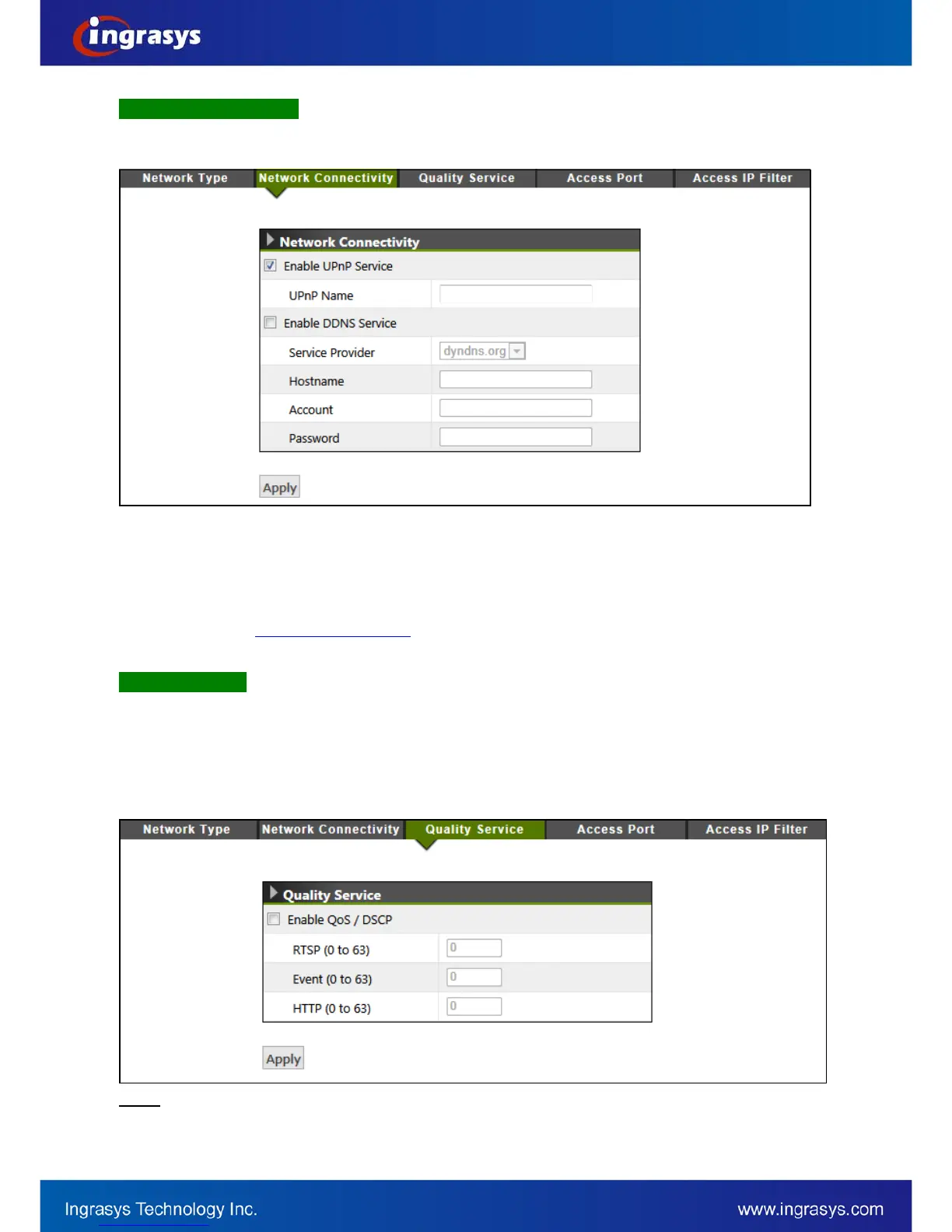
Network Connectivity
This page provides the connectivity configuration, so that IP camera can be accessed without necessarily
providing the numerical IP address.
Enable UPnP Service: With UPnP enabled, IP camera device can be easily discovered in Windows Network
(My Network Places). See “Discover devices in Windows Network” in previous section.
Enable DDNS Service: By registering this sort of service, camera can be assigned and accessed over
Internet with a hostname instead of IP address. To enable the services, visiting the website of the service
provider and registering an account are required.
Dyndns.org:
http://www.dyndns.com/
Quality Service
Quality Service provides network traffic management to guarantee the quality of services in higher priority,
especially when network is insufficient. DSCP (Different Service Code Point) is a 6-bit IP header which defines
the service level of the packet. According to the DSCP value, routers with PHB (Per-Hop Behavior) will define
a specific class of traffic for the packet, in terms of bandwidth, latency, or loss rate, etc. Enable QoS and set
DSCP value for the service to ensure its quality to be maintained.
To make the QoS function work, all the switches and routers in the network must support QoS.
NOTE


 To Next Page