Network Configuration
The IP Camera acts as one of the network devices. It allows user to configure the
network functionalities based on applications. This section will describe the network
configurations. Fundamentally, for instance, the IP assignment of the device can be
done via DHCP server, static IP option or PPPoE to obtain IP from the service
provider.
There are 5 subdirectories in “Network”:
− Network Type
− Network Connectivity
− Quality Service
− Access Port
− Access IP Filter
Network Type
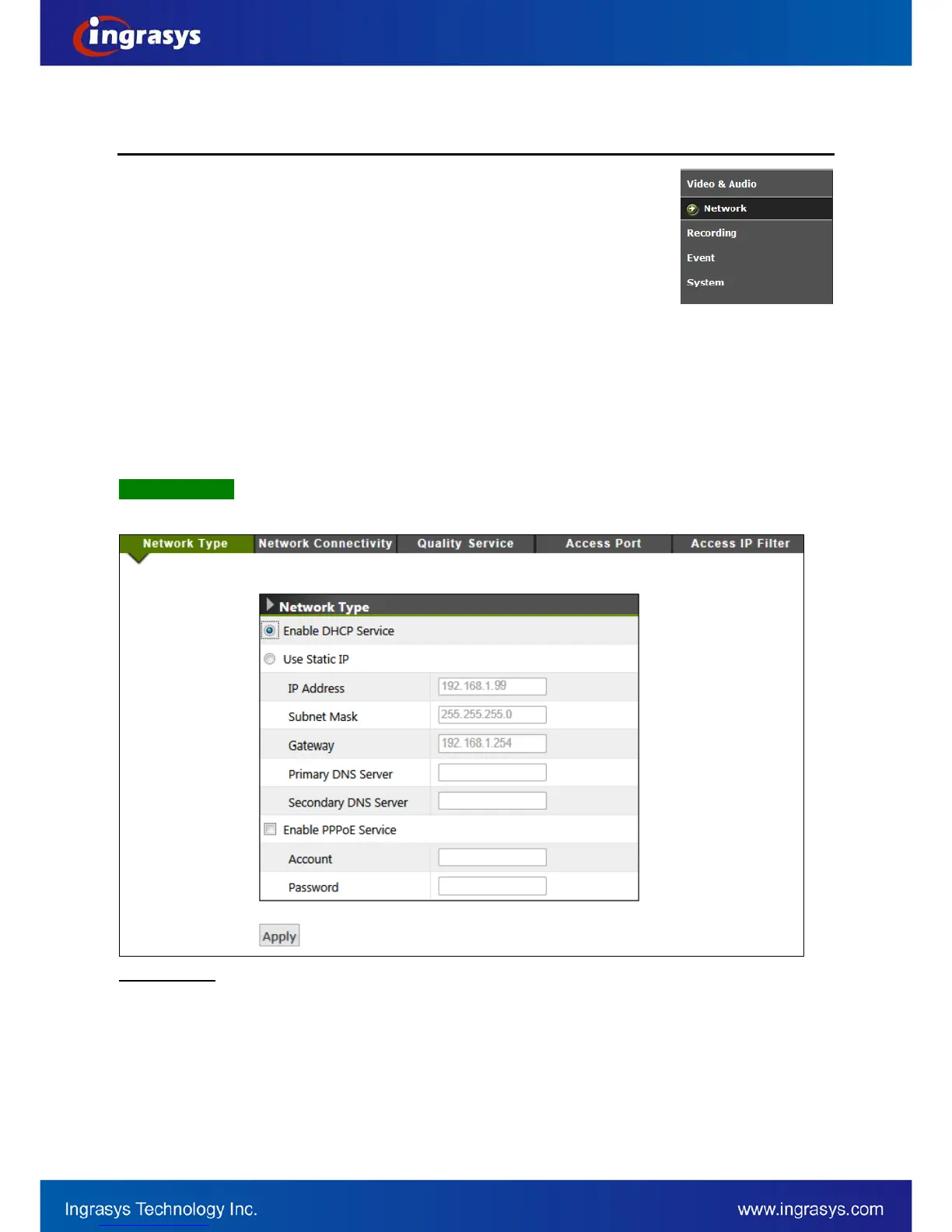
There are 3 ways to configure IP address for the IP camera device, including DHCP, Static IP and PPPoE.
Network Type
Enable DHCP Service: The default setting is DHCP, which camera will be automatically given an IP
address in a network with DHCP server.
Use Static IP: Camera may also be manually assigned with a static IP address. Subnet mask,
Gateway and DNS server(s) will also need to be specified for certain network function properly
executed.
Enable PPPoE Service: This service is usually provided by an ISP (Internet Service Provider). IP
Camera can establish a dial-up connection to the ISP and then get connected to Internet.


 To Next Page