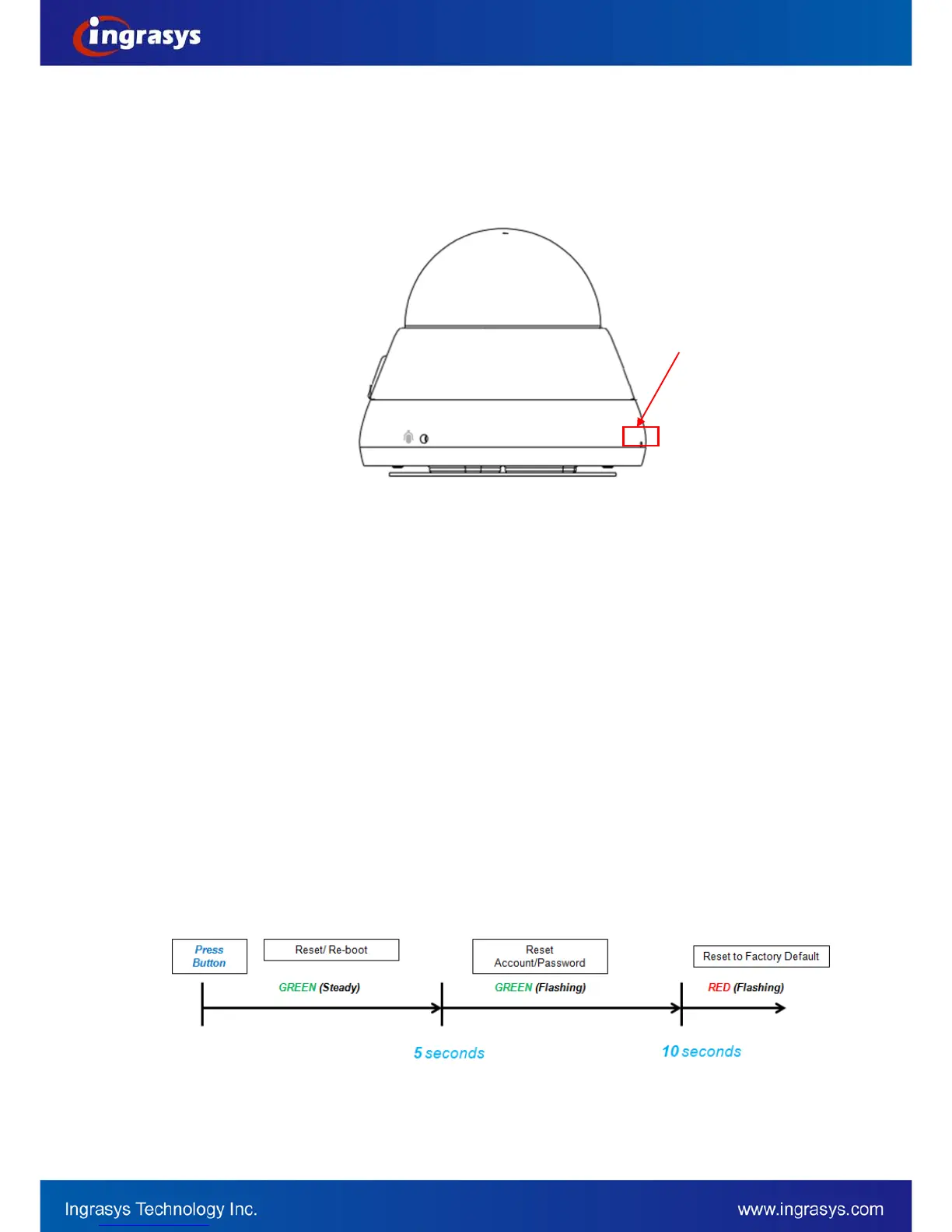
Recover device settings
In some cases, camera system does not respond to any operation. A certain recovering processes would help
to get the unit back to initial status, so that it can resume operable / configurable. This will be the operations
on the “Reset Button”.
Before executing hardware reset, please make sure the system booting process is completed by checking the
LED (steady green) on the front panel.
1. Restart / Reboot the device
Press and release the Reset Button within 5 second, the system will be restarted (the LED Indicator
will be steady amber during rebooting process). Upon successful reboot, the LED will be steady
green during normal operation.
2. Reset account/password to factory default
Press and hold the Reset Button over 5 seconds, the LED will change from steady green to flashing
green. During LED flashing as green, then release reset button, ONLY account/password will be reset
as factory default, which is Admin/Admin. Please notice that, all configured accounts/passwords will
be cleared and only the default one will been reserved.
3. Reset to factory default settings
Press and hold the Reset button over 10 seconds, the LED will change as flashing red. During LED
flashing as green, then release the reset button, ALL settings will be reset as factory default.
The system will enter the restoring process automatically and complete it in 30 seconds after reset
button released.
The following illustrates the LED behavior during the restoring process for reference.


 To Next Page