
 Need help?
Do you have a question about the Ingrasys N3211E and is the answer not in the manual?
Describes Ingrasys's responsibility for manual errors and limitations of liability.
Mentions that all names used are registered trademarks of respective companies.
Details compliance with FCC rules for digital devices and potential interference.
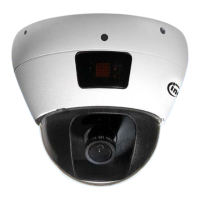
Describes the camera as an Ultra-Mini dome with IR lighting, measuring 82.2mm in diameter.
Mentions the 4mm board type lens providing a wide viewing angle for broad recognition.
Lists the camera model (N3211E), optional power adapter, quick installation guide, hardware packs, product CD, warranty, and VIP card.
Details connecting the camera via Ethernet cable and DC 12V adapter or PoE.
Introduces the Discovery Tool utility for searching and managing IP cameras.
Guides on assigning IP addresses using the Discovery Tool, including single camera setup.
Selecting a specific camera from the Device List in the Discovery Tool.
Entering desired IP address, Net Mask, Gateway, Account, and Password for the camera.
Describes the process for assigning IP addresses to multiple cameras simultaneously.
Selecting multiple cameras from the Device List for batch IP assignment.
Entering the account and password for the selected cameras.
Entering the base IP, Net Mask, and Gateway for multiple cameras.
Explains how IP cameras appear in Windows Network via UPnP services.
Guides on installing the ActiveX control for Internet Explorer to view live video.
Explains how to configure IE security settings to allow ActiveX control installation.
Describes accessing live video via IE browser or the Discovery Tool's browse button.
Covers using RTSP players (VLC) and NVR/CMS software for live video access.
Illustrates the camera website interface, including Quick Index, Live Window, and functional buttons.
Explains language selection, video stream choice, display size, and streaming protocol.
Introduction to camera, video, and audio configuration sections.
Configuration of brightness, contrast, saturation, and sharpness for image quality.
Options for mirroring or flipping the video image horizontally or vertically.
Configures day/night mode, enhancement, and switching thresholds with time delays.
Adjusts AC frequency, white balance, flickerless mode, exposure, and gain.
Shows symbols representing day and night modes for clarity.
Provides example settings for day and night modes, illustrating interface changes.
Detailed settings for video format, resolution, frame rate, intra frame period, and quality.
Compares video formats, explains resolution table, frame rate, and quality controls.
Options for enabling On-Screen Display (OSD), including timestamp and custom text.
Allows blocking specific areas of the video feed to maintain privacy.
Enables audio streaming, configures encoding (G.711 ulaw), and input source.
Configures IP addressing via DHCP, Static IP, or PPPoE.
Enables UPnP for network discovery and DDNS for remote access via hostname.
Configures Quality of Service using DSCP values for traffic prioritization.
Sets web access ports for HTTP, HTTPS, and RTSP services.
Filters incoming IP addresses to allow or deny access for security.
Explains UPnP for network discovery and DDNS for internet access by hostname.
Details QoS functionality for network traffic management and DSCP values.
Configuration of HTTP, HTTPS, RTSP ports and multicast settings.
Notes on multicast stream triggering and IP address filtering for security.
Configuration of recording schedules and plans for the camera.
Setup for network storage (Samba) to save recorded video files.
Detailed steps for creating or modifying recording plans, including source and schedule.
Enabling Samba and configuring path, username, and password for network storage.
Describes handling events with triggers, actions, and time-based schedules.
Configuration for remote servers (FTP/Email) and media file types (snapshot/video).
Setup for motion detection areas, sensitivity, and object size.
Provides a summary of configured events, including triggers, actions, and scheduling.
Detailed configuration for Email and FTP servers, including ports and sender info.
Settings for snapshot image capture and video clip recording duration.
Enabling, defining ranges, and adjusting sensitivity/object size for motion detection areas.
Visualizes motion activities and shows the number of motion areas.
Configuring events with triggers (motion, manual, network fail) and actions (upload files).
Setting periodic triggers and explaining dependencies between Event Server and Media Type.
Example of manually triggering an event to send email with captured pictures.
Filling in email server details and recipient information for event notifications.
Setting up snapshot (pre/post-alarm) and video clip recording parameters.
Creating and enabling the event in the Event List page.
Detailed steps for setting up a manual trigger event for alarm notification.
Displays firmware version, MAC address, IP address, and RTSP status.
Overview of date/time configuration options.
Overview of user authentication and management.
Overview of system maintenance functions.
Overview of system and event log access.
Detailed settings for synchronizing date/time via NTP or PC, or manual adjustment.
Steps to enable authentication, add, and edit user accounts with different privilege levels.
Tools for rebooting, restoring defaults, backing up configurations, and upgrading firmware.
Accessing System Log, Event Log, and Parameter List for system monitoring.
Illustrations of the camera's front and rear views, labeling key components and connectors.
Explains the status indicated by RJ45 LEDs (network) and bicolor LED (power/system).
Guides on how to locate and check the camera's current firmware version.
Provides steps and precautions for upgrading the camera's firmware via the web interface.
Illustrates the firmware upgrade process with figures showing file upload and progress.
Instructions for restarting, resetting account/password, or performing a full factory reset.
Details camera model, sensor, lens, IR distance, resolution, and frame rate.
Covers video format, dual streams, interface, and compression standards.
Lists supported network protocols, event triggers, and event actions.
Details the built-in microphone and audio support.
Includes power supply, consumption, weight, dimensions, and operating temperature.
Specifies supported OS, browser compatibility, and bundled software.
Lists additional features such as Wide Dynamic Range (WDR).

 To Next Page
 General