Server Name: Identifier of the event server
Server Type
Email: Send the media file via email when an event is triggered.
• Mail Server Address: Enter a host name or IP address of the email server.
• User Name: Enter the user name of the email account.
• Password: Enter the password of the email account.
• Server Port Number: Enter the server port of the mail server. The default is 25.
• Sender’s E-mail Address: Enter the email address of the sender
• Mail Subject Prefix: Enter the subject description for the mail.
• Receiver Table: Enter the recipients’ email address. The mail can be sent to up to 5 recipients.
FTP: Send the media file to a FTP server when an event is triggered.
• FTP Server address: Enter the FTP server’s address.
• User Name: Enter the user name of the FTP login account.
• Password: Enter the user name of the FTP login password.
• Server Port Number: Enter the server port of the FTP server. The default is 21.
• Upload Path: Enter the file path that files will be sent to..
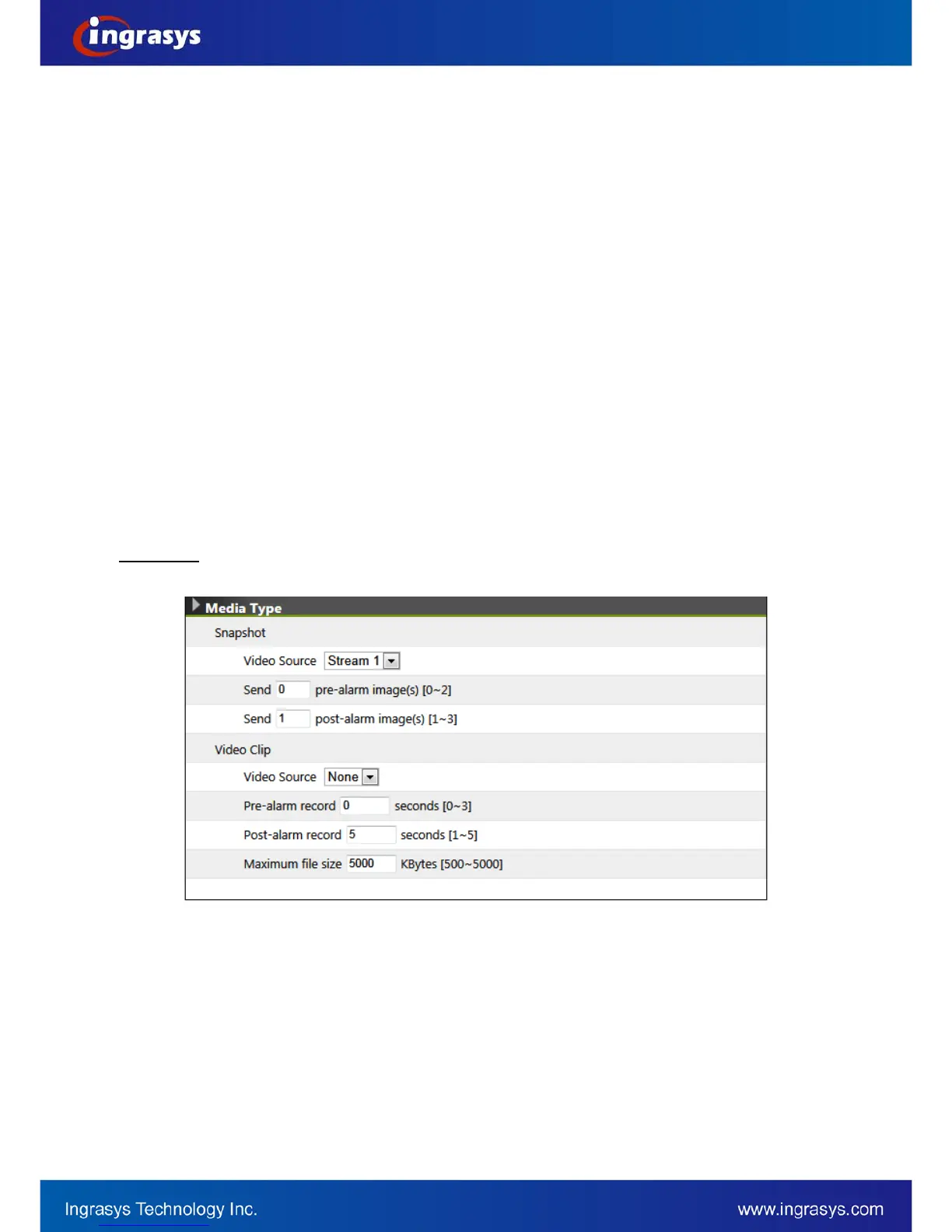
There are 2 types of media (file) available, snapshot (.jpg image) and video clip (.avi).
Media Type
Video Source: Select the video source to be captured
Pre-alarm / Post-alarm image(s): Enter the numbers of images that will be captured before and after trigger
is activated.
Pre-alarm / Post-alarm record: Enter the numbers of seconds that video will be recorded before and after
trigger is activated.
Maximum file size: Define the maximum file size that a video clip is generated.


 To Next Page