Installation manual
Technical description 7
English
All models of the communicator are equipped with anti-tamper devices that protect
against unauthorized opening and dislodgement of the enclosure containing the PCB.
BUZZER
The Nexus and Nexus/G models are equipped with a buzzer for confirmation signals
programmed for any events related to programming from the control panel of the
Nexus board (for example the confirmation of call or SMS commands).
BATTERIES
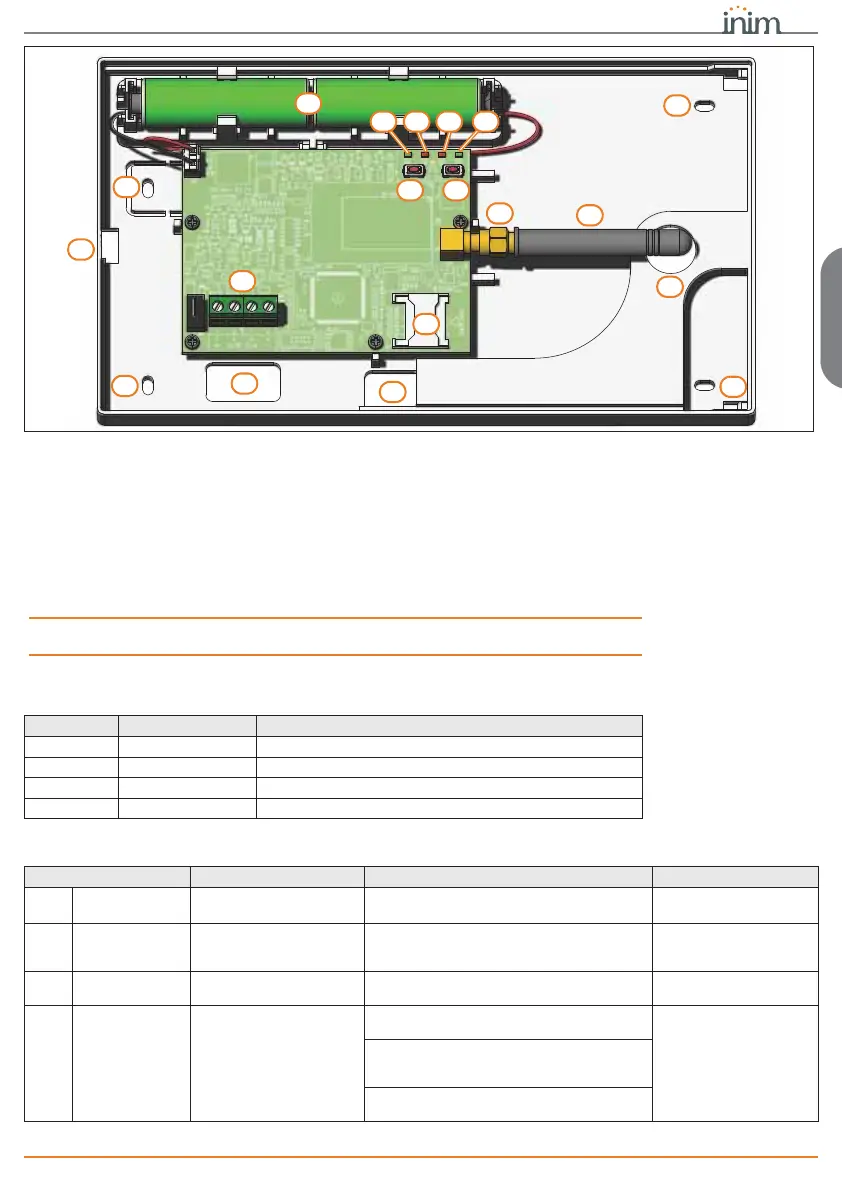
The Nexus/3GP model has internal batteries (supplied, description of the parts, [O]),
which ensure the correct functioning of the signals and transmissions from the device in
the absence of the power supply from the BUS (for example, in the case of wire-cutting
or tamper).
Note
Despite the presence of batteries with sufficient charge, the power supply from the BUS
is required to switch on the Nexus/3GP.
TERMINALS
The screw terminals for the connections (description of the parts, [A]) are described
below:
LED
Peripheral activity LED signals are as follows:
A
E
K
K
F HG I
B
C D
K
J
M
O
L
N
L
L
n. icon/identifier description
1+
Terminal “
+
” for the I-BUS connection
2D
Terminal “
D
” for the I-BUS connection
3S
Terminal “
S
” for the I-BUS connection
4-
Terminal “
-
” for the I-BUS connection
LED function ON OFF
DL1
Communica-
tion
Indicates communication
with the control panel
The LED blinks during ongoing
communications
Not communicating
DL2 Emergency
Indicates communication
failure with the control
panel
Blinks in the event of tamper or fault on the
BUS
Normal communication
with the control panel
DL3 Faults
Indicates the presence of
a communicator fault
Blinks in the event of ongoing faults No faults present
DL4 Connection
Indicates the status of the
wireless network
Slow flashing (ON 64ms / OFF 3000 ms) -
device registered to the cellular network
Device Off
Regular flashing (ON 64ms / OFF 800 ms) -
device not registered and in search of the
network provider
Fast flashing (ON 64ms / OFF 300 ms) - data
communication in progress


 To Next Page