Need help?
Do you have a question about the Inner Range Integriti Elite and is the answer not in the manual?
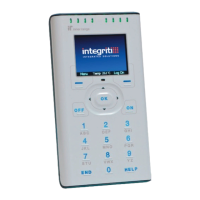
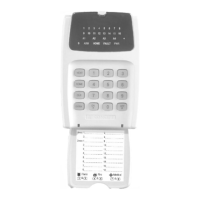
Displays images of Integriti Elite and EliteX LCD terminals.
Detailed view of the Elite LCD Terminal hardware.
Detailed view of the EliteX / EliteX-SIFER Keypad hardware.
Explains various default display options for LCD terminals.
Describes system status messages and their meanings.
Explains the function of indicator lamps on the keypads.
Overview of the keypad layout and key functions.
Procedure for logging into an Integriti LCD Terminal.
Steps to turn Area(s) Off using the LCD terminal.
How to use the timed disarm feature for areas.
Steps to turn Area(s) On using the LCD terminal.
Managing 24-hour tamper monitoring for areas.
Procedure for testing zones before arming an area.
How to activate a panic alarm from the terminal.
How to activate a duress alarm using a special PIN.
How to acknowledge alarm messages on the terminal.
Reviewing recent events without logging in.
Displaying the current system time and date.
How to access the user menu after logging in.
Options for controlling area arming status.
Accessing system information like event logs and user details.
Options related to user access and codes.
Isolating faulty inputs or devices.
Performing zone testing procedures.
Viewing time and date settings.
Accessing other system settings like UK Reset.
Accessing service reports.
Controlling named actions, doors, and lifts.
 General
| Product Type | Keypad |
|---|---|
| Model | Integriti Elite |
| Display | LCD |
| Number of Keys | 12 |
| Connectivity | Wired |
| Communication | RS-485 |
| Tamper Protection | Yes |
| Operating Voltage | 12V DC |
| Housing Material | Polycarbonate |
| Weight | 150g |
| Compatibility | Integriti Access Control System |
| Keypad Type | Touch |
| Current Consumption | 50mA |
| Operating Temperature | 0°C to 50°C |
| Dimensions | 120mm x 85mm x 25mm |

 To Next Page